


Tor Browser review
 Analysis by Appsdrops
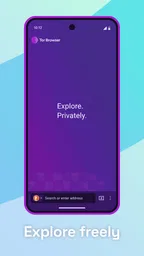
I think Tor Browser makes the most sense when you want a more private way to browse, rather than a replacement for every browser on your phone. It is a communication app from The Tor Project, built around routing browsing through the Tor network. That approach can make everyday web use feel less straightforward than opening a typical browser, but it gives the app a clear purpose: reducing how easily your browsing can be tracked and helping you reach information where access is restricted.
Where the first session can feel unfamiliar
The main point of friction is that Tor Browser is not simply a browser with a privacy switch. Its connection depends on reaching the Tor network, so a slow start or a page that takes longer to load is not automatically a sign that the app is broken. Compared with a conventional mobile browser, the extra routing can affect speed and make some websites behave differently.
That difference matters most if you expect instant results. A news page with lots of scripts, a service that asks you to sign in, or a site that reacts to your location may load slowly or present extra checks. I would give a page a little time before repeatedly tapping reload; repeated attempts can make a temporary connection problem harder to distinguish from a website issue.
The browser is free, and its Everyone age rating makes it broadly accessible. That does not mean every site opened inside it is appropriate for every user, of course. I see it as a tool for people who understand why they want a privacy-focused connection, not as a guarantee that every online activity becomes anonymous or risk-free.
Its audience is substantial: Tor Browser has more than 50 million installs, an average rating of 4.5 from around 293,000 ratings, and roughly 8,700 written reviews. Those figures suggest that many people find a use for it, but they do not remove the practical trade-off: privacy-oriented browsing may ask for more patience than the browser already built into a phone.
Start with a simple connection check
If the first attempt stalls, I would begin with the basics. Check that the phone itself can reach the internet by opening a familiar site in another browser. If that also fails, the issue is probably with the device’s connection rather than Tor Browser. If ordinary browsing works, close and reopen Tor Browser and try again before changing several settings at once.
On a restricted or unreliable network, the connection may be blocked or interrupted. Switching between available Wi-Fi and mobile data can help identify whether the problem is tied to one network. This is a diagnostic step, not a promise that either connection will work everywhere. If the app still cannot connect, look for its in-app connection guidance and follow the options it presents rather than relying on random configuration advice.
It also helps to test with a plain page before judging the browser by a complicated site. A page with embedded media, advertising scripts, or elaborate sign-in checks gives you more possible causes for a failure. If a simple page opens but one particular service does not, that points toward a site-specific compatibility or access issue rather than a total connection failure.
Keep the first test low-stakes
I recommend trying the browser before you need it urgently. Open a few ordinary pages, learn how long connection startup feels on your network, and see whether the sites you rely on work well enough. That small trial is especially useful if you plan to use it while travelling or on a network where access restrictions may be present. You do not want your first encounter to happen while you are rushing to retrieve an important account or document.
For a practical example, imagine checking a local news report while connected to public Wi-Fi. I would use Tor Browser for reading the report, but I would avoid assuming that a bank or work portal will behave exactly as it does in a standard browser. The site might ask for additional verification, take longer to load, or treat the connection differently. For important transactions, use the method your service recommends and make sure you can complete the task before relying on it.
Set expectations before signing in
Tor Browser can help protect the privacy of a browsing session, but signing in to a personal account still identifies you to that service. That is a useful distinction people often miss: privacy from some forms of network observation is not the same as hiding your identity from a site where you enter your name, email, or account credentials.
I would also avoid treating it as a secure place to store every kind of information. A privacy-focused browser does not make a weak password stronger, verify that a message is genuine, or prevent you from sharing sensitive details with the wrong page. Use ordinary caution with downloads, unfamiliar sign-in prompts, and links received in messages, just as you would elsewhere.
Recovering a browsing session without guesswork
When a page fails, change one thing at a time. First check whether the browser is connected and whether other pages open. Then retry the affected page once. If only that page is failing, it may be relying on behavior that does not work smoothly through the browser’s privacy protections, or it may simply be having an outage. If nothing loads, return to the connection check rather than repeatedly refreshing every tab.
A second useful habit is to separate browsing tasks. If you are researching a sensitive subject, keep that session focused instead of mixing it with routine account logins and casual browsing. This does not create a magical privacy boundary, but it makes your own choices easier to manage: you are less likely to forget which account you signed into or why a particular page was opened.
When a site is inconvenient, decide whether the task is worth doing there. For reading public information, a slower page may be an acceptable trade. For a time-sensitive form or a service that depends on repeated identity checks, a mainstream browser or the service’s own app may be more practical. I would not force every task through Tor Browser just to claim that I used it.
One non-obvious trade-off is that constantly changing your approach can make troubleshooting worse. If you jump between networks, restart the app, clear browsing state, and reload the same site in quick succession, you lose a clear sense of what helped. A calmer sequence—test general connectivity, test one simple page, then revisit the problem page—usually tells you more.
When the app is not the cause
Not every broken page is a browser defect. A site may be offline, a network may be filtering connections, or an account provider may challenge a login it considers unusual. The useful clue is whether the problem appears everywhere or only in one place. If other pages work, I would not immediately reinstall the browser or assume the whole connection is compromised.
Some services are designed around a familiar location, device, or network pattern. A privacy-focused route can look different to those services, so they may request extra verification or refuse a session. In that situation, the service’s own support guidance is more useful than repeatedly attempting the same login. If access is essential, switch to a normal connection or another approved method rather than risking an account lockout.
Similarly, a slow page can reflect the route, the site’s own performance, or the phone’s connection. Compare a simple page and a more complex one, and compare Wi-Fi with mobile data if both are available. These checks will not identify every technical cause, but they can keep you from blaming the browser for an unrelated outage.
How it compares with everyday mobile browsers
The usual browser on a phone is generally the easier choice for quick searches, saved logins, and websites that expect a conventional connection. Tor Browser is the more deliberate option when limiting tracking or navigating censorship is the priority. The choice is not “private versus bad”; it is a balance between the kind of privacy you want and the convenience a particular task demands.
I would not use it as my only browser if my day depends on web apps that need fast, predictable sign-ins. Nor would I recommend it to someone who expects it to conceal activity from every service they use. It is a better fit for readers, researchers, travellers, and people facing network restrictions who are willing to accept occasional delays and compatibility quirks in return for a different browsing model.
Tor Browser was released on May 21, 2019, and its current version is 16.0.2 (153.7.0esr). It supports devices running Android 8.0 or later. Those details are useful when deciding whether an older phone can install it, but I would still check the app store on the device for the version currently offered before planning a workflow around it.
Who should choose it—and who should not
If you want a browser for reading public material with less routine tracking, or you need an option to try when ordinary access is restricted, I think Tor Browser is worth keeping available. The strongest reason to use it is that the privacy goal is built into how the browser connects, rather than being an optional extra you have to remember to enable for each session.
If you mainly want the fastest possible page loads, seamless integration with all your accounts, or a browser that behaves exactly like the one you already use, you may be happier with a conventional alternative. It is also not the right choice if you believe opening it alone makes every action anonymous. Your logins, the information you submit, and your own browsing decisions still matter.
My practical verdict
I recommend Tor Browser as a purposeful second browser, not a universal replacement. Its strengths are most valuable when privacy or access is the reason you opened it; its friction is most noticeable when you expect ordinary sites to work instantly and without extra checks. Start with low-stakes browsing, learn how your network behaves, and keep a standard option for tasks that need predictable account access.
That is the approach I would suggest to a friend: install it if you have a real reason to browse this way, test it before depending on it, and judge individual site failures carefully. Used with sensible expectations, Tor Browser is a practical privacy tool. Used as a promise of total anonymity or effortless compatibility, it will disappoint.
What we like
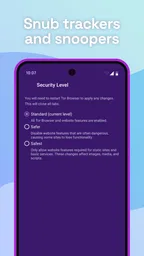
- Blocks many third-party trackers by default.
- Offers access to onion sites not available through standard browsers.
- Includes a private browsing mode that clears session data when closed.
- Uses HTTPS-only connections when available.
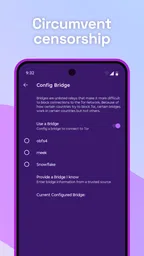
- Can connect through bridges to help bypass some network blocks.
What could be better
- Browsing is often slower because traffic passes through multiple relays.
- Some websites block Tor connections or require extra verification.
- Video playback and other data-heavy tasks may feel sluggish.
- Certain websites may not work correctly with Tor's privacy protections.
- Installing apps or extensions can weaken anonymity.





