




Talkatone: Texting & Calling review
 Analysis by Appsdrops
I see Talkatone as a practical way to add calling and texting to a household’s communication toolkit, especially when someone needs to stay reachable over Wi-Fi. It is a communication app from Talkatone, Llc, and its appeal is straightforward: it gives you another way to contact people without making your usual mobile number the only option. That can be useful for a shared household phone, a spare device, or someone who wants a separate channel for everyday coordination.
When a household needs another way to reach people
A realistic use is a family member taking a Wi-Fi-connected tablet or spare phone around the home, or using it while away from the main phone. They can use Talkatone to keep in touch with people they need to reach, while the household’s regular numbers and messaging apps remain available for other purposes. That flexibility is the real draw for me: it can give a device a communication role without requiring it to become everyone’s primary phone.
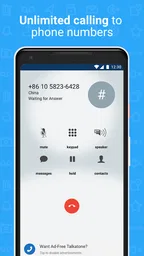
The key distinction is that Wi-Fi is part of the proposition, not a guarantee that every call will feel identical to a call on a carrier connection. In practice, the usefulness of an internet-based call depends on having a dependable connection. If the household Wi-Fi is congested, the router is out, or someone is in a weak-coverage corner, Talkatone is a less reassuring fallback than a working mobile line. I would treat it as an additional route, not the only route for urgent contact.
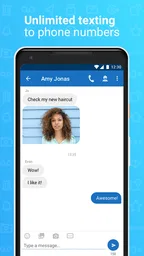
That distinction also helps set expectations for texting. A household can use the app to coordinate ordinary plans, but it should not assume that every person will see a message immediately or that the app replaces the phone’s entire communication setup. If a relative is not using the same service, the point is that Talkatone is intended to let you connect with people beyond its own user base; the quality of the experience still depends on connectivity and on the recipient being reachable through the relevant calling or messaging route.
Useful for coordination, not as a magic family hub
For everyday coordination, I can imagine using it for a simple check-in: one person is finishing an errand, another is preparing dinner, and a quick text or call can settle when they will meet. It can also help when a device is being used temporarily by a household member who does not want to rely on the owner’s usual number for every conversation. The benefit is not a complicated family-management system; it is having another communication option on a device that can get online.
A less obvious but useful approach is to decide in advance which device and number people should use for which kind of contact. For example, a household might reserve a spare device for practical coordination and keep personal conversations on each person’s own phone. That separation can make it easier to recognize why a call is coming in and reduce confusion about who is expected to answer. It is a human routine rather than a special app control, so it only works if everyone understands the arrangement.
I would not make it the sole channel for time-sensitive household responsibilities. If someone needs to be reached during a commute, in a building with poor Wi-Fi, or during an internet outage at home, a conventional mobile connection or another established way to contact them is a safer choice. Talkatone is most convincing when it adds convenience to a working setup, rather than being asked to cover every possible situation.
Set clear boundaries before sharing a device
Talkatone can be installed on a shared device, but sharing hardware does not automatically make an account a shared household account. Before handing a phone or tablet around, I would agree on who is responsible for it, who is expected to answer incoming calls, and whether other household members may read messages on that device. Those boundaries matter more than the convenience of having the app ready to use.
One concrete precaution is to avoid treating a shared screen as a private messaging space. If several people can unlock the same device, they may also encounter conversations intended for one person. I would keep personal discussions on a personal device and use the shared setup only for contacts and coordination that everyone involved is comfortable handling there. That is a simple way to prevent the common mismatch between “we all use this phone” and “these messages are only for me.”
There is also an account-identity question worth settling before setup: whose communication is the app meant to represent? If one person installs it and another later uses the same device, callers may not understand who has answered. A household should explain the arrangement to regular contacts rather than assuming the app itself will communicate those boundaries. That small bit of planning helps avoid missed expectations, especially when a device changes hands.
For someone considering Talkatone as a substitute for a personal mobile line, I would first think through how they will receive calls when Wi-Fi is unavailable and what contacts need to reach them reliably. For someone who only needs an extra way to communicate while connected, the trade-off is easier to accept. The more important the number is for work, emergencies, or account recovery, the less wise it is to depend on a secondary internet-based setup alone.
What the ratings and free entry point suggest
The app is free to install, with in-app purchases ranging from $0.99 to $14.99 per item. That makes it easy to try without an upfront purchase, though I would still check what an optional purchase covers before spending. I would not assume that every useful function is included in the free experience or that a purchase is necessary; the sensible approach is to install it for the particular communication need and decide only after seeing how it fits.
Talkatone has an average rating of 3.4 from around 194,000 ratings, alongside roughly 61,000 written reviews. I read that as a reason to go in with practical expectations rather than expecting a flawless replacement for a standard phone service. The app has reached over 10 million installs, so it is not an obscure experiment, but popularity does not remove the need to test call quality and message handling on the specific devices and networks a household uses.
Its first release was on February 21, 2012, and the current version is 10.6.2. It supports Android 6.0 and later. Those details make it relevant to some older Android devices, which can be helpful if the household has a spare phone that still works well for basic tasks. Even so, an older device’s overall condition and network performance matter; meeting the minimum operating-system requirement does not guarantee a smooth experience on every handset.
Age, trust, and household expectations
The content rating is Everyone, which describes the app’s age classification, not whether every child is ready to manage calls and messages independently. I would make that decision based on the child, the contacts they need to reach, and the household’s expectations for privacy and supervision. The rating should not be treated as a substitute for a conversation about who may call, what information should remain private, and when an adult should be involved.
For a younger user, a parent might choose to keep the app on a device that stays in a common area and use it for limited practical coordination. But that is a household choice, not a built-in family-control feature I would rely on. If the priority is detailed parental oversight, managed contacts, or strict separation between a child’s and adult’s communications, I would compare dedicated family communication options and the controls available through the device’s operating system before choosing Talkatone.
Trust also depends on the people at the other end. A second communication channel can make it easier for a household member to reach relatives or friends, but it can also make it less obvious who is using a shared device. I would tell regular contacts whose device or account they may be reaching, and I would avoid using a shared setup for sensitive conversations unless everyone has agreed on who can access it. Clear expectations are the best safeguard here.
How it compares with the usual alternatives
Compared with a carrier’s ordinary calling and texting, Talkatone’s clearest advantage is the option to communicate over Wi-Fi. That can be useful when a device has no active mobile plan but can connect to the internet. The trade-off is that a carrier line is usually the more dependable choice when the person needs to be reachable beyond Wi-Fi, while an app-based route is tied to an internet connection and the app’s own account setup.
Compared with familiar messaging apps, Talkatone is more interesting when the goal is to add calling and texting to a device or contact arrangement that does not revolve around the same app being installed by everyone. A messaging service built around a social circle may be simpler when all the intended contacts already use it. For a household that mainly wants group chats, photos, and shared social conversations, the app everyone already checks may be more convenient. Talkatone makes more sense when a separate calling-and-texting option is the point.
It is also different from buying another phone plan. If the household needs a number that remains dependable while travelling or away from Wi-Fi, a conventional mobile service may be worth the cost and setup. If the need is occasional contact from a connected device, trying a free app is a lower-commitment first step. I would choose based on the moments when someone must be reachable, not simply on the appeal of avoiding a monthly plan.
Who I would recommend it to
I would suggest trying Talkatone if you have an Android device running version 6.0 or later, regular access to Wi-Fi, and a clear use for another calling and texting option. It may suit someone who keeps a spare device at home, a household that wants a practical contact route for a shared tablet or phone, or a person who prefers to separate certain everyday communications from their main number. In each case, a short trial with ordinary, non-urgent conversations is a sensible way to see whether the connection and routine work for you.
I would skip it as the primary choice if you need uninterrupted reachability, if the device will often be offline, or if several people need private accounts and carefully managed boundaries on one shared screen. I would also look elsewhere when the main need is advanced family supervision or a group messaging experience that depends on shared features beyond straightforward contact. These are not failures of the app so much as mismatches between its Wi-Fi-centered role and a household’s requirements.
My household verdict
Overall, Talkatone is worth considering as a flexible extra, not as a promise that every household member can forget about their normal phone service. Its best use is modest and clear: give a connected device another way to handle calls and texts, then make sure everyone knows who is using it and what to do when Wi-Fi is unavailable. That combination of a practical use case and honest limits is more useful than treating it as a universal replacement.
For a household, I would begin with one device, a small set of appropriate contacts, and a clear agreement about privacy and responsibility. If that setup proves reliable for ordinary coordination, it can earn a place alongside the communication tools already in use. If it creates confusion about who answers, exposes private messages on a shared screen, or cannot meet the household’s need for dependable contact, I would choose a more suitable alternative. Talkatone is most convincing when it fills a specific gap without being asked to solve every communication problem at once.
What we like
- Offers a US phone number for calling and texting.
- Works over Wi-Fi when cellular service is unavailable.
- Supports voicemail for missed calls.
- Can help keep your personal number private.
- Provides a low-cost option for international calls.
What could be better
- A stable internet connection is needed for reliable calls.
- Free access may include ads.
- Some destinations require paid calling credits.
- Number availability can vary by region.
- Call quality may fluctuate on weak networks.





