



SimplyWise Cost Estimator review
 Analysis by Appsdrops
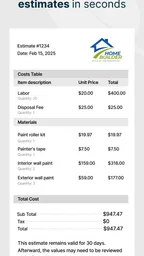
When I’m pricing a small building job, the slow part is often not the math itself but turning a rough description into a quote I can discuss with a customer. SimplyWise Cost Estimator is aimed at that practical moment: it helps estimate construction work using labor and material costs, with the goal of getting a quote together quickly. I see it as a useful starting point for contractors and tradespeople who need to organize an estimate while away from a desk, rather than as a replacement for careful measuring or professional judgment.
It is a free business app from SimplyWise, and its focus is narrower than that of a general calculator or bookkeeping tool. The app has a 4.8 average from around 18,000 ratings, and has been installed over 500,000 times. That popularity suggests it has found an audience, but the real question is whether its estimating approach fits the way you price work. In my view, it is most appealing when speed and a clear first draft matter more than building a deeply customized costing system.
Estimating when a connection is available
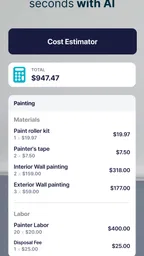
The app’s central promise is straightforward: bring labor and material costs into a construction estimate and make it possible to quote a job in minutes. That can be handy during an initial conversation, when a client wants a ballpark figure before you have returned to your office. Instead of relying on memory alone, I’d use the estimator to give the discussion a more structured basis, then review the assumptions before treating the number as final.
Connectivity matters most at the points where you are setting up or revisiting an estimate. A phone may be online in the shop but lose a reliable signal in a basement, a new development, or a rural property. I would avoid planning a customer-facing workflow around an assumption that every step will work without a connection. If you know a site has weak reception, prepare the information you need beforehand and keep your own notes available as a fallback.
A practical approach is to treat the first estimate as a working draft, not a promise. For example, if a homeowner asks about replacing a section of fencing, I would first clarify the length, access, removal work, and finish they expect. I would then use the app to help organize the cost estimate, explain that site conditions can change the final amount, and confirm the details after a proper assessment. That keeps a quick mobile calculation from being mistaken for a fixed quote.
Use it as part of a job conversation
The strongest use case is an early, relatively simple estimate where you already understand the kind of work involved. The app can help you move from “I’ll get back to you” to a more useful conversation about the likely cost drivers. That does not mean every figure is automatically complete: travel, disposal, unusual access, taxes, contingencies, or specialist subcontracting may need separate consideration depending on the job and your local practice.
One useful habit is to separate what you know from what you are assuming. Before sharing a number, note which measurements came from the customer, which you checked yourself, and which material choices are still undecided. This makes later revisions easier and reduces the risk of confusing an early estimate with a final scope. The app’s value is not just speed; it is the chance to pause and make the components of a quote more deliberate.
Working from a phone on site
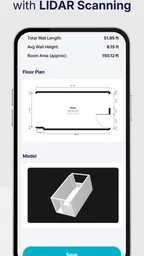
A phone-based estimator suits the moments when carrying a laptop is inconvenient: a walk-through, a quick visit between jobs, or a call from a customer who wants to discuss a small repair. I would still do the measuring carefully. A compact screen can make it tempting to enter a rough quantity and move on, but small errors in area, length, or unit choice can have a bigger effect than the time saved.
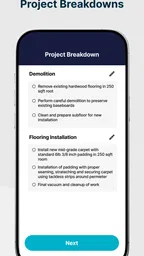
For a room renovation, for instance, I would record dimensions and scope in a consistent way before entering costs. If the customer has not chosen a finish, I would avoid presenting a single material assumption as though it were settled. Instead, I’d compare the options separately or clearly label the estimate as provisional. This is especially useful when a job includes several trades: a tidy calculation cannot compensate for a missing task in the scope.
The app is less compelling for someone who needs a full project-management system with scheduling, crew coordination, invoicing, and detailed accounting all in one place. Its construction-estimating focus is an advantage if you want to work on costs without navigating a larger suite, but it also means you should expect to pair it with whatever tools you already use to track customers, jobs, and payments.
When a connection falters
Any network-dependent step can interrupt a site visit, so I would build a little resilience into the workflow. Before leaving a connected location, gather the job details you already know and keep a separate note of measurements, customer choices, and open questions. If the app becomes unavailable at an awkward moment, you can continue the conversation without guessing, then finish or check the estimate when you have a reliable connection again.
That fallback is important because recovery should not mean entering the same uncertain details twice from memory. I recommend writing down the date of the visit, the scope discussed, and any provisional assumptions in a consistent job note. When you return to the estimate, compare it against that note before sending anything. This is a simple safeguard against a rushed entry or a forgotten change in material choice.
For a contractor who regularly works in areas with patchy reception, the key question is not simply whether an app is convenient in ideal conditions; it is whether the estimating process can tolerate a pause. I would test the workflow in the places where you actually work before making it central to quoting. The app may still be useful as a connected tool, but a paper notebook or an existing offline method can remain a sensible backup for measurements and scope notes.
Keeping data use and costs in perspective
Because the estimating task is focused, I would not expect to spend long sessions browsing through the app just to prepare a straightforward quote. Still, if you are trying to conserve mobile data, it makes sense to use the app when you have a stable connection and avoid repeatedly reopening or refreshing anything during a weak-signal visit. For a data-conscious user, the more meaningful issue is likely to be reliability at the job site rather than the size of a single estimate.
The app is free to download, but it includes in-app purchases ranging from $4.99 to $299.99 per item. I would check what a paid option actually unlocks and whether it matches your quoting routine before committing. A solo tradesperson who prices occasional small jobs may have different needs from a business that estimates work throughout the week. The free entry point makes it easier to try, while the broad purchase range is a reason to understand the available options rather than assume every useful capability is included at no cost.
It is rated for Everyone, and the current version is 0.20.0. The app was released on September 17, 2024, and its minimum operating-system requirement is 7.1. Those details are useful if you are checking compatibility on an older device, though I would still make sure the app runs smoothly on the phone you plan to carry to sites. A business tool that opens slowly or is awkward to use in bright light can undermine the time it is meant to save.
Who will get the most from it
I would recommend SimplyWise Cost Estimator to a contractor, remodeler, or independent tradesperson who wants a mobile way to assemble construction costs and discuss a preliminary quote. It is particularly relevant if your current alternative is mental arithmetic, scattered notes, or a spreadsheet that is cumbersome to use while standing with a customer. The app’s labor-and-material focus gives it a clearer purpose than a generic calculator.
I would be more cautious if your prices depend on highly specialized assemblies, complex regional rules, extensive overhead allocation, or a tightly controlled approval process. In those situations, a spreadsheet or dedicated estimating platform may offer the flexibility and audit trail you need. The same is true if you must prepare a final, contract-ready bid from detailed plans: use the estimator as one part of the process, not as a substitute for reviewing quantities, exclusions, and terms.
Compared with a spreadsheet, an estimating app can feel more approachable on a phone and may help keep a quick calculation organized. A spreadsheet, on the other hand, is easier to adapt when your business has unusual formulas or categories. Compared with a full contractor-management suite, this app is more focused, but it should not be expected to handle every stage of running a job. The better choice depends on whether your main problem is making an estimate promptly or managing the entire project lifecycle.
My verdict on using it wherever the work takes you
For me, the best way to use this app is as a connected quoting assistant: prepare the scope, estimate labor and materials, and then check the result against the actual site conditions before sending a firm figure. Its mobile emphasis is valuable when a customer wants a quick answer, but weak reception and incomplete job details can turn speed into a liability if you skip the verification step.
The key trade-off is convenience versus control. SimplyWise Cost Estimator can make early construction pricing more organized and approachable, especially for people who do not want to build every estimate from scratch in a spreadsheet. It is less suited to businesses that need extensive customization or a complete management system. If your work regularly takes you beyond reliable coverage, keep measurements and assumptions in a dependable backup, then use the app to finish the estimate when connectivity is stable. That balance makes it a practical option without asking it to do more than its focused role.
What we like
- Quick estimates help with everyday cost planning.
- A simple layout makes the main tools easy to find.
- Useful for comparing expected expenses before a purchase.
- Can help users spot costs they may have overlooked.
- Suitable for people who want a straightforward estimator.
What could be better
- Estimates may differ from final prices or quotes.
- Results depend on the accuracy of the details entered.
- Some estimates may not reflect local pricing.
- It may not suit users who need detailed budgeting features.
- The app's usefulness depends on the estimates available.





