



Shiftsmart - Find Work review
 Analysis by Appsdrops
I’d treat Shiftsmart as a way to look for occasional, local work—not as a promise of steady hours or a complete replacement for a regular job. Its focus is connecting people with part-time earning opportunities, and that makes it most useful when I have some flexibility and can check what is available rather than plan my whole week around a shift that has not been secured.
What I find appealing is the narrow purpose. Shiftsmart is a free business app from Shiftsmart, aimed at people who want to find work through their phone. It has a 3.9 average from around 56,000 ratings and more than 1 million installs, which gives a prospective user a useful sense of its reach without telling the whole story of how well a particular opportunity will fit their location or schedule.
Finding a workable opportunity takes more than browsing
The first challenge with any local-shift app is not simply finding a listing; it is deciding whether the listing makes sense for your real day. I would check the location, timing, travel time, and what the work requires before treating an opportunity as worthwhile. A shift that looks convenient on a screen can become a poor choice if getting there means an awkward commute or rearranging other responsibilities.
That matters especially if you are comparing Shiftsmart with a conventional job board. A broad job-search app is usually better for exploring permanent roles, comparing employers, or applying for jobs with a longer hiring process. Shiftsmart is better suited to someone looking for flexible, part-time work and willing to assess opportunities one by one. I would use it alongside other options if I needed dependable weekly income, rather than relying on it as my only plan.
Before investing time in an application, I’d make sure my profile details are accurate and consistent. Names, contact information, and availability are easy to overlook when entering details on a phone, but mistakes can create avoidable delays later. I’d also keep my schedule realistic: marking every possible hour as available may seem useful, but it can lead to commitments that are difficult to honor.
Set expectations before you start
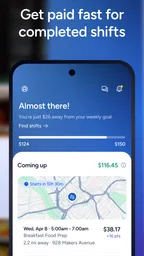
Shiftsmart’s appeal is the possibility of earning from part-time opportunities near you, with payment described as arriving within days. I would still plan my finances conservatively. “Within days” is not the same as money arriving at a precise time that suits a bill deadline, so I would not count on a newly completed shift to cover an immediate payment unless I had allowed room for processing and banking time.
It is also worth separating the app’s role from the work itself. Shiftsmart can help you find and manage opportunities, but a listing is not automatically a guaranteed shift or a promise of recurring work. If your household budget depends on a fixed number of hours, keep a backup source of income or a more predictable job search in motion. That is a sensible safeguard, not a reason to dismiss the app.
The app is free, and its content rating is Everyone. Those details make it straightforward to try from a cost and age-rating perspective, but they do not remove the practical questions that matter most: whether opportunities are available where you live, whether their hours suit you, and whether the work is worth the travel and effort.
Small checks can prevent avoidable setup friction
When an app-based work search seems to stall, I start with basic checks rather than assuming the whole service is broken. I confirm that I am signed in to the account I intended to use, review the details I entered, and make sure the app is up to date. Shiftsmart is currently at version 114.0.0 and supports Android 7.0 or later, so on an older device I would first check that the operating system meets that minimum.
If an opportunity does not appear, I would avoid repeatedly changing profile details just to see whether the screen changes. Instead, I’d check the location and availability information I supplied, then revisit the search after correcting any obvious error. Local work can depend on where you are and when you are free, so a sparse set of results may reflect a mismatch between those factors rather than a failed installation.
One useful habit is to keep a simple note of the dates and hours you can genuinely accept before browsing. That gives you a clear basis for comparing listings and makes it easier to spot a tempting shift that clashes with a commitment you had forgotten. It also prevents the common trap of treating every available opportunity as automatically suitable.
Recover the workflow without making a bigger mess
If a screen appears stuck or a step does not go through, I’d use a calm sequence: check the connection, close and reopen the app, and confirm that the relevant account information is still correct. If the issue persists, I’d write down what I was trying to do and the point where it stopped. A concise description is more useful when seeking help than a vague report that “the app isn’t working.”
For an opportunity that has already been accepted or scheduled, I would be more careful than I would be while casually browsing. I’d review the information shown in the app and avoid assuming that deleting and reinstalling it will resolve an account or scheduling issue. Reinstallation can be a last-resort troubleshooting step for a persistent technical problem, but it is not a substitute for checking the status of a work commitment or preserving any relevant details.
A practical recovery tip is to keep important shift information accessible outside the moment you need it. I would note the date, start time, location, and any instructions shown to me, while taking care not to store sensitive personal information carelessly. That simple backup helps if I need to compare a commitment with my calendar or explain a problem later.
Sometimes the obstacle is outside the app
Not every disappointing search result points to a technical fault. If there are few suitable opportunities, the issue may be that the available work does not match your location, schedule, or willingness to travel. I would broaden the times I can consider only if I can truly manage them, and I would weigh the commute before expanding the search area. A longer trip can erase much of the value of a short shift.
Payment timing is another area where expectations matter. The app’s description points to payment within days, but my own planning would allow a cushion rather than treating that as an exact deadline. If payment seems delayed, I’d first check the information and status available in the app, then contact the appropriate support channel with the shift details. I would not assume that reinstalling the app or submitting the same information repeatedly will speed up a payment process.
Likewise, if a shift is unavailable or no longer suits you, the best next step is to follow the instructions shown for that opportunity rather than simply ignoring it. For work arranged through an app, clear communication and careful attention to the current status are part of being reliable. That is especially important if you hope to use the platform again.
A realistic way to fit it into a week
Imagine I have a free afternoon next week but cannot commit to the same hours every week. I could open Shiftsmart, compare nearby opportunities against that afternoon, and judge each one by its timing and travel burden. If I find a suitable option, I would record it in my calendar and avoid accepting another commitment that creates a conflict. If nothing fits, I would leave my schedule intact rather than stretching it to make an unsuitable listing work.
That approach shows the app’s strongest use case: filling a limited pocket of free time with work that fits, while keeping control of the rest of the week. It is less compelling for someone who needs guaranteed hours, wants a long-term career path, or cannot manage changes in schedule. For those needs, a conventional employer or a job board focused on stable roles is likely a better starting point.
I also would not compare every opportunity by its advertised pay alone. The practical value depends on the whole commitment: getting ready, traveling, completing the work, and getting home. Even without calculating a complicated hourly rate, writing down the total time involved can reveal whether a shift is genuinely worthwhile for you.
Who should give it a try—and who should look elsewhere
I’d recommend Shiftsmart to someone who wants to explore part-time earning options, has some control over their schedule, and is comfortable checking availability rather than expecting a fixed routine. It can also make sense for a person who already has a main source of income and wants to investigate occasional work around it. The key is to use it as one tool in a broader plan, not as proof that work will always be available on demand.
I would hesitate to recommend it as the sole solution for someone with urgent bills, strict childcare arrangements, or a need to know exactly how many hours they will work each week. In those cases, predictable employment or a direct arrangement with an employer may be a better fit. Someone who dislikes checking an app regularly or cannot travel to varying locations may also find the process more frustrating than helpful.
The rating gives a broad indication of how users have responded, but I would not read it as a guarantee of an individual experience. Shiftsmart has around 21,000 written reviews alongside its 56,000 ratings, and individual outcomes can depend heavily on local opportunities and personal circumstances. I’d treat those figures as context, then make my decision based on whether the app’s flexible-work approach matches what I actually need.
My practical verdict
After weighing how I would use it, I see Shiftsmart as a focused option for finding part-time work when flexibility matters more than a guaranteed routine. Its clearest advantage is giving people a place to explore local opportunities from a phone; its main trade-off is that users still have to judge availability, scheduling, travel, and payment timing with care. It is not a magic fix for inconsistent income, but it may be useful for someone who can be selective and patient.
If you try it, I’d start by entering accurate details, checking the app’s current version, and setting a realistic availability window. Compare the full commitment rather than the headline appeal of a shift, and keep a calendar note once you accept work. Those habits make it easier to tell whether the app is serving your needs or whether the obstacle is a mismatch in timing or location.
Overall, I’d give Shiftsmart a cautious recommendation to flexible workers who want another channel for part-time opportunities. I would not depend on it alone for stable income, but I can see its value as a practical supplement—provided you approach each listing with clear expectations and keep a backup plan for the weeks when nothing fits.
What we like
- Flexible shifts can fit around other work or personal commitments.
- The app lets you browse opportunities without contacting employers individually.
- Shift details can help you judge whether a job suits your schedule.
- In-app work history can make it easier to track completed shifts.
- A mobile-first application process is convenient for finding work on the go.
What could be better
- Available shifts may vary widely by location.
- Some roles require screening or onboarding before you can start.
- Popular shifts may be claimed quickly.
- Work availability can change from week to week.
- The app may collect personal information during registration.





