

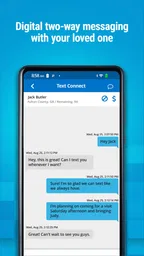

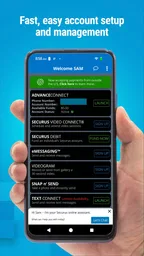
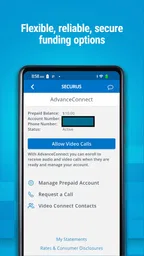

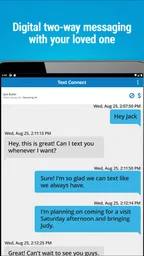

Securus Mobile review
 Analysis by Appsdrops
Keeping in touch through calls and video visits can involve more planning than ordinary messaging, especially when someone has to manage an account as well as arrange a session. Securus Mobile is built for that specific communication routine: it brings calling-account management, funding, and video-session scheduling and joining together. I see its value less as an all-purpose chat app and more as a practical companion for people coordinating contact with someone in a correctional setting.
That focus matters when judging how accessible it feels. The app’s usefulness depends not only on whether someone can find a button, but also on whether they can manage account tasks, prepare for a scheduled visit, and take part under the conditions they actually have. It is a free communication app from Securus Technologies, LLC, and its purpose is narrower than the broad messaging tools many people already use.
Finding the right task without extra navigation
The clearest advantage is that the main jobs belong together. A person can use the app to deal with a calling account and to arrange or join video sessions, rather than treating those as unrelated chores. For a family member who already knows why they opened the app, that focused setup can reduce the mental work of switching between separate services.
In practice, I would approach it with a simple routine: check the account before planning a call, handle any funding need, and then look at the video-session schedule when a visit is coming up. Keeping those steps in that order makes it easier to catch a practical issue before the time set aside for a conversation. It is a small workflow, but it is more helpful than waiting until a session is imminent to discover that account preparation still needs attention.
The app’s audience is specific, so its navigation should be judged against that purpose rather than against a general social network. Someone looking for a feed, group chats, or a broad collection of everyday messaging tools will not find the same kind of experience here. I would not install it as a replacement for ordinary chat; I would use it when its account and visit functions match a real communication need.
There is also a useful distinction between setting up a visit and joining one. Scheduling is a planning task that can happen ahead of time, while joining is something to do when the session is due. Treating them as separate steps helps avoid the common mistake of assuming that arranging a session automatically means everything is ready at the moment of contact.
The name is familiar to a substantial audience: Securus Mobile has an average rating of 4.6 from around 47,000 ratings, with more than 5 million installs. Those figures suggest that it is widely used, but they do not guarantee that every person will find the same workflow easy. Account-specific communication tools can feel very different from one user’s situation to another.
Readability is only one part of ease of use
For someone deciding whether the app will be manageable, I would focus on the clarity of the task rather than assume that a familiar phone interface solves everything. A person may understand how to open an app and still need help with the sequence: what to do before a call, when to schedule a video session, and what action to take when it is time to join.
A practical way to reduce confusion is to make a short personal checklist outside the app: confirm the account is ready, review the visit plan, and open the session when appropriate. That does not add a feature the app may not provide; it simply turns the app’s separate responsibilities into a repeatable routine. It can be particularly useful for relatives who handle communication on behalf of someone else or who do not use the app every day.
The current version is 5.5.0, build 7, and it requires iOS 12 or later. Those details are worth checking before relying on it, especially if a family member plans to use an older iPhone or is helping someone else install it. A person with a compatible device may still prefer to make a trial run well before an important visit, so setup does not become part of the pressure on the day itself.
Motor and sensory needs shape the real experience
Any app used for a scheduled video conversation has to work in more than one mode: a person may be tapping through account tasks, reading information, or taking part in a live interaction. Those activities can place different demands on vision, hearing, dexterity, and attention. I would not assume that success with one part proves that every part will suit someone with a particular access need.
For people who find small or precise touch interactions difficult, the most helpful approach is to complete account preparation when there is time and not under the pressure of an approaching call. If a trusted relative can assist with setup, it may be sensible to agree in advance who will handle account tasks and who will join the session. That division can preserve the conversation itself as the main event rather than turning it into a last-minute troubleshooting exercise.
Video visits can also be a mixed fit for sensory preferences. Some people value seeing the person they are speaking with; others may find a video interaction tiring or prefer a call. Since the app supports calling-account management as well as video sessions, users can consider which kind of contact makes sense for a given occasion, rather than treating video as the only meaningful way to stay connected.
For a person with hearing or vision needs, I would test the intended kind of interaction in a low-pressure situation and with the device they will actually use. Check whether the person can follow the on-screen steps comfortably and whether a video conversation is workable for them. A relative who is able to assist should be nearby during preparation if needed, but should avoid taking over the communication itself unless that is what the user wants.
Planning around different places and schedules
The app’s practical strength is that it supports contact that has to be arranged, rather than assuming both people are free to message at any moment. A realistic example is a family member who has a busy workday and wants to set aside a specific period for a video visit. They can plan the session in advance, check the calling account separately, and keep the relevant tasks in one communication-focused app.
That planning can help when the person managing the app is not the person who will ultimately take part in the conversation. One relative might organize the account and schedule, while another family member joins the visit. In that case, it is worth agreeing on responsibilities beforehand: who checks that the plan is in place, who will use the device, and who can offer help if the steps are confusing. Clear roles matter more than downloading an app and hoping everyone knows what to do.
There is a trade-off, though. A scheduled interaction asks users to be ready at a particular time, so it does not offer the spontaneity of a message that can be read later. If someone’s availability changes often, or if they chiefly want casual, asynchronous conversation, their usual messaging option may be more convenient. Securus Mobile makes more sense when arranging contact through its supported calling and video-session functions is the actual need.
The app is rated for Teen users. That age guidance is a factor for households deciding who will manage the app, but it does not replace a family’s own judgment about who should handle account-related tasks. If a younger person is involved in a visit, an adult can decide whether to manage the preparation and device use together with them.
Where the experience can still be difficult
The focused purpose is also a limitation. It does not make the app a universal solution for staying close: it is not the obvious choice for people who want one familiar place for ordinary texts, photos, and everyday group conversations. If those are the main needs, a conventional messaging app is likely to feel more natural and may already be part of everyone’s routine.
Another friction point is preparation. Funding a calling account and scheduling a session are tasks that require attention before the conversation, and users may need to learn which step belongs where. I recommend doing the administrative work early, then returning to the app when it is time to join. That small separation helps keep a technical or account-related question from interrupting a visit.
Video access also depends on the people involved being comfortable with the device and the format. A person who struggles with screens, touch controls, or live video may need a relative’s help, and some may simply prefer a call. It is better to make that choice based on the individual’s comfort than to assume that a video session is automatically more accessible or more personal.
For a first-time user, I would avoid making the first attempt coincide with an important occasion. Spend a calm moment learning the account and scheduling steps, and decide in advance who can help if something is unclear. This is not a claim that the app is unusually complicated; it is a sensible precaution for any communication process where timing and account readiness matter.
Its broad adoption and strong average rating may reassure someone who wants to know that other people use it, but popularity cannot answer a personal accessibility question. A person who depends on a particular way of navigating a phone should test the actual tasks they need to perform. The most relevant test is not whether the app opens, but whether that person can comfortably manage the account or join the kind of session they expect to use.
Who I would recommend it to
I would recommend Securus Mobile to people who need its particular combination of calling-account management and scheduled video contact, especially when a family member is willing to plan ahead and help with setup if needed. It is also a reasonable fit for someone who wants those responsibilities gathered in one focused communication app instead of juggling separate tools for each step.
I would suggest looking elsewhere if the need is mainly casual messaging, if scheduling feels like an unwanted constraint, or if the intended user cannot comfortably manage the device and has no suitable support. A standard communication app is a better match for everyday, flexible conversation; this app earns its place when its specific calling and video-session workflow is relevant.
My overall view is that the app is most useful when people treat it as a planned route to contact, not as a complete substitute for every way of communicating. Make account preparation a separate task, keep the session plan clear, and choose call or video according to the user’s comfort. With that approach, its focused design can help families organize meaningful contact while being honest about the extra planning and personal support some users may need.
What we like
- Manage account details and contact information from a mobile device.
- Review available phone and video communication options in one place.
- Receive account-related notifications on your phone.
- Check transaction history without calling customer support.
- The app provides a mobile alternative to the Securus website.
What could be better
- Some features may be unavailable at facilities that do not support them.
- Account setup may require details supplied by the correctional facility.
- Service availability and pricing can vary by facility.
- Communication quality may depend on the facility's network and equipment.
- Users may need to add funds before using paid communication services.





