


SAP Concur review
 Analysis by Appsdrops
I see SAP Concur as a work tool that makes most sense when travel and expense reporting are already part of an organized company process. Its mobile focus is useful: instead of waiting until you are back at a desk to deal with a receipt or trip detail, you can handle those chores while they are still fresh. But it is not a general-purpose spending tracker, and it is unlikely to feel worthwhile if your employer does not use Concur as part of its expense workflow.
That distinction shapes the whole experience. The app is aimed at people who need to keep business travel and expenses moving, not anyone who simply wants a personal budget. If your workplace has set up the service for you, having the process in your pocket can reduce the end-of-trip paperwork pile. If it has not, the app’s business orientation is a reason to look elsewhere rather than a problem you can solve by installing it.
Where mobile expense handling earns its place
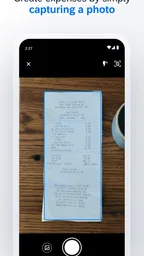
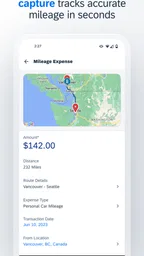
The strongest case for SAP Concur is timing. A receipt is easiest to deal with when you have just paid, know what the purchase was for, and still remember whether it belongs to a trip or another work expense. Capturing information as you go can spare you the familiar end-of-month detective work of matching charges to faded slips and trying to recall the purpose of each purchase.
Consider a realistic travel day: you pay for a work-related meal between meetings, then take a taxi to the next stop. Rather than leaving both items until you get home, you can use the mobile app to keep the expense task close to the purchase. That does not remove the need to follow your employer’s rules or check your entries, but it can make the admin feel like a small ongoing task instead of a large, unpleasant one.
This is where a travel-and-expense app differs from a standard notes app or a personal finance tool. A notes app can store a reminder, and a budgeting app can help you monitor your own spending, but neither is necessarily built around a company’s expense process. Concur is most useful when the goal is to prepare work expenses for the workflow your organization already uses, rather than to build a private view of household finances.
A practical habit is to deal with each receipt before moving on to the next part of the day. Even a quick review of the amount, date, and business purpose can help catch an entry that might otherwise be confusing later. I would also keep a separate personal note for unusual context, such as which client meeting an expense relates to, if your company’s process asks for that kind of explanation. The point is not to create duplicate paperwork; it is to make sure the information you submit is clear and defensible.
Concur is a business app from SAP SE, and that background matters more than a long feature checklist would. The intended value is not just storing transaction details on a phone; it is helping employees participate in a managed travel and expense process. For someone who already has an account and a company workflow, that can be more useful than juggling a receipt folder, email reminders, and a spreadsheet.
The difference between convenience and control
Mobile access is convenient, but it should not be confused with automatic correctness. Employees still need to understand what their organization considers reimbursable, which expenses need explanations, and when reports are due. An app can make it easier to enter information, but it cannot decide whether a particular purchase fits an internal policy that varies from one workplace to another.
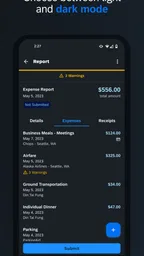
That is why I would treat the phone as a place to keep the process current, not as a reason to submit without checking. Before sending anything through a company workflow, review the entries together: do the descriptions make sense, are the business purposes understandable, and have you overlooked a receipt? A short review at the end of a trip is usually less stressful than trying to reconstruct a week of spending later.
There is also a useful trade-off in doing things on the move. A quick entry can prevent forgotten details, but entering information while rushing through an airport or heading into a meeting invites mistakes. My approach would be to capture the essential information promptly and reserve a calmer moment to check the report. That balance uses the app’s mobile convenience without expecting a small screen to be the ideal place for every administrative decision.
What may feel awkward
The main limitation is that Concur’s usefulness depends heavily on the company context around it. A first-time user may be able to install it, but the experience is only meaningful if their employer has arranged the relevant account and process. This is not a standalone travel planner that every traveler can use in the same way, nor is it a simple app for splitting holiday costs with friends.
There can be a learning curve as well. Business expense routines often involve internal categories, approval steps, and rules that are specific to an organization. Even when the mobile interface makes routine actions more accessible, a new employee may still need guidance on how their company expects expenses to be described and submitted. I would not blame the app alone for that friction, but it is part of what a prospective user should expect from workplace software.
Small-screen administration has limits. Reviewing a handful of recent purchases is a natural phone task; comparing a complicated set of expenses or carefully checking a long report may be more comfortable on a computer, depending on the workflow your employer provides. The app is best understood as a companion for keeping work moving while away from a desk, not a guarantee that every substantial review will be pleasant on a phone.
It is also not the right choice if your real need is personal budgeting. Someone who wants to categorize grocery spending, set household targets, or understand monthly cash flow should choose a consumer finance app built around those goals. Concur’s business focus is a strength for employees following an employer’s process, but it would be a poor substitute for a personal money manager.
Who is most likely to benefit
I would recommend trying it if you travel for work or regularly pay for reimbursable business expenses and your employer already uses Concur. It is especially relevant if you tend to forget receipts, delay expense reports, or spend time after trips trying to remember why a charge appeared on a statement. Keeping the process close to the moment of purchase can make the administrative side of work more manageable.
It may also suit people who travel occasionally rather than constantly. A light but reliable routine—record the expense when practical, add enough context to recognize it later, and check the report before submission—can be valuable even if you only take a few work trips. The benefit is less about doing everything instantly and more about avoiding a backlog that grows while you are busy with your actual job.
By contrast, I would skip it if you are an independent traveler without access to an employer’s Concur setup, if you only need a place to store personal receipts, or if you prefer to handle all expense administration on a computer and have no need for mobile access. In those cases, a notes tool, a spreadsheet, or a personal finance app may be simpler. Choosing the less specialized option is sensible when the company workflow is not part of your life.
For prospective users wondering whether it costs anything to try, the app is free. It is rated for Everyone, and its broad adoption is reflected in an average rating of 4.6 from around 122,000 ratings, with more than 10 million installs. Those figures suggest it is a familiar tool for many users, but they do not guarantee that it will fit a particular employer’s setup or make every company policy easy to understand.
The app has been available since June 4, 2010, and its current version is 10.37.0. It requires iOS 12 or later. That compatibility detail is worth checking before relying on it for a trip: install it and confirm that you can access the account and workflow your organization expects before you are away from your desk. A little preparation is more useful than discovering an access issue when you are trying to finish a report on the road.
A more useful routine for work trips
My most practical advice is to make expense handling a short checkpoint rather than a separate project. After a purchase, pause long enough to preserve the receipt and record whatever context your company expects. At the end of the day, scan the items you have collected and note anything that may be hard to identify later. When the trip is over, review everything once more before submitting it through the process your employer uses.
This routine also helps separate business spending from personal spending. On a mixed-purpose trip, do not assume that every charge made while traveling belongs in a work report. Check what your organization allows, and make the distinction clear in your own records. That small bit of care is useful whether the app makes entry quick or not, because unclear expenses can create questions long after the trip has ended.
Another sensible approach is to avoid turning every mobile moment into an administrative session. If you are hurrying to board or dealing with a delayed connection, capture only what you can handle accurately and return to the details when you have time. The app’s value is in keeping expenses from becoming forgotten, not in forcing you to complete a perfect report in a noisy terminal.
My verdict for employees and travelers
Overall, I think SAP Concur is a practical companion for employees whose organization already relies on it. Its best quality is not that it makes expense policy exciting; it is that it can help keep receipts and travel-related admin from slipping into a forgotten pile. Used consistently, it can turn a stressful catch-up task into a series of smaller actions that are easier to check.
The weaknesses are just as specific. The app is tied to a workplace context, company rules can still take time to learn, and a phone is not always the easiest place to examine a complex report. Those are meaningful limitations, especially for people who expect a universal travel organizer or a personal budget manager. I would not install it expecting it to replace those tools.
For someone who has employer access and wants to stay on top of business expenses while away from a desk, I would give it a try and build a simple receipt habit around it. For everyone else, the better choice is the tool that matches the job they actually need done. That is the clearest way to judge Concur: useful when it fits an established company process, and unnecessarily specialized when it does not.
What we like
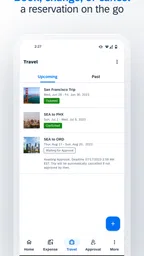
- Combines travel booking and expense reporting in one app
- Supports receipt capture with the phone camera
- Lets users track expense report progress
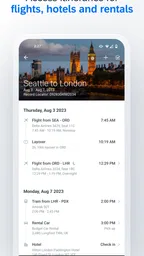
- Provides access to itinerary details while traveling
- Can import eligible transactions from linked cards
What could be better
- Some features require an employer-provided account
- Company settings can limit available tools
- Expense submissions may need extra review
- Receipt scanning can require manual corrections
- Travel booking options depend on employer policies





