
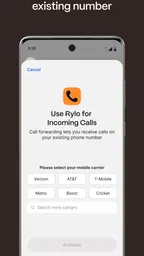
Rylo: Live Call Captions review
 Analysis by Appsdrops
I see Rylo: Live Call Captions as a focused communication tool, not an all-purpose accessibility suite. Its value is straightforward: it puts written captions alongside phone calls for people who are deaf or hard of hearing. That narrow purpose is also its strongest point. Instead of asking you to change how you make every call, it aims to make spoken exchanges easier to follow while they happen.
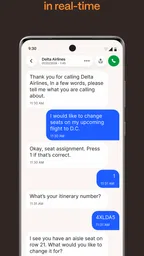
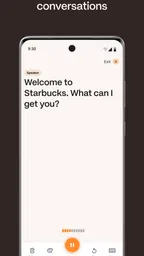
In my view, the app is most compelling when a phone call is necessary but listening alone is difficult or tiring. A captioned call can make it easier to catch a name, a time, or a key instruction without relying entirely on hearing. It will not make every conversation effortless, but it offers a practical way to add visual information to a familiar task.
What live captions change during a call
Rylo is a free communication app from Rylo HQ, and its purpose is more specific than a general messaging or calling service. I would think of it as an accessibility aid for phone conversations rather than a replacement for texting, video calls, or other ways of communicating. That distinction matters: it is intended to help you follow speech on a call, not to turn every exchange into a different kind of conversation.
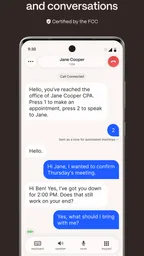
The most useful benefit is the chance to read along instead of trying to hold every spoken detail in memory. In an everyday situation, imagine calling a clinic to confirm an appointment. You may need to keep track of the date, a time, and a short instruction. Captions can give you another way to check what was said as the conversation moves along, which can be especially helpful when the call is brief and there is little opportunity to ask someone to repeat themselves.
I also like the way this kind of tool can support independence. If you would otherwise ask another person to help interpret a routine phone conversation, live text may let you handle more of those calls yourself. That does not mean captions solve every communication barrier; it means they can make some ordinary calls more manageable without changing the other person’s role in the conversation.
There is a practical trade-off, though. Reading and listening are different tasks, and a live exchange can move quickly. If you are looking at captions, you may have less attention available for noticing tone, pauses, or other cues. I would approach a call by keeping the main purpose in mind: use the text to support understanding, and ask for clarification when a detail is important rather than assuming that every caption will settle it.
Where the focused approach helps most
Rylo makes the most sense for direct, spoken phone calls where you want words available visually as the conversation happens. That could include arranging a service, checking a delivery detail, or speaking with a family member who prefers calling. These are situations where a short misunderstanding can create inconvenience, and having a visual aid can be more useful than hoping to remember a string of spoken details.
A helpful habit is to decide before dialing what you need from the call. If you are confirming an appointment, for example, keep the date and time in mind as the details to verify. That makes it easier to notice whether the captioned exchange has answered the question, and it gives you a natural reason to ask the other person to repeat or spell something if needed. This is a workflow tip, not a claim that the app provides a separate note-taking or call-management feature.
Another useful distinction is between a conversation that can be clarified and one where exact wording has serious consequences. For routine plans, captions may provide a convenient extra channel. For legal, medical, financial, or otherwise high-stakes calls, I would not treat any live caption as an official record or a guaranteed transcript. If an exact instruction matters, confirm it directly with the speaker and use an appropriate written follow-up where possible.
Compared with ordinary phone calls, the appeal is the added visual support. Compared with text messaging, a call can still be more immediate and conversational, while captions may help you keep up without asking the other person to type everything. A video call with visible signing or another established accessibility arrangement may be a better fit for some people, depending on their communication preferences. Rylo’s appeal is narrower: it is for people who want help following a spoken phone conversation, not for every communication style or situation.
Limits worth considering before relying on it
Live captions are not the same as a human interpreter, and I would not expect them to handle every speaking style or conversational complication equally well. A fast speaker, overlapping speech, unfamiliar names, or noisy surroundings can make any speech-to-text experience harder to follow. Because the available description centers on captioning during phone calls, I would judge the app by whether that central task suits your needs rather than assume it covers other accessibility workflows.
There is also a personal-comfort question. Some people prefer to read a conversation as it unfolds; others may find that watching text makes a call feel more demanding. If you are new to captioned calls, it may help to try the app first on a low-pressure conversation, such as checking a simple detail with someone you know. That gives you a chance to see whether reading along improves your confidence before using it for a more complicated exchange.
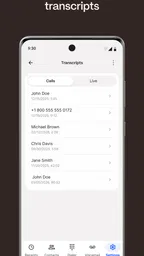
For a caller who mainly needs a written record after a conversation, a messaging service or a method that produces a confirmed written summary may be more suitable. For someone who needs a live visual aid while speaking by phone, Rylo’s specific focus is more relevant. The choice is less about which communication tool is universally better and more about whether you need support during speech or a written conversation from the outset.
Who I would recommend it to
I would recommend giving Rylo a try if you are deaf or hard of hearing and want a visual aid for phone calls, especially if calls are part of everyday tasks you would like to manage more independently. It may also suit someone who can follow a conversation more comfortably by reading than by relying on sound alone. Its Everyone content rating makes clear that its audience is not restricted by age classification, though the usefulness will depend on each person’s communication needs.
I would be more cautious about recommending it as the only solution for someone who needs exact, dependable interpretation in complex conversations. It is also not the obvious choice if you would rather communicate through text, sign language, or video from the start. In those cases, a tool designed around your preferred communication method may feel more natural than adding captions to a voice call.
The app has an average rating of 4.6 from around three thousand ratings, with close to a thousand written reviews, and has passed one hundred thousand installs. Those figures suggest that many people have tried it, but they cannot tell me whether it will fit a particular caller’s hearing, reading, or conversation habits. I would treat them as useful context, not a substitute for trying a low-stakes call yourself.
Availability and day-to-day expectations
Rylo is free, which lowers the barrier to testing whether captioned calls work for you. It was released on September 21, 2020, and its current version is 2.0.24. The minimum operating system is version 8.0. Before installing, I would check that your device meets that requirement and consider whether you are comfortable using an app as part of your call routine.
One question many people will have is whether the app suits calls they make every day or only occasional situations. The sensible answer is to test it against your own pattern: try a short, uncomplicated call first, then decide whether the captions help enough to make it part of your routine. Another likely concern is whether it replaces the need to clarify speech. It should not; when a name, number, or instruction matters, confirming it with the other person remains the safer habit.
You may also wonder whether this is a general-purpose communication app. I would not approach it that way. Its identity is tied to caption support for phone calls, so it is best judged on that job. If your main need is exchanging messages, making video calls, or capturing a formal transcript, compare those needs with the capabilities of tools built around them instead of expecting one focused app to cover everything.
My verdict on Rylo
The clearest reason to choose Rylo is the combination of a familiar phone call and a visual aid for following speech. I appreciate that its purpose is easy to understand, and I can see the value in using it for routine calls where hearing every word is difficult. The strongest use case is not a complicated conference or a high-stakes exchange; it is the everyday conversation where catching a detail can make the difference between feeling included and feeling left behind.
Its limitations are just as important to keep in view. Captions do not replace clarification, a preferred sign-based conversation, or a reliable written record when exact wording matters. Reading in real time may also take concentration, so it will not feel equally comfortable for everyone. I would start with an easy call, see whether the visual support genuinely helps, and keep another communication method available for situations where accuracy or nuance is especially important.
Overall, I recommend Rylo: Live Call Captions to deaf and hard-of-hearing callers who want to make spoken phone conversations easier to follow. It is a targeted tool rather than a universal answer, and that is precisely how I would use it: as practical support for the calls it is designed to help with, while choosing another option whenever the conversation calls for a different kind of access.
What we like
- Live captions make calls easier to follow in noisy places.
- Useful for people who are deaf or hard of hearing.
- Captions can help when a caller speaks quietly.
- Text support can reduce the need to ask callers to repeat themselves.
- A practical accessibility aid for everyday phone conversations.
What could be better
- Caption accuracy may vary with accents and speech speed.
- Background noise can make transcripts harder to understand.
- Some features may require a subscription or in-app purchase.
- Call captioning may not be available for every carrier or region.
- Transcripts can contain sensitive information that needs careful handling.





