



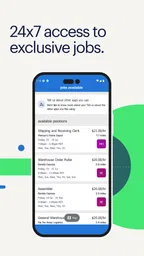
randstad: jobs for workers review
 Analysis by Appsdrops
I would approach randstad: jobs for workers as a practical job-search tool, not as a promise of instant work. It is a free business app from randstad at work, built around finding nearby opportunities and temp shifts from a phone. That focus matters: a mobile route into work can be useful when your schedule changes often, but it is not a replacement for checking the details of a role or deciding whether an employer suits you.
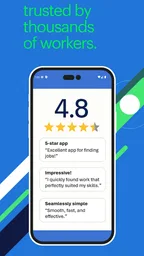
The app has an average rating of 4.6 from around 10,000 ratings, and it has passed one million installs. Those figures suggest that many people have tried it, though they cannot tell you whether the jobs available in your area match your skills or timetable. My view is that its appeal is most straightforward for people already open to temporary work and comfortable managing a job search digitally.
Trust starts with a clear purpose
Randstad is a familiar name in recruitment, and the app’s connection to randstad at work gives it a specific employment context rather than the feel of a general classified-ad board. I find that distinction useful, but it should not be mistaken for a guarantee that every listing will be suitable or that a role will lead to longer-term employment. A recognizable recruiter can help set expectations; the actual terms still deserve your attention.
The app is rated for Everyone, but that age label is not a judgment about the suitability of a particular job. Work can involve responsibilities, schedules, or conditions that call for careful consideration. I would treat the rating as an app-store content classification and assess each opportunity on its own merits, especially if you are helping someone else search.
For a first-time user, the sensible question is not simply whether the service is legitimate, but whether its opportunities fit your real circumstances. A nearby result may still be a poor match if the shift begins before transit runs, the hours conflict with childcare, or the role requires experience you do not have. I would use the app to discover possibilities, then slow down before committing.
What the phone-first approach is good at
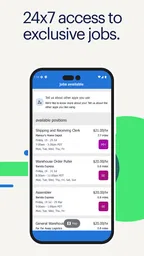
The strongest case for this app is convenience. If you are already out and have a spare moment, searching from your phone can make it easier to check whether work is available near home or along a route you already travel. That is a more focused task than opening a broad job board and sorting through permanent office roles when you are looking specifically for temporary work.
It can also suit people whose work plans are unsettled. Someone between longer roles might use it to look for short-term assignments while keeping time available for interviews elsewhere. A student or caregiver may want to explore shifts around other commitments. In both cases, the app is best treated as one channel in a broader plan, not the only place to look.
There is a useful trade-off here: a mobile search can make checking opportunities feel quick, but speed can encourage rushed decisions. I recommend reviewing the whole job description when something catches your eye, rather than judging it by proximity or a short preview. For temporary work, practical details such as start time and expected duration can matter as much as the job title.
Controls and choices to check before applying
App permissions and privacy choices are important in a job-search tool because a search may involve personal information. I would review the permission prompts on your device as they appear and consider whether each request makes sense for the task you are performing. If a prompt is unclear, pause and check the app’s explanation or your device settings rather than granting access automatically.
I would also take a moment to understand the account controls shown in the app before entering more information than a particular application requires. Check what profile details you are being asked to provide, which fields are optional, and how to reach account settings if you later want to update information. These are practical habits, not a claim that a particular control or privacy setting is available in every version.
For a job application, accuracy and restraint go together. Keep your work history current, but do not add sensitive details unless there is a clear reason and you understand how they relate to the application. If you are using a shared phone, consider whether your account remains signed in and whether notifications could reveal job-search activity to someone else. Those small checks give you more control over a process that can feel personal.
Data-sensitive moments in a job search
The moment to be especially deliberate is when moving from browsing to applying. A search can begin with broad interests, while an application may ask for information that identifies you or describes your employment background. Before submitting, I would reread the role and the information requested, make sure the recipient and job are the ones you intended, and avoid sending details simply because a form makes them convenient to enter.
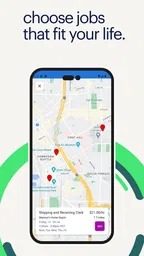
Location is another sensitive part of a nearby-job search. If you use location-based options, consider whether a manually chosen area would be enough for your search instead of enabling a broader device permission. The right choice depends on your preferences and the controls your phone presents. I would not assume that a job app needs continuous access just because location can help identify nearby work.
Notifications can be helpful when you are actively looking, but they can also interrupt or expose information on a lock screen. I would tailor notification settings through the app or the phone if they become distracting, and check what is displayed before relying on them in a shared setting. A quieter setup may be preferable if you only want to search when you have time to assess listings carefully.
A realistic routine that avoids rushed choices
Imagine you have a free half-hour after finishing a shift and want to find another temporary role for the coming week. I would first search the area I can realistically reach, then note a few promising jobs rather than applying to every result. Next, I would compare each opportunity against my availability, travel time, and experience. Only after that would I open an application and review what information it asks me to provide.
This workflow makes the app more useful because it separates discovery from commitment. It also reduces a common job-search mistake: treating a nearby result as automatically convenient. A job that is close on a map may not work with an early start, a late finish, or a changing transit schedule. Keeping a short list and checking logistics outside the quick search is a simple way to protect your time.
If you are comparing several options, keep your own notes about the role, schedule, and any questions you need answered. That is particularly helpful when browsing on a small screen, where it is easy to lose track of which listing had which conditions. I would not rely on memory alone when multiple temporary opportunities appear similar.
How it compares with broader job boards
Compared with a general job-search app, randstad’s clearest distinction is its emphasis on local opportunities and temporary work. A broad board may be a better starting point if you want to compare permanent positions across many industries or search for roles beyond this particular service’s focus. If you already know you want temp work nearby, a more targeted app can reduce irrelevant browsing.
Compared with contacting recruitment agencies directly, a phone app offers a more self-directed first step: you can explore openings when it suits you. A direct conversation may still be better when you need help interpreting a role, explaining an unusual work history, or clarifying conditions before applying. I see the app and human contact as complementary rather than competing approaches.
The app is currently at version 8.2.3 and was released on November 12, 2021. It supports Android 8.1 and later, which makes the stated minimum platform relatively accessible to people using older compatible devices. Even so, the experience on a particular phone can depend on its software and settings, so I would keep the app updated through the app store and check that the device itself is functioning reliably before depending on it for time-sensitive applications.
Who should use it—and who may be better served elsewhere
I would recommend trying it if you are actively seeking temporary work, want to look for opportunities around a chosen area, and are comfortable handling the early stages of a search on your phone. Its free price makes it an easy option to test without paying for access, and its focused purpose is more relevant than a broad board when temp work is your priority.
I would be less likely to make it my main tool if I wanted a wide comparison of permanent careers, detailed coaching, or a guided conversation before applying. It may also be a poor fit if you need a particular schedule or specialist role and find few relevant local openings. In those cases, combine it with other job boards, direct employer applications, or a conversation with a recruiter rather than repeatedly checking a narrow pool.
Randstad’s app has a useful, clear role in a job search: it gives workers a mobile way to explore nearby temporary opportunities. The important part is using that convenience without handing over more information or making a commitment too quickly. I would start with a focused search, review permissions and account choices thoughtfully, and verify each role’s practical details before applying. For the right kind of worker, randstad: jobs for workers is a sensible extra route to work—not a substitute for careful judgment.
What we like
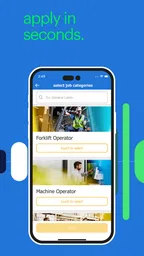
- Lets you search for jobs by location and role
- Job alerts can help you spot new openings
- A profile makes it easier to manage applications
- The app connects job seekers with Randstad recruiters
- Useful for exploring temporary and permanent roles
What could be better
- Job availability depends heavily on your location
- Some listings may require extra steps outside the app
- Recruiter responses can take time
- Creating a complete profile takes effort
- The app may request personal details during registration





