


Public Storage review
 Analysis by Appsdrops
I tend to judge a storage app less by how polished it feels on day one and more by whether I still have a reason to open it once the boxes are in place. Public Storage is aimed at customers who want to manage their storage space from a phone rather than treat every task as a visit or phone call. That focus makes it useful in a very particular way: it is not a general-purpose inventory app, but a companion to a Public Storage rental.
In my view, its appeal depends on how often you need to manage that rental. If you have a unit and regularly need to keep track of practical details, the app may earn a spot on your phone. If you only need storage briefly and rarely interact with the facility, it can feel like an extra app for a job you have already finished.
Useful from the first week, if you have a unit to manage
Public Storage is a free business app from Public Storage Apps. Its purpose is straightforward: bring storage-related management into one mobile place. That can be a welcome change when you are juggling a move, clearing a room, or storing seasonal belongings. Instead of relying entirely on memory, paperwork, or a string of reminders, you can make the app part of the routine around your rented space.
The first week is when that convenience is easiest to notice. A move tends to create small, easy-to-forget tasks: remembering which facility is relevant, deciding when you will need to deal with the unit again, and keeping storage errands from getting lost among everything else. An app designed around the rental is a more natural place to start than a generic notes app, because its value is tied to the storage relationship itself.
A practical tip is to use the app alongside, not instead of, your own system for remembering what is inside the unit. If you are storing boxes for a move, label them clearly and keep a simple list or photo record that works for you. The Public Storage app is best understood as a tool for managing the space, not as a substitute for organizing every item. That distinction helps prevent a common disappointment: expecting a rental-management app to solve the separate problem of household inventory.
The product’s scale suggests that it serves a substantial group of customers: it has more than one million installs, with an average rating of 3.3 from around 43,000 ratings. I take that as a reason to approach it with sensible expectations rather than assuming it will be a perfect fit for everyone. The rating is mixed, so I would treat the app as a potentially useful convenience, not as a reason by itself to choose a storage provider.
Where it fits better than a general-purpose alternative
Compared with a calendar, notes app, or folder of saved documents, a provider-specific app has one clear advantage: it is designed around the service you are using. A calendar can remind you to handle a storage errand, but it cannot serve as a dedicated management companion. Notes can track what you packed, but they do not replace the provider’s own app for the rental relationship. If you already rent with Public Storage, that distinction is the reason to try this app.
There is a trade-off. A generic organizer can remain useful when you change providers or move your belongings elsewhere; a provider app is naturally less portable. I would not build my entire household record around it. Instead, I would keep personal information about contents and packing in a format I control, and use Public Storage for the parts of the experience that belong specifically to the rental.
Does it keep earning space after the first month?
For a short-term renter, the answer depends on how many storage-related tasks actually recur. If you have a unit during a move and expect to empty it soon, the app may be most valuable during the period when plans are changing. Once the move is settled, you might not need to open it often. That is not necessarily a flaw; a utility app does not need daily engagement to be worthwhile. It does need to save enough effort when you do need it.
For someone using storage over a longer stretch, the value is more about keeping the rental manageable without turning it into a project. I would think of the app as a place to check when a storage task comes up, rather than something that deserves constant attention. The strongest habit is a light one: open it when you have a reason, handle the task, and leave. If you find yourself checking it without a purpose, the app is not adding much to your routine.
One useful approach is to connect storage errands to events you already remember. For example, when changing seasonal clothing or preparing for a trip, decide whether you need anything from the unit and check the app as part of planning that errand. This reduces forgotten visits and avoids repeated, unplanned trips. It is a workflow tip, not a special feature: the app becomes more valuable when it supports an existing routine rather than asking you to invent a new one.
Another everyday scenario is sharing the mental load during a household move. One person may handle packing while another manages the storage rental. A dedicated app can give the person responsible for the rental a clear starting point for storage-related tasks. I would still agree on who is handling each errand and keep essential details accessible to the people who need them. Relying on one person’s phone as the only record can create a different kind of friction.
Keeping the upkeep light
The maintenance burden should be modest if you use the app only when storage needs arise, but any app can become clutter when it sits unused or when you expect it to track every detail of a project. I would keep the phone’s broader organization simple: use the app for rental management, a short note or photo album for the contents of the unit, and a calendar for reminders that matter. Giving each tool one job makes it easier to return to the app after weeks away.
It is also sensible to check whether the app is still useful at natural checkpoints: after the initial move, when your storage plans change, and when you are preparing to clear the unit. Those moments help you decide whether it is serving a real purpose. If the answer is yes, keep it. If the rental has ended or you no longer need mobile management, removing an app you do not use is a reasonable choice.
The current version is 2.34.0, and it supports Android 7.0 or later. It is rated for Everyone, which makes its age classification broad, though the app’s usefulness is still tied to being a Public Storage customer. The practical question is not whether it is appropriate for a wide audience; it is whether you have a storage rental that gives you a reason to use it.
What may cause the appeal to fade
The biggest source of fatigue is a mismatch between the app’s narrow purpose and a user’s expectations. Someone looking for a full home inventory, a moving checklist, or a universal organizer may find a better fit in a dedicated tool for that job. Public Storage is about managing a Public Storage space, so its usefulness naturally shrinks if you do not have that relationship or if your needs are mostly about cataloging belongings.
A second source of friction is low-frequency use. Storage is often a background task: you may go a long time without needing to do anything, then suddenly have several errands to handle. That pattern makes it easy to forget the app exists. I would not judge it by whether it becomes part of a daily habit. I would judge it by whether it helps at the moments when the rental becomes relevant.
The mixed average rating is another reason to keep expectations grounded. Ratings summarize many different experiences, and they do not tell me exactly which parts matter to each person. For a potential user, the practical lesson is to try the app for the management tasks you actually need and notice whether it makes those tasks easier. Do not assume that installing it will resolve every inconvenience associated with renting storage.
Public Storage is free, which lowers the barrier to trying it, but free does not mean it must stay installed forever. If you are not a customer, it is unlikely to earn lasting space. If you are a customer but handle everything comfortably through other means, its added value may be small. And if your main priority is tracking possessions across multiple locations or providers, a portable inventory tool will probably serve you better.
My long-term verdict
I would recommend Public Storage to someone who already rents a space with the company and wants a phone-based way to manage that part of life. Its appeal is practical rather than entertaining: it can support storage errands and keep the rental closer at hand during a move or an extended storage period. Public Storage Apps has built a focused business app, and its more than one million installs show that many people have chosen to try it, though I would still let my own needs decide whether it stays.
For lasting value, I would use it selectively. Keep your own records of what is packed, make storage checks part of an existing routine, and turn to the app when you need to deal with the rental. That approach avoids unnecessary upkeep and gives the app a clear job. If it saves you a bit of time or helps you stay on top of storage tasks, it has earned its place. If you rarely need it, there is no reason to force a habit.
My recommendation is simple: try it if you are managing a Public Storage unit and want the provider’s service close at hand; skip it if you need a general organizer or do not have a rental to manage. It is a useful, specific companion, not a complete solution to moving or household organization. That is the right standard to hold it to—and the one most likely to tell you whether it deserves to remain on your phone after the first week.
What we like
- Online reservations make it easier to secure a storage unit.
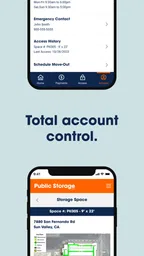
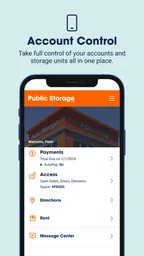
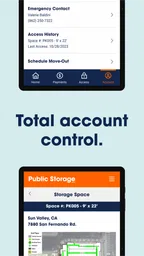
- Account access helps manage rentals away from the facility.
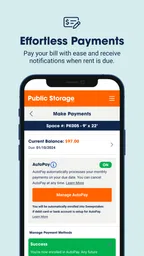
- Payment tools offer a convenient way to handle monthly bills.
- Location search helps users find nearby storage facilities.
- The app can simplify managing an existing Public Storage rental.
What could be better
- App features may vary by facility and rental status.
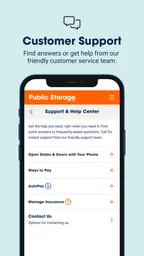
- Some tasks may still require contacting facility staff.
- Online reservations may not guarantee a specific unit.
- Users need an account to access rental management tools.
- App usefulness is limited for people who do not rent with Public Storage.





