
Paycor Mobile review
 Analysis by Appsdrops
I see Paycor Mobile as a work tool rather than an all-purpose personal finance app. It is made for employees whose organizations use Paycor, so its value depends less on flashy extras and more on whether it gives you a convenient way to handle work-related tasks from your phone. If your employer already uses Paycor, that focused role can be a real advantage; if not, there is little reason to install it.
My main takeaway is that this app works best as a companion to an employer’s Paycor setup, not as a replacement for the company’s payroll or HR processes. That distinction matters: downloading it alone does not make it useful to every worker. The strongest reason to consider it is having a familiar, mobile point of access to the work services your employer has made available through Paycor.
A mobile companion for work, not a standalone service
Paycor Mobile is a free business app from Paycor, Inc. Its audience is specifically employees of Paycor clients. That makes the first question simple: does your employer use Paycor, and has your employee access been set up? If the answer is yes, the app may fit naturally into your routine. If you are looking for an independent tool to manage a job search, personal budget, or payroll for a small business that does not use Paycor, it is the wrong starting point.
The app has been available since August 29, 2012, and its current version is 6.3.9. It has a 4.4 average from around 37,000 ratings, with more than a million installs. Those figures suggest it has a substantial audience, but they do not tell me whether it will match the configuration at a particular workplace. In an employer-linked app, the organization’s setup is a major part of the experience.
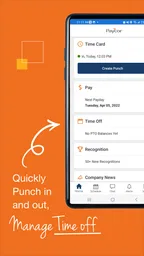
Its practical promise is convenience: use a phone to reach work-related Paycor services instead of treating every task as something that must be done at a desk. That can make a difference for employees who are away from a computer during much of the day. Still, I would think of it as one doorway into an employer’s system, rather than assume that every Paycor customer exposes the same options or workflow.
Why the employer connection changes the experience
Unlike a general payroll app, Paycor Mobile is not useful simply because you have an account with a payment provider. It is tied to the relationship between an employee and an organization using Paycor. The employer’s account and configuration determine the context in which the app can help, so it is worth checking internally whether your workplace supports mobile access before spending time troubleshooting a sign-in.
This also changes how I would judge the app. A missing option may reflect what an employer has enabled, rather than a flaw in the phone interface. If something important is unavailable, the sensible next step is to ask your HR or payroll contact whether it is supported for your workplace. That is more productive than repeatedly reinstalling the app or assuming that every employee should see an identical set of tools.
How I would fit it into a normal workday
Imagine starting a shift away from a desk and needing to check a work-related item before the day gets busy. A mobile app can be more convenient than waiting until you are back at a computer, especially when the task is brief and you already have the necessary account access. The real benefit is not that a phone makes workplace administration disappear; it is that it can reduce the friction of reaching the service at the moment you need it.
I would use that convenience deliberately. Handle a quick check while you have a calm moment, then leave more involved decisions or corrections for a time when you can focus. Small screens are useful for access on the move, but they are less comfortable for reviewing detailed information, comparing entries, or typing a careful explanation. Treating mobile access as a shortcut for simple tasks, rather than a reason to rush through important ones, is a sensible trade-off.
There is also a useful workflow lesson here: confirm that you can sign in before you urgently need the app. Work apps are easiest to adopt when you have time to sort out the organization-linked account and understand which services are available to you. If access is not ready, an urgent moment is exactly when the app will feel least convenient.
Where mobile access helps—and where it can add friction
The strongest case for a phone-based employee app is access between shifts, during a break, or while away from a work computer. For employees who rarely sit at a desk, that can be more practical than relying on a desktop portal for every small interaction. It can also make a work service feel easier to reach because the phone is already part of the day.
The trade-off is that an employer-centered app can only be as useful as the account and options available to that employee. If your organization has not enabled the service you need, the app cannot substitute for an HR conversation. If you prefer to review sensitive or detailed work information on a larger screen, a desktop experience may suit you better. And if your employer uses another system, Paycor Mobile is not a universal alternative you can adopt on your own.
Another point I would keep in mind is context. A work app on a personal phone can blur the boundary between work and home, even when the app itself is convenient. I would decide when I want to check work matters rather than letting easy access turn into a habit of monitoring them constantly. The convenience is most valuable when it saves a deliberate trip to a computer, not when it creates pressure to be available all the time.
Choosing between this and the usual alternatives
Compared with a general employee-management or payroll app, Paycor Mobile has a narrower role: it is designed around employees whose companies use Paycor. That focus is helpful when your workplace already depends on the platform, because you are not trying to move your employer’s process into a separate tool. It is less helpful if you want an app that works independently across employers or combines personal and work finances.
A desktop portal is the more sensible choice when a task involves careful reading, longer forms, or several details that are easier to compare on a large display. A direct conversation with HR or payroll is better when you need clarification about a company rule, a correction, or an account-specific issue. The mobile app can help you reach the work system; it should not be mistaken for a person who can interpret your employer’s policy.
For employees already using Paycor at work, the decision is not necessarily “app or everything else.” I would treat the mobile app and desktop access as complementary. Use the phone when convenience matters and the task is straightforward; switch to a larger screen or contact the relevant workplace team when accuracy, explanation, or a policy decision matters more.
Who is most likely to benefit
Paycor Mobile is most appealing to employees at organizations that use Paycor and have made mobile access part of their process. It is especially worth considering if you are away from a computer for much of the day and want a more direct way to reach employer-provided services. The app is free, and its content rating is Everyone, so the main practical consideration is not the price or age label but whether your workplace supports it and whether a phone suits the tasks you handle.
I would skip it if you are not an employee of a Paycor client, if your employer has not enabled the access you need, or if your preference is to keep all work administration on a desktop. I would also avoid expecting it to answer questions about workplace policy: those depend on the employer, not just the app. In those cases, your company’s usual HR or payroll channel is likely to be more useful.
My recommendation is straightforward: ask your employer whether Paycor Mobile is part of your employee setup, then try it for the small work tasks you would otherwise postpone until you reach a computer. Paycor has built a focused mobile companion, and that focus is both its strength and its limitation. When your workplace supports it, it can make work-related access easier; without that employer connection, it has little to offer.
What we like
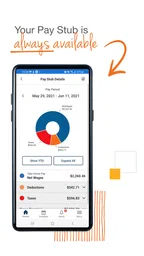
- Employees can check pay statements from their phone.
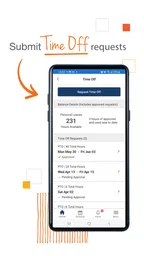
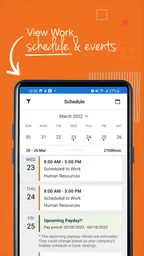
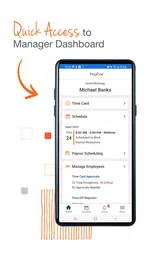
- The app provides access to work schedules and timekeeping tools.
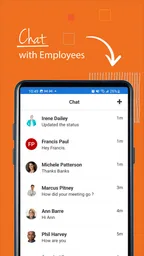
- Push notifications can help users stay aware of workplace updates.
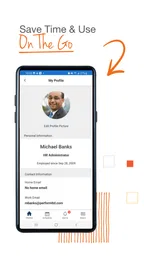
- Employees can update some personal details without contacting HR.
- A single login can bring together several Paycor employee tools.
What could be better
- Features available may vary depending on the employer's Paycor setup.
- Some actions require approval or follow-up from a manager.
- Users may need employer-provided credentials to sign in.
- The app is less useful for people whose workplace does not use Paycor.
- Troubleshooting account access may require contacting the employer's administrator.





