
Paychex Flex review
 Analysis by Appsdrops
I see Paychex Flex as a practical companion to an employer’s Paychex payroll and HR setup, not as a general business toolkit. Its main appeal is having work-related information and tasks available on a phone instead of needing to reach for a computer every time. That convenience is meaningful when you already use Paychex through work; it is much less compelling if you are looking for an independent payroll service or an app that can manage a business without an existing Paychex relationship.
Developed by Paychex, Inc, this free business app has been around since June 10, 2012, and its current version is 7.79.0. It is rated for Everyone, so the age classification is broad, though the practical audience is adults handling employment or business administration. The overall store reception is positive, with an average rating of 4.4 from around 78,000 ratings. I would treat that as useful context rather than a guarantee: an employee checking a pay detail and an administrator handling payroll may judge the same app very differently.
Where the phone-based approach earns its place
The strongest case for Paychex Flex is continuity. Payroll and employment questions often appear at inconvenient moments: away from a desk, between shifts, or while someone is trying to resolve a small detail before a deadline. A mobile route to the Paychex services tied to your work can save a trip to a computer and reduce the back-and-forth of asking a manager to look something up. The benefit is not that every task becomes effortless; it is that routine checking can fit into the day more naturally.
For an employee, the app is most useful as a place to handle personal work-related checks without turning each one into a conversation with payroll. For a business user, the value is different: a phone can make it easier to keep up with Paychex-related work while away from the office. That distinction matters. I would not assume that every person sees the same screens or has the same responsibilities, because the experience depends on their role and the services their employer uses.
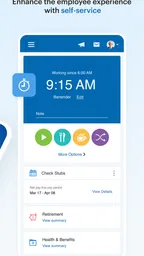
A realistic example is an employee who wants to review a payroll detail after leaving work. Instead of waiting until the next shift or asking a colleague to check, they can open the app and look for the relevant information associated with their account. If something does not make sense, the app may help them identify the issue before raising it with payroll. That is a modest but useful improvement: it gives the employee a clearer starting point for a question, rather than making the phone a substitute for a human payroll contact.
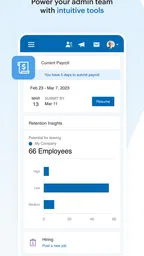
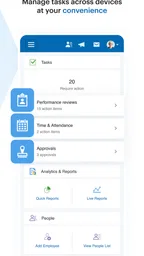
For a manager or business owner, the practical use case is more about staying connected to administrative work while moving between locations. A mobile app can help make an urgent check less dependent on access to a laptop. Still, I would keep consequential payroll work deliberate. A phone is excellent for quick access, but small screens and interruptions are poor companions for carefully reviewing details that affect employees’ pay. I would use mobile access to check, prepare, or follow up, then move to a larger screen when the task calls for sustained attention.
Useful when access is more important than a deep workspace
That is the key trade-off I notice in this kind of app: mobile convenience is not the same as desktop depth. Paychex Flex is best understood as an extension of a larger service relationship. If you already rely on Paychex, having an app can make common interactions easier to fit around the rest of your day. If you are choosing payroll software from scratch, the app alone is not enough to judge the whole service. You would also need to consider the employer’s setup, the work handled outside the app, and whether Paychex is the right fit for the organization.
This is where it differs from a typical standalone business utility. A notes app, spreadsheet, or general task manager can be used by almost anyone and shaped to many workflows. Paychex Flex is more specialized: its usefulness is tied to Paychex and the user’s employment or business context. That focus can be a strength because it avoids pretending to be a universal tool. It is also a limitation because someone without the right account or employer connection has little reason to install it.
Small habits that make mobile administration safer
I would use the app with a simple routine rather than treating every notification or reminder as a cue to finish important work immediately. First, check information when you have a moment to read it carefully, not while walking into a meeting or juggling another task. Second, if a detail appears wrong, note exactly what you were reviewing and raise a focused question with the appropriate person. That makes a later conversation more productive than relying on a vague memory of a screen.
A further useful distinction is between looking something up and making a decision. Mobile access is well suited to the first: confirm what you need, identify a discrepancy, and decide whether it requires follow-up. For decisions that affect payroll or other formal records, I would avoid acting in a rush simply because the app is in my pocket. Keeping that boundary helps the convenience of the phone without letting convenience become carelessness.
It is also worth thinking about the setting in which you use a work-related app. If you are checking personal employment details in a shared space, wait until you can do so privately. That is not a special feature of Paychex Flex; it is sensible handling of information connected with work. The app is most valuable when it reduces friction without encouraging casual treatment of information that deserves attention.
The friction: access depends on the workplace
The biggest limitation is structural, not cosmetic: this is not a universal app that creates a payroll relationship for any person who downloads it. Its usefulness depends on being connected to Paychex through an employer or business arrangement. That can make the first step feel less straightforward than installing a self-contained app. If you open it expecting to set up a business from scratch, manage payroll independently, or explore a full set of tools before an employer has enabled access, you may find that your needs and the app’s role do not line up.
There is also a natural mismatch between employee and administrator expectations. An employee usually wants a quick, clear answer about their own work-related information. An administrator may need to handle more involved processes and may prefer the organization and screen space of a desktop. Neither preference is unreasonable, but it means that a good experience for one audience does not automatically make the app a complete solution for the other.
Mobile use can add friction when a task involves comparing details, reading carefully, or keeping several pieces of information in view. A phone is easy to reach, but the very convenience that makes it useful can lead to hurried checks. I would not make the app my only way to handle important business administration. It works better as one access point alongside the employer’s normal payroll process and, when needed, a computer or direct conversation with the relevant team.
Who should choose it—and who should look elsewhere
I would recommend Paychex Flex first to employees whose workplace uses Paychex and who want a convenient mobile way to stay connected to their work-related services. It also makes sense for business users who already depend on Paychex and would benefit from checking in when they are away from a desk. The app’s scale suggests it is an established option: it has more than five million installs and around 11,000 written reviews. Those figures show broad use, but they do not tell an individual user whether their employer’s particular setup will meet their needs.
I would be more cautious if you are a small-business owner comparing payroll providers for the first time. In that situation, compare the underlying service and the way it fits your organization, rather than choosing based on the existence of a mobile app. A spreadsheet may be enough for a very limited record-keeping need, while another payroll provider may better suit a business that wants a different workflow. If your employer does not use Paychex, a standalone finance or productivity app is likely to be more relevant than installing this one in hope of gaining access.
For someone deciding whether the app is worth trying, the practical question is straightforward: does your job or business already use Paychex, and do you regularly need to check or handle related work away from a computer? If both answers are yes, the free download is an easy way to see whether mobile access fits your routine. If the first answer is no, the app is unlikely to solve a problem you actually have.
A measured recommendation
Paychex Flex earns its place by bringing a Paychex relationship closer to the user’s everyday routine. I like the idea of being able to check in when a work question comes up, and I think that can be genuinely helpful for employees and business users who are already part of the system. The app is less persuasive as a reason to choose Paychex by itself, and it should not be mistaken for a replacement for careful payroll work or direct support when a question needs a person’s attention.
My verdict is a clear recommendation for existing Paychex users who value mobile access, with a practical caveat: use it for convenience, but use a larger screen and a more focused moment for work that deserves close review. With an average rating of 4.4 and a free price, it is a reasonable app to try when your employer’s setup makes it relevant. For everyone else, its specialized purpose is also its boundary. I would install it because Paychex is already part of my work—not because I expect a business app to create that connection on its own.
What we like
- The mobile app makes it easier to check payroll details away from a computer.
- Employees can view pay stubs and tax documents in one place.
- Direct deposit information is available through the employee account.
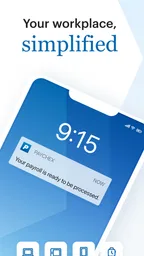
- The app can send notifications about important account updates.
- Biometric sign-in may make returning to the app more convenient.
What could be better
- Some features may only appear for users whose employer enables them.
- Access requires employer-provided account setup and login details.
- Payroll information may not update until the employer processes it.
- Troubleshooting account access can require contacting an employer or Paychex.
- The app offers limited value to people whose workplaces do not use Paychex.





