


Package Tracker - pkge Mobile review
 Analysis by Appsdrops
If you’re waiting on several deliveries and keep switching between carrier apps, Package Tracker - pkge Mobile is meant to give you one place to check their progress. I’d approach it as a convenient tracking hub, not as a promise of more precise information than the delivery companies themselves provide. Its first useful moment is simple: add a shipment you’re expecting, then check whether the latest update helps you decide what to do next.
What to expect from a shared tracking app
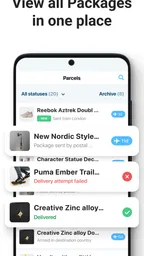
This is a free business and package-tracking app from DARADDO APPS LTD. It brings together shipments handled by major carriers such as FedEx, USPS, UPS, and DHL, so it can be handy when an online order, a return, and a parcel from someone you know are all in transit at once. The appeal is less about replacing each carrier’s delivery operation and more about reducing the effort of checking several places.
The app has been available since June 19, 2018, and its current version is 20.1.2. It has passed five million installs, with an average rating of 3.0 from around 39,000 ratings and about 2,400 written reviews. That mixed rating is worth keeping in mind: I would try it for the convenience of a combined view, but I would still treat the carrier’s own tracking page as the final reference when a delivery is important or an update seems unclear.
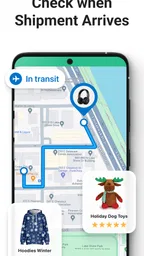
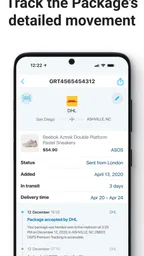
For a first-time user, the sensible expectation is modest. A tracker can help you see shipment progress without repeatedly opening separate carrier tools, but it cannot make a carrier scan a parcel sooner or guarantee that an estimated delivery time stays unchanged. Tracking updates are most useful as a sequence of clues: a parcel has been accepted, moved through a facility, or reached a delivery stage. A quiet period between scans does not automatically mean something has gone wrong.
That distinction matters especially for shipments that cross carriers or borders. The app may offer a convenient place to follow a parcel, but the original carrier remains the source of the operational events. If a package is late, marked delivered but not found, or associated with a delivery problem, I’d use the tracker to notice the issue and then follow up with the carrier or retailer directly.
Start with one shipment, not your whole order history
On the first run, I’d begin with a tracking number for a parcel that is already on its way. That gives you a straightforward test: add the number, identify the resulting shipment, and see whether the status matches what you expected. Starting with one item also makes it easier to spot a typo or an unexpected carrier match before you build a crowded list.
If you have several numbers, keep a small note of which order each one belongs to before adding them. Tracking codes can look alike, and a plain shipment entry may not immediately remind you whether it is a birthday gift, a return, or something you bought for work. A simple naming habit, if the app provides an appropriate way to label items, can prevent that confusion; if it does not, keep the order details elsewhere rather than assuming the tracking screen will replace your purchase records.
When entering a number, copy it carefully from the retailer’s order page or shipping message. Avoid adding spaces or punctuation that were not part of the code, and double-check characters that can be mistaken for one another. If the app does not recognize a number straight away, first compare it with the original message and allow for the possibility that the carrier has not yet registered the parcel. Re-entering the same code repeatedly is unlikely to make an early shipment appear sooner.
There is no need to add every parcel you have ever received. The app is more useful when its list represents shipments you still need to monitor. Once a delivery is complete and no return or claim is pending, keeping it in your active mental checklist can add clutter rather than value. I’d use the tracker for current shipments and keep invoices, order confirmations, and return deadlines in the retailer’s account or another record you already rely on.
The first meaningful success is a useful status check
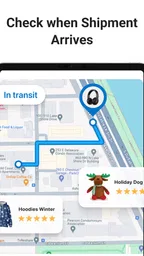
Your first win is not simply seeing a tracking number on screen. It is being able to answer a practical question without hunting through multiple apps: has this parcel moved, is it still in transit, or is there a status that needs attention? For someone expecting a delivery while working from home, that can help decide whether to stay nearby, arrange for someone else to receive it, or check again later.
For example, imagine you have a household order coming by one carrier and a return moving through another. Instead of opening both carriers’ apps just to see whether anything changed, you can look at the tracker first. If one shipment has a new scan and the other has not, you can focus your attention where it matters. The practical benefit is saved checking time, not a guarantee that the app will provide a more detailed explanation than the carrier.
A useful habit is to check at meaningful moments rather than refreshing constantly: after you receive a dispatch notice, when the parcel is expected to move, and when the status suggests delivery is close. This keeps tracking from becoming a distraction. It also helps you distinguish a genuine change from the ordinary stretches when a parcel is travelling without a new scan.
If you manage deliveries for a small business, a consolidated view can be especially helpful when orders are spread across several carriers. It may make it easier to notice which shipment deserves a closer look, while your sales records and customer communications remain in the systems you use for those jobs. I would not treat a package tracker as an inventory tool or proof of delivery documentation unless the relevant information is clearly available and suitable for that purpose.
How to handle confusing or missing updates
The most common source of confusion is timing. A tracking number may be created before the parcel has its first carrier scan, so an initial lookup can appear empty or stale. In that situation, check the code against the seller’s message and try again later. If the same problem persists after the carrier has had time to record movement, compare the result with the carrier’s own tracking service before deciding the parcel is lost.
Another point to watch is the difference between a delivery estimate and a confirmed event. An estimate is useful for planning, but it can shift as the shipment moves. A scan showing that a parcel has reached a facility is not the same thing as a notice that it is out for delivery, and neither necessarily answers whether someone must be present. Read the wording of each event rather than interpreting every new line as a firm arrival promise.
Because this app brings several carriers into one place, its strength is convenience, while carrier-specific tools may be better for resolving an exception. If a package is delayed, needs a delivery change, or is marked delivered when you cannot find it, go to the responsible carrier or seller for the next action. A combined tracker helps you spot where to investigate; it does not replace the organization that controls the parcel.
If a shipment appears under the wrong carrier or the status seems inconsistent, avoid making a decision from that single screen. Confirm the tracking number and carrier, then compare the latest event with the source that issued the shipping code. This is a small but important habit when you are following a valuable order or a return with a deadline: convenience is worthwhile, but accuracy matters more than keeping every check inside one app.
Who will get the most from it—and who may prefer another option
I’d recommend trying it if you regularly receive parcels from different retailers and want a central place to check their progress. It is also a reasonable fit for someone who sends or returns packages and wants a quick overview without memorizing which carrier handles each shipment. The app is free to install, is rated for Everyone, and includes optional in-app purchases priced from $0.99 to $59.99 per item, so check the purchase details in the app store before buying anything.
On the other hand, if nearly all your deliveries come through one carrier, that carrier’s own app or tracking page may be the simpler choice. It is also the better place to look when you need carrier-specific actions or authoritative help with a delay. People who only track an occasional parcel may find that the retailer’s order page already does enough, without maintaining another app.
The 3.0 average rating suggests that experiences are not uniformly smooth, so I would test the basic tracking workflow with a low-stakes shipment before relying on it for something urgent. Keep expectations grounded: the app’s value is the convenience of checking multiple shipments together, while updates still depend on carrier activity and the quality of the tracking information. That trade-off is common to package trackers, but it is particularly important here because convenience can make a summary feel more definitive than it really is.
Make it useful without making it another chore
After your first shipment appears, add only the parcels you genuinely need to monitor. Check the list when a change could affect your plans, and use the carrier’s own service if you need to act on a delivery issue. That two-step routine—overview first, official carrier follow-up when necessary—is a practical way to get the benefit of a unified tracker without expecting it to do every part of the shipping process.
My overall view is that Package Tracker - pkge Mobile is worth a cautious try if juggling FedEx, USPS, UPS, and DHL updates is a recurring annoyance. Its best use is straightforward: bring active shipments together, notice meaningful progress, and decide which parcel deserves your attention. It is less compelling for a single-carrier household or anyone who needs detailed delivery controls more than a shared overview. Start with one tracking number, confirm that its updates are useful to you, and keep the carrier’s own service as your backup when the details matter.
What we like
- Tracks parcels from many carriers in one place.
- Automatically detects some carriers from tracking numbers.
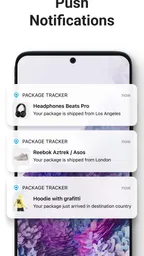
- Provides delivery status updates and notifications.
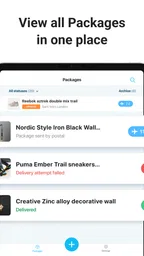
- Keeps shipment details organized in a clear list.
- Offers a convenient way to check packages on the go.
What could be better
- Carrier support may vary by country and service.
- Tracking updates can lag behind carrier websites.
- Some features may require a paid subscription.
- Ads may interrupt use of the free version.
- Manual entry is needed when automatic detection fails.





