




Opera Mini: Fast Web Browser review
 Analysis by Appsdrops
When I choose a mobile browser, I care less about a long feature list than about how it behaves when I’m in a hurry, on a small screen, or working with a limited connection. Opera Mini is built around that practical kind of browsing: it gives you a lightweight way to reach the web, with tools such as ad blocking, Night Mode, downloads, and football content. It is free, made by Opera, and sits in the communication category, but its strongest appeal is simple: it aims to make everyday browsing feel manageable on a phone.
What I would look for in a phone browser
A browser earns a place on my home screen if it handles the pages I actually need without adding friction. That means opening a news story, checking a travel detail, finding a product, or saving something to read later should all feel straightforward. I also want settings that suit different situations: a darker screen at night, fewer interruptions from ads, and a way to keep useful files on my device.
That is the lens through which I judge Opera Mini. It is not trying to be a desktop browser packed with every advanced workflow. Instead, its combination of browsing tools makes sense for people who spend much of their phone time on ordinary websites and want a browser that can adapt to the moment. If you mainly need a place to open links and read, it is a sensible candidate to try.
There is also a meaningful difference between a browser that is merely familiar and one that feels suited to constrained mobile use. Opera Mini’s identity has long centered on compact, phone-first browsing. That does not mean every page will look or behave exactly as it does elsewhere, so I would judge it by the sites I depend on rather than by a single quick test.
Who is likely to get the most from it?
I would put it on the shortlist for someone who reads a lot on a phone, wants a browser with a built-in ad-blocking option, and appreciates having downloads close at hand. It may also suit a person who switches between bright outdoor use and late-night reading. Opera Mini is rated for Everyone, and its scale is substantial: it has over 500 million installs and an average rating of 4.6 from around 10 million ratings.
Those figures tell me that it has reached a broad audience, but they do not decide whether it fits your habits. I would still test your regular sites, especially if they rely on elaborate page layouts, embedded media, or interactive tools. A browser can be popular and still not be the best match for a particular workflow.
Everyday browsing with fewer distractions
The ad-blocking option is useful when a page feels crowded or when you want to focus on the article rather than surrounding promotions. I like having that kind of control in the browser instead of having to change how I read every individual site. The trade-off is that websites sometimes depend on advertising or other page elements to work as intended. If a page looks incomplete, temporarily changing the blocking setting is a reasonable first troubleshooting step.
Night Mode is similarly practical rather than flashy. I find it most useful when I’m checking a recipe or reading a long article in a dim room and do not want a bright page to dominate the screen. It can make browsing more comfortable, though it is a viewing preference, not a guarantee that every site’s colors and images will look exactly as their designers intended.
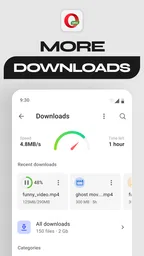
Downloads add another useful path through the browser. For example, if I find a document or image while connected and expect to need it later, saving it gives me a way to return to the file without reopening the original page. I would treat downloads as a small, dependable workflow rather than as a replacement for a dedicated file manager: the important habit is to check that the file has finished saving and to know where your device makes it available.
A realistic day with Opera Mini
Imagine checking a football update on the way home, then opening a news story while waiting for a bus. The football content gives the browser a relevant place to surface sports browsing, while ad blocking can help make a text-heavy article less cluttered. If the trip continues into the evening, Night Mode can make another quick reading session feel more comfortable. That is a coherent set of small conveniences, not a promise that every page will load instantly or that every site will behave identically.
For a more deliberate workflow, I would use it to collect a few pages or files during a break, then revisit them when I have time to read carefully. That approach is especially helpful when I know I may lose a reliable connection later. It also keeps expectations realistic: a browser can help organize access to web content, but it cannot make every online service available offline.
Where it stands against other browser choices
Compared with a basic browser that focuses on opening pages with minimal adjustment, Opera Mini offers more built-in ways to shape the experience, including Night Mode and ad blocking. That may be enough to make it preferable for casual reading. In contrast, someone who prioritizes deep synchronization, extensive developer controls, or a familiar desktop-to-phone setup may be happier with a browser chosen specifically for those workflows. I would compare the actual settings and account features you use rather than assuming all browsers handle them alike.
There is also a difference between choosing a compact, phone-centered browser and choosing a full-featured alternative designed to mirror a broader computer setup. The latter may be a better fit if you regularly move work between devices or rely on specialized extensions. Opera Mini’s appeal is more immediate: browse, adjust the viewing experience, and handle downloads in one mobile app. The right choice depends on whether you value those everyday conveniences more than a particular cross-device routine.
I would not install it expecting every advanced site to behave perfectly. Some web pages are built around complex interactions, and any mobile browser can expose awkwardness there. If your work depends on a specific web application, open that application in Opera Mini before switching your whole routine. A few minutes of testing can reveal whether menus, forms, and media behave well enough for your needs.
The trade-offs to check before switching
Changing browsers has a small but real cost. Your saved pages, browsing habits, and any browser-specific setup may not carry over in exactly the way you expect. Before making Opera Mini your default, I would identify the sites you open daily, try signing in to the ones that matter, and confirm that your downloads are easy to find. This is more useful than judging a browser only by its first screen.
Ad blocking also involves a choice. It can reduce visual clutter, but a site may ask you to allow certain content or may not display as expected. Rather than leaving the feature on or off as a matter of principle, I’d treat it as a control to adjust when a particular page gives me trouble. That is a practical compromise for anyone who wants cleaner reading without assuming every website responds the same way.
Another point to consider is what you value most in a browser. If you want a highly customized workspace, a broad extension ecosystem, or a tightly integrated account setup, compare those requirements directly with the alternatives you already use. Opera Mini may still cover your casual browsing, even if another browser remains better for work. There is no need to force every online task into one app.
Opera Mini is free, so trying it does not require a purchase. It was released on November 24, 2014, and has accumulated around 34,000 written reviews alongside its wide install base. I see that history as context for its established place in mobile browsing, not as proof that it will suit every phone, site, or personal preference.
My recommendation
I recommend Opera Mini to readers who want a practical phone browser with ad blocking, Night Mode, football content, and downloads available in one place. It is especially worth trying if your browsing is mostly reading, quick searches, and everyday link opening, and if you value tools that can make those sessions more comfortable.
I would steer someone toward another option if their browser is primarily a work environment, if a particular web app must behave flawlessly, or if their main priority is a specific sync or customization system. For everyone else, the easiest way to decide is to install it, test a handful of your most-used sites, and try the settings in the situations where they matter. My overall view is that Opera Mini makes a convincing everyday choice when convenience and phone-friendly browsing matter more than having the most elaborate browser setup.
What we like
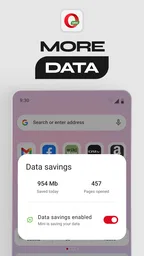
- Data-saving mode can reduce mobile data usage while browsing.
- Built-in ad blocking can make pages feel less cluttered.
- Offline file sharing works without an internet connection.
- A night mode makes browsing more comfortable in low light.
- The browser is lightweight and can suit phones with limited storage.
What could be better
- Some websites may not display correctly in extreme data-saving mode.
- Video and image quality can be reduced when data savings are enabled.
- The interface includes shortcuts and news content that may feel busy.
- It may lack some advanced features found in full-size browsers.
- Privacy-conscious users may want to review its data and sync settings.





