






MyWalmart review
 Analysis by Appsdrops
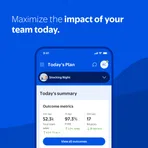
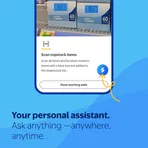
MyWalmart is best understood as a work companion for people who are already part of Walmart’s store workforce, not as a general business app for anyone managing a shop. That distinction should guide your decision: if you are a Walmart associate, it may be a useful place to start for work-related information; if you are looking for a public-facing shopping, scheduling, or business-management tool, this is probably not the right fit. I see its appeal in that focused audience, but I would not expect it to replace every work system an associate may need.
Decide whether it matches your work
The first question is simple: are you an associate working in a Walmart store? The app is intended for that group, so its usefulness depends on being inside that work context. A general user may be able to find it in an app store, but that alone does not make it relevant to their needs. I would choose it because of my connection to Walmart, not because I wanted a broad business toolkit.
Walmart is the developer, and the app sits in the business category. It is free to download, carries an Everyone age rating, and has a 4.5 average from around 245,000 ratings. It has been installed over a million times. Those figures suggest substantial interest and a generally positive reception, though they cannot tell you whether the app will suit your role, location, or day-to-day routine.
That role-specific nature is also the key to setting expectations. MyWalmart is not a substitute for a general calendar, a personal task manager, or a retail point-of-sale product. Before relying on it, I would check whether it is relevant to my associate status and whether my particular work needs are handled in the app or through other workplace channels. That small check can prevent the common mistake of assuming one company app covers every part of a job.
What it is useful for—and what not to assume
The strongest case for installing MyWalmart is having a single app associated with your store work, rather than trying to use consumer shopping tools or unrelated business software for an employee purpose. Its narrow scope can be a benefit: you are not sorting through features aimed at customers, independent sellers, or office teams to find something intended for store associates.
At the same time, I would avoid assuming that the app automatically includes every tool you might want at work. A short store description cannot tell you which tasks are covered for every associate. Treat it as a work-related app whose usefulness you can assess once you have access, rather than as a guaranteed all-in-one hub. If a task is important—such as checking a work detail before leaving home—I would confirm that the app actually provides it for your situation before making it part of a routine.
A practical way to evaluate it is to install it when you have time to explore, rather than during a rushed moment before a shift. Check whether you can get to the information you need, whether the app makes sense for your role, and whether it is dependable enough for the moments when you would use it. If something remains unclear, keep using the established workplace channel for that task rather than relying on an assumption.
Where MyWalmart has the advantage
Its main advantage is relevance. A generic business app might offer flexible notes or task lists, but it cannot be presumed to understand Walmart store work. MyWalmart is designed for associates, so it is the more sensible place to look for app-based support tied to that setting. For an employee who wants to keep work-related resources separate from personal apps, that focus is meaningful even before considering any particular feature.
I also like the practical simplicity of having a dedicated app available on a personal device. If you are trying to keep track of work information without mixing it into your shopping apps or personal planning tools, a separate work destination can make your phone feel more organized. This is not a promise that every work task moves into the app; it is a reason to consider it as one part of an associate’s toolkit.
One useful workflow is to check the app at a calm time before you need something, then note which information it is genuinely helpful for. That gives you a personal map of what belongs there and what still belongs in another workplace system. It is a small but valuable distinction: you avoid hunting through the app under time pressure, and you avoid treating it as the single source for every work question.
A second trade-off is about boundaries. Keeping a work-focused app distinct from personal utilities can help you avoid scattering work details across a notes app, a calendar, and messages to yourself. But separation only works if you know where each kind of information lives. I would not duplicate sensitive or important details across multiple places just for convenience; instead, learn the intended channel for each task and use the app where it clearly applies.
The version listed is 2.17.1, and the minimum operating system is version 9. If your device is older, check compatibility before planning to use it. If you are setting it up on a phone you rely on for other work tools, leave time to update or troubleshoot rather than waiting until the moment you need access. Those are basic precautions, but they matter more for an employee app than for an occasional entertainment download.
How it compares with common alternatives
Compared with general-purpose productivity apps, MyWalmart has a narrower purpose. A notes app is better for personal checklists you control; a calendar is better for events you manage yourself; and a broad business platform may suit someone running a small company. Those tools are not interchangeable with an associate-focused app, and I would not choose between them as if they served the same audience.
For workplace information, the usual alternative may be an existing company process or another tool your store already uses. That route can be better when a task is not supported in MyWalmart, or when your team has been told to use a specific channel. The most sensible approach is not to replace a working process just because an app is available. Use MyWalmart where it helps, and retain the established route for anything it does not clearly handle.
It is also worth separating employee use from customer use. If your goal is to browse products, handle a purchase, or manage a shopping trip, a consumer-facing Walmart app is the more natural category of tool. MyWalmart’s intended audience is associates in stores, so I would not download it expecting the experience of a retail shopping app. Choosing the right category upfront saves time and avoids frustration.
What the switch really involves
For a current associate, the cost of trying MyWalmart is low in money terms because it is free. The more important cost is attention: installing it, seeing whether it applies to your role, and learning which work situations it can help with. I would treat that first check as a short trial, not as a commitment to move every work habit onto a phone.
If you already rely on a dependable workplace process, switching everything at once would be unnecessary. Start with one low-pressure task that the app appears suited to, then see whether it is easier than your existing method. If it is, you can gradually make it part of your routine. If it is not, there is little reason to force the change. This one-task approach is especially useful when your shift is busy or you share responsibilities with coworkers who use different workflows.
A realistic example is preparing for an upcoming shift: rather than opening the app for the first time while you are heading out the door, take a moment beforehand to see whether it contains the work information you usually need to check. If it does, you have a clearer routine for next time. If it does not, you can use the appropriate workplace channel without losing time. The value here is not a guaranteed feature; it is testing the app against a real, repeatable need.
Another good habit is to keep a fallback for anything time-sensitive. Even a well-rated app may not be the right place for every question, and a phone app is only useful when it fits the task and your access. I would save the relevant workplace contact or process separately, rather than assuming that an app will answer every issue. That is not a criticism unique to MyWalmart; it is sensible preparation for any work tool.
Who should choose it, and who should skip it
I would recommend trying MyWalmart if you are a Walmart store associate and want to see whether a dedicated app can make work-related information easier to manage. Its focused audience, free price, and large user base make it a reasonable option to investigate. The ratings are encouraging context, but your own role and the app’s fit for your routine matter more than a popularity figure.
I would skip it if you are not an associate, if you want a general-purpose business manager, or if your main goal is shopping as a customer. I would also avoid depending on it for a task until you have confirmed that it serves that task in your circumstances. For an employee whose store already has a clear, effective process, the app may be a useful extra rather than a necessary replacement.
My overall view is that MyWalmart makes the most sense as a focused workplace companion, not a universal solution. It is worth exploring if you belong to the audience it is built for, especially if you want to keep work tools distinct from personal apps. Go in with a practical test: identify one recurring work need, see whether the app helps, and keep your existing fallback until you know it does. That approach lets you benefit from the app where it fits without expecting it to do more than its role calls for.
What we like
- Store maps help locate products during a visit.
- Pickup options can reduce time spent shopping.
- Saved lists make repeat shopping easier.
- Walmart Pay supports quick checkout at participating stores.
- Order tracking keeps delivery updates in one place.
What could be better
- Some features vary by store and location.
- Pickup slots may be unavailable during busy periods.
- The app requires an account for many shopping features.
- Prices and product availability can change quickly.
- Notifications may feel excessive unless you adjust settings.





