

myMetro® review
 Analysis by Appsdrops
When I judge a carrier app, I care less about flashy extras than whether it helps me handle account tasks without turning a quick check into a chore. myMetro® is Metro by T-Mobile’s communication app, built around managing a Metro relationship rather than replacing everyday messaging or calling apps. That distinction matters: it is most useful to existing customers, while someone comparing carriers or looking for a general communication tool will get little from installing it.
The app is free and developed by Metro by T-Mobile. It has a 4.7 average rating from around 585,000 ratings, and it has passed 100 million installs. Those figures suggest broad use, but they do not tell me whether it suits a particular person’s account needs. The more practical question is whether you want a dedicated place on your phone for dealing with Metro, instead of relying on a browser or contacting support for every routine matter.
Trust starts with knowing what kind of app this is
MyMetro is not a neutral utility that works across mobile providers. Its value is tied to Metro, so I would treat it as an account companion, not as a substitute for the phone’s settings, your messaging app, or a carrier-independent service. If you are already with Metro, keeping the account tool close at hand can make sense. If you are not, its relevance is limited from the start.
That carrier-specific role also shapes how I think about trust. An app connected to a mobile account deserves a little more attention than a casual game: I would want to understand the choices presented during setup and pay attention when handling account-related information. I would not assume that the word “communication” means it reads messages or manages calls; the category is broad, and the app’s purpose is Metro account access.
I also avoid treating popularity as proof of privacy or reliability. A large audience and positive average rating are useful context, but they cannot answer what information a particular screen requests or how account data is handled. My practical approach is to review any permission prompt in context, grant only what I understand and need, and revisit device settings if my use changes.
Controls are most useful when you make them part of a routine
The app’s strongest potential is convenience: putting Metro-related account work on the device you already carry. Rather than waiting until a problem becomes urgent, I would open it when I have a calm moment, look over the available account options, and learn where the controls relevant to me live. That small bit of preparation can make a later task less stressful, even if I still need another support route for an unusual issue.
A useful habit is to separate account administration from general phone troubleshooting. If a device loses service, for example, first decide whether the problem appears to be with the handset or the Metro account. MyMetro may be a sensible first stop for account-side questions, while the phone’s own settings are the better place to inspect Wi-Fi, mobile data, or app permissions. Keeping those routes distinct avoids changing device settings when the actual issue is account-related, or vice versa.
I would also use the app deliberately rather than leaving it open while multitasking through sensitive account screens. Finish one task, check that it is complete, and then close or leave the app. This is ordinary caution, not a claim about a particular security feature. It is a straightforward way to reduce confusion if you share a device or regularly switch between personal and work accounts.
Where sensitive moments call for a pause
The most important moment to slow down is any screen that asks you to sign in, confirm account details, or make a change with consequences for your service. Read the prompt before continuing, especially if you have arrived there after tapping a notification or a message. I prefer opening the app directly from my phone rather than following an unexpected request, because it gives me a clearer sense of which app I am using.
Permission requests deserve the same attention. I would ask myself what task I am trying to complete and whether the requested access makes sense for it. If I do not understand why a permission is needed, I would postpone granting it and look for an explanation in the app or the device’s settings. That is a sound way to retain control without making unsupported assumptions about which permissions MyMetro uses.
There is a practical trade-off here: a carrier app can save time when its account tools match your needs, but it also creates another place to sign in and maintain. If you only contact Metro rarely, the convenience may not justify keeping an additional app on your home screen. You can instead use another available support route when necessary, then reconsider if repeated tasks make the app worthwhile.
Everyday use: prepare before you need help
Picture a weekday morning when you are about to leave and notice a question about your Metro service. Instead of trying to remember where you last handled an account task, you can open MyMetro and check whether the relevant account option is available there. If it is, handle it while you have a moment; if it is not, you have learned that the issue needs a different channel before you are in a rush.
For a family member who helps manage a relative’s phone, the app may be useful as a consistent starting point, but I would keep account ownership and consent clear. Do not treat access to someone else’s handset as permission to make changes on their behalf. Agree on who handles the account and who should approve consequential actions. This is a human safeguard, not a feature I am attributing to the app.
For someone changing phones, I would install the carrier app only after checking that the device meets its requirements and after deciding whether the account tools are needed on the new device. The current version is 12.4.0, and the minimum operating-system requirement is 11. Those details make compatibility worth checking before troubleshooting an installation problem; a device running an older system may not meet the stated requirement.
How it compares with the usual alternatives
Compared with a web browser, a dedicated carrier app can be quicker to reach when you routinely manage the same account on your phone. A browser is often the more flexible choice if you prefer not to install a provider-specific app, use a device with limited storage, or want to keep account work separate from everyday phone use. Neither route is automatically better: it depends on whether convenience or keeping fewer apps matters more to you.
Compared with contacting support, an app is appealing for tasks that can be completed independently and at your own pace. For a complicated billing concern, an account problem you cannot resolve, or a situation where you need a person to clarify what is happening, direct support may be the better path. I would not assume that an app can resolve every account issue simply because it is the official carrier companion.
It is also different from general messaging services. If you want group chats, calls, or a way to reach friends across networks, look to the communication tools designed for those jobs. MyMetro earns its place only when Metro account access is part of your routine. That narrow focus is a limitation for some people, but it is also what makes the app’s purpose easy to understand.
Who will benefit, and who can skip it
I would recommend trying it if you are a Metro customer who expects to handle account matters from a phone and values having a provider-specific tool available. Its Everyone content rating means it is suitable for a broad audience in that respect, though account access should still be handled thoughtfully by whoever is responsible for the line.
I would skip it if you do not use Metro, if you rarely need to manage your account, or if you prefer handling carrier tasks in a browser or through direct support. I would also avoid installing it solely because of its popularity: an app is useful when it fits your own workflow, not because many other people have downloaded it.
Before relying on it, I would check that the app is current, confirm the operating-system requirement, and take a minute to learn which account actions are available to me. If a task is time-sensitive, I would not wait until the last minute to discover whether it can be completed in the app. That simple test gives a much clearer answer than judging by a rating alone.
A cautious recommendation for Metro customers
With a release date of March 3, 2014, MyMetro has been around long enough to become a familiar part of many Metro customers’ routines. Its current version and large audience make it a well-established option, but I would still judge it by the account tasks I personally need and by the choices I see on my own device. The app is free, which makes trying it less of a commitment, though it still takes space and deserves the same care I give any account-related app.
My verdict is practical rather than universal: myMetro® is worth considering when you are already a Metro customer and want a direct mobile route to account management. I would keep expectations focused, read sensitive prompts carefully, and use browser or human support when those routes suit a task better. For the right customer, it can make routine account work easier to approach; for everyone else, it is easy to leave off the phone.
What we like
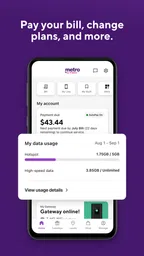
- View your account balance without calling customer support.
- Make payments through the app using a saved payment method.
- Check how much data you have used during your billing cycle.
- Manage AutoPay settings from your phone.
- Find nearby Metro by T-Mobile stores with the locator.
What could be better
- Some account features require you to sign in first.
- Payment options may vary depending on your account.
- Usage details may not update immediately.
- The app requires an internet connection to access account information.
- Store listings may not show real-time wait times.





