
MyFrontier review
 Analysis by Appsdrops
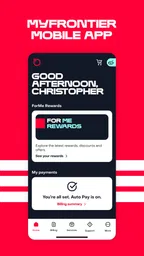
Managing a home internet account is rarely something I want to turn into a project. I usually open a provider’s app because I need one clear answer—what is happening with my service, or where to handle an account task—then I want to get back to whatever I was doing. MyFrontier is built for that practical, account-management role rather than for chatting or keeping up with a social feed. Its value is less about encouraging more screen time and more about giving Frontier customers a mobile place to take care of service-related business.
That distinction matters. This is a communication app from Frontier - A Verizon company, but it is not a general-purpose messaging alternative. I would think of it as a customer-service companion: useful when a question concerns your Frontier account, but not a replacement for texting, email, or a conversation with someone who does not manage your service. If you are already a Frontier customer and prefer handling routine account matters on your phone, the idea is straightforward and potentially convenient.
Keeping account questions in one place
Provider issues often interrupt a day at awkward moments. You might be about to join a video call, helping a child with homework, or settling in to stream something when you start wondering whether the problem is with your home setup or your service. In that situation, having an account-focused app can give you a direct place to start instead of searching through old messages or trying to remember where you last handled a billing task.
That is the communication need MyFrontier addresses: not conversation for its own sake, but clearer contact with the company responsible for your connection. The practical benefit is a more deliberate starting point. Rather than letting a small uncertainty become repeated checking, I can open the account app when there is a specific reason, deal with the matter in front of me, and close it again.
The app is free, rated for Everyone, and has a 4.6 average from around 90,000 ratings. It has been available since May 14, 2015, and its current version is 4.35.0. Those details give a sense of an established service tool, though they do not guarantee that every account task will feel equally simple for every customer. The important question is whether its account-management approach fits how you prefer to deal with your provider.
Useful when the question is about your service
I see the strongest case for this app when the issue is specific to a Frontier account. That might mean wanting to review or manage account matters while away from a computer, or simply preferring a phone over a browser for routine provider business. A dedicated app can make that kind of interaction feel separate from personal email and everyday conversations, which helps keep service questions from getting lost among unrelated messages.
It is also a sensible option for people who handle household logistics on the move. If you are the person in a family who keeps track of internet service, you may want an easy place to turn when another household member says the connection is acting up. The app gives you a provider-oriented starting point, rather than asking you to treat a service problem like a general technology question.
That does not mean it can diagnose every cause of a connection problem. A slow video call might come from a device, a wireless dead spot, a busy network, or something outside the home. I would use MyFrontier to deal with the account side of the question, while still checking the device and home setup when the symptoms point there. Keeping those two kinds of troubleshooting separate can save time and prevent an account app from becoming the first stop for every Wi-Fi annoyance.
A calmer workflow for service conversations
Account tools change the rhythm of communication in a small but useful way. Instead of leaving a question hanging in a text thread or postponing it until you have access to a laptop, you can make provider business a short, intentional task on your phone. That is a good fit for people who want to handle practical chores in brief sessions rather than letting them occupy a whole evening.
My useful habit would be to open the app with a specific goal in mind: check or manage the account, then stop once that task is done. Before starting, I would also make sure I am using the account associated with the service I intend to manage. That simple check matters in households where more than one person may be involved in provider arrangements; starting from the wrong account can turn a quick errand into unnecessary confusion.
For a realistic example, imagine that the household internet seems unreliable just before an important remote meeting. I would first note what is affected—one device or several—and whether the problem is happening across the home. Then I would use MyFrontier for the account-related part of the investigation, rather than repeatedly restarting the router or sending vague messages to family members. That approach does not promise a particular fix, but it gives the service question a clearer path and keeps the household’s discussion more focused.
Attention costs and expectations
A provider app can reduce friction, but it also creates one more account tool to maintain. If you already have a reliable routine through a browser, phone call, or another method, installing an app may not make your life easier. I would not keep it on my phone just because it exists; I would keep it if I regularly need to manage Frontier service away from a computer or value having provider tasks separated from my other communications.
There is also a difference between being able to contact a provider and getting an immediate answer. A mobile app can make the first step more convenient, but convenience should not be mistaken for a guarantee that every issue can be resolved in a few taps. For a time-sensitive outage or a complicated account problem, use the channel that best suits the urgency and the kind of help needed. The app is most compelling as a practical entry point for ordinary account management, not as a promise that support will always be instant.
People sometimes expect any app in the communication category to provide direct messaging with friends, voice or video calls, or a shared inbox. That is not the right expectation here. MyFrontier is tied to a provider relationship. If what you need is a way to coordinate a group, discuss a work project, or reach a friend across services, a conventional messaging app is the better choice. The category label matters less than the job the app is meant to do.
Setting sensible household boundaries
In a shared home, account responsibility can easily become an informal job that lands on one person. A dedicated service app may make that role easier to manage, but it does not automatically make the responsibility fair or clear. I would agree with household members on who handles account matters and when they should bring a connection concern to that person. That avoids a stream of duplicate checks and helps distinguish a genuine service issue from a single device having trouble.
Another helpful boundary is to avoid turning every minor inconvenience into a constant account check. If a page loads slowly once, there may be no need to stop what you are doing and investigate the provider account. If a problem repeats or affects several people, then a focused check makes more sense. This is a small change in habit, but it can reduce the attention a household spends monitoring its connection.
For families, the Everyone content rating makes the app suitable from a content-rating perspective, but account access is still a practical responsibility. I would keep account management with the household member who is meant to handle it, rather than treating the app as a general utility for every person using the Wi-Fi. That keeps the purpose understandable and avoids confusion about who is making account decisions.
Who should choose it—and who can skip it
I would recommend trying MyFrontier if you are a Frontier customer who wants a phone-based way to manage the service account and prefers having provider tasks in a dedicated place. It is especially likely to suit people who handle household service arrangements themselves, travel between home and work, or want to take care of routine account business without waiting until they are at a computer.
I would skip it if you are not a Frontier customer, if your account needs are rare and your current method works well, or if you are looking for a general communication platform. A provider app is naturally narrower than a browser or messaging tool: it is valuable because it is focused, but that focus also means it cannot replace the other ways you communicate or solve home-network problems.
Compared with handling everything through a browser, a dedicated app may feel more convenient when your phone is already in hand and the task is account-specific. A browser can still be the better choice if you prefer not to add another app, need to work across several provider accounts, or find that a larger screen makes account details easier to review. Compared with calling, the app may suit a task you can handle independently; a conversation with a person may be preferable when the problem is unusual, urgent, or difficult to explain through an account workflow.
Frontier has distributed MyFrontier to more than a million installs, and the app has around 14,000 written reviews. I would treat that reach as a sign that it is a commonly used companion for the provider, not proof that every customer will have the same experience. The best measure for an individual household is whether it makes a recurring account task easier without creating a new routine that takes more attention than it saves.
My verdict on the everyday fit
MyFrontier makes the most sense as a quiet utility: open it when you have a Frontier account question, handle what you can, and return to the rest of your day. I like that purpose because it gives service matters a clear home instead of letting them spread across notes, browser tabs, and family messages. The trade-off is that a dedicated app only earns its place if you use its account-management role often enough to justify it.
For me, the deciding question is simple: do you want a mobile route into managing your Frontier account, or are you already comfortable using another channel? If the app matches a real household need, it can help make provider communication more intentional and less distracting. If you want broader support, a different way to troubleshoot home networking, or a general messaging app, choose the tool designed for that job. For Frontier customers who want their account tasks close at hand, MyFrontier is a focused option worth considering.
What we like
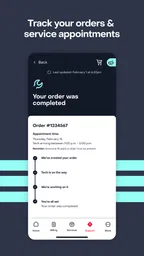
- View and manage your Frontier account from your phone.
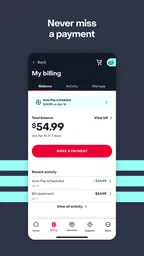
- Check current billing details and payment history.
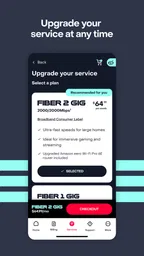
- Review internet plan information in one place.
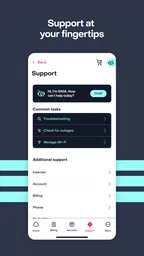
- Find support resources without calling customer service.
- Receive account updates while away from home.
What could be better
- Requires a Frontier account to access most features.
- Available tools may depend on your Frontier services.
- Some account changes may require contacting support.
- App performance can vary with network connectivity.
- Account details may take time to reflect recent changes.





