
MyChoice Benefits review
 Analysis by Appsdrops
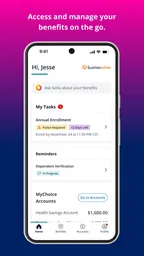
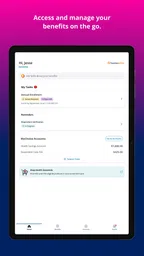
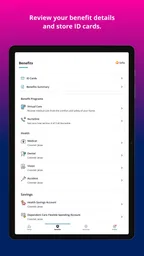
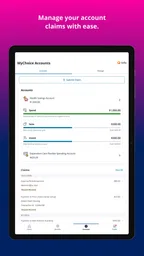
Benefits are easy to ignore until you need to check a detail, make a choice, or find enrollment information while juggling everything else. I see MyChoice Benefits as a practical way to bring that work closer to hand: instead of treating benefits as something you only deal with at a computer, you can use a mobile app to access information tied to your eligibility. Its value is less about doing something flashy and more about reducing the small delays that make benefits administration feel like a chore.
When benefits become an interruption
The usual alternatives are not always convenient. You might search old emails, revisit an employer portal in a browser, or wait until you are back at a desk. Those approaches can work, but they make a straightforward question take longer than it should. This app is aimed at eligible users who want to check benefits and enrollment information on a phone, which is useful when the question comes up away from work or during a busy day.
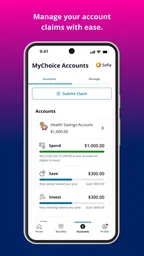
That focus also defines the app’s limits. It is not a general-purpose finance tool, a health provider directory, or a place for everyone to browse benefit plans. Access is intended for eligible users, so the app makes most sense when your employer or benefits arrangement already connects you to it. If you are looking for a public catalog of insurance options, this is not the right starting point.
Businessolver develops the app, which sits in the business category. The store’s audience figures are substantial—more than a million installs and an average rating of 4.8 from about 9,300 ratings, alongside roughly 1,100 written reviews. I would treat that reception as encouraging, not as a promise that every employer’s setup or every user’s benefit questions will work identically.
Getting to the useful part
The first step is to establish whether you are an eligible user and can access the benefits connected to you. That matters more here than browsing through screens: without the relevant eligibility and enrollment context, a benefits app cannot answer the questions that make it worthwhile. I would begin setup when I have a little time, rather than waiting until an enrollment deadline or a medical appointment makes the information urgent.
Once access is in place, my advice is to use the app with a specific question in mind. For example, if you are comparing choices during enrollment, decide what you need to verify before opening it: which option applies to you, what information you still need, or whether a decision is complete. A narrow question helps you avoid wandering through benefits material and makes it easier to know when you have found what you came for.
I would also make a habit of checking the information before a deadline rather than relying on a last-minute visit. Mobile access can save the trip to a computer, but it cannot make a decision for you or remove the need to understand the choices. If a benefit description leaves you uncertain, use the app as a convenient place to review the information and follow up through the appropriate benefits channel instead of guessing.
Useful in the moments that usually derail a task
A realistic example is a quick question that comes up between errands: you are trying to remember what you selected, or you need to look at enrollment information before discussing a decision with someone in your household. Being able to reach the relevant material from a phone can turn that into a short check rather than a task postponed until you return to a laptop. That is the kind of time saving I find believable for this app—not a dramatic overhaul, but fewer interruptions and less hunting.
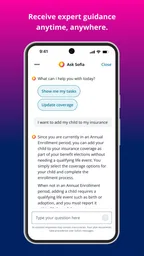
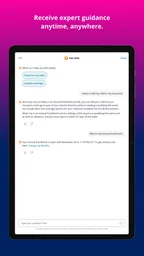
It can also help when you want to prepare for a conversation. Rather than relying on memory while speaking with a family member or benefits contact, you can look at the information available to you and identify what still needs clarification. That is a useful distinction: the app can make the starting point more accessible, while questions that need personal guidance may still require a human response.
During enrollment, the phone format has a particular trade-off. It is handy for checking details in short sessions, especially when you have a spare moment, but comparing several complicated choices may be easier on a larger screen where you can keep more information in view. I would use the app for quick reference and progress between other tasks, then move to a computer or another available support channel if I need to study dense plan details side by side.
A third useful workflow is to make a deliberate final check after handling an enrollment task. Instead of assuming that a choice was completed because you spent time reviewing it, revisit the available information and confirm what the app shows. This is not a special feature claim; it is a sensible way to use a mobile access point when the cost of a misunderstanding could be more than the minutes saved.
Less searching, but not less decision-making
The strongest friction removed is the distance between having a benefits question and reaching the information intended for you. An employer portal in a browser may offer similar material, but opening it, finding the right page, and working through a small screen can feel cumbersome. MyChoice Benefits is a more direct option when your goal is specifically benefits or enrollment information, rather than navigating a broader workplace site.
Compared with email, the app can be a more purposeful place to check information than searching through messages for an old attachment or announcement. Email can still be better for locating a particular communication or keeping a written exchange. I would not assume the app replaces every employer resource; I would think of it as a convenient access route for the benefits information available to an eligible user.
There is a meaningful trade-off between convenience and context. A phone is excellent when you need a quick check, but not every benefit question has a one-screen answer. Some choices depend on personal circumstances, and an app can help you find information without resolving every uncertainty. When a detail affects a decision and the wording is unclear, pausing to ask for clarification is more useful than treating quick access as a substitute for understanding.
Reliability also has a practical meaning here: the app is most helpful when the information you need is available to your account at the moment you need it. I would avoid making an important decision based only on what I vaguely remember seeing earlier. If timing is tight, check the relevant information in advance and keep a little room to use another appropriate channel if you need help. That approach protects the convenience without expecting a phone app to eliminate every possible delay.
Who should use it—and who may prefer another route
I would recommend it to eligible users who want a straightforward mobile way to reach benefits and enrollment information, especially people who often need to check details away from a desk. It may be particularly useful for someone who handles benefits in short bursts rather than setting aside a long session. The free price removes a purchase decision, and the Everyone content rating indicates that it is not restricted to an adult-only audience, though eligibility still determines whether it is useful to a particular person.
I would not recommend relying on it as the only source of guidance if you need detailed comparisons, personalized advice, or help understanding a complicated choice. In those situations, a larger-screen portal, relevant plan documents, or direct assistance may serve you better. It is also a poor fit for someone who is not eligible to access the benefits connected to the service; the app’s convenience cannot overcome that basic limitation.
The app is at version 3.5.7 and requires Android 10 or later on Android devices. If you use an older Android phone, check compatibility before planning around it. The version and platform requirement are worth considering alongside your normal routine: a benefits app only saves time if it runs on the device you actually carry and you can reach it when a question arises.
A practical tool with a clear boundary
My overall view is that MyChoice Benefits earns its place by making a specific administrative task easier to approach. It is not a replacement for careful decision-making, and it does not turn a complex benefits choice into an effortless one. What it can do is reduce the hunt for relevant information and make a quick check possible without waiting until you are at a computer.
If you are eligible and your recurring frustration is simply getting to benefits or enrollment information at the right moment, I think it is worth trying. Set it up before you are under pressure, use it to answer focused questions, and switch to a larger screen or a benefits contact when the decision needs more context. That is the balance I would recommend: let the app save time on access, while keeping the actual judgment where it belongs—with you and the information needed to choose well.
What we like
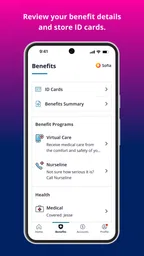
- Keeps benefit details accessible from a mobile device
- Can help users review coverage options before choosing
- Provides a central place for benefit-related resources
- May save time compared with contacting support for basic details
- Useful for checking benefits while away from a computer
What could be better
- Available features may depend on your employer’s plan
- Some benefit changes may still require contacting your employer
- Account setup may require work or member identification details
- Outdated plan data could cause confusion during enrollment
- Users without participating coverage may find limited value





