


My Tracfone: Account Manager review
 Analysis by Appsdrops
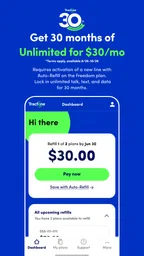
My Tracfone: Account Manager is best understood as a practical companion to a Tracfone phone plan, not as a replacement for your phone’s regular calling and messaging apps. I’d recommend it to someone who wants a straightforward way to keep an eye on their Tracfone account and handle routine account tasks from a phone. The main benefit is convenience: you can check in through a communication app from TracFone Wireless, Inc. rather than treating every plan question as a reason to go hunting through paperwork or remember details from your last account visit.
That focus also sets a boundary. If you are comparing mobile carriers, looking for a general-purpose messaging service, or expecting a tool that improves the phone’s signal, this is not the app I’d start with. It is for people already using Tracfone, or considering its service, who want their account information close at hand. The app is free, is rated for Everyone, and has an average rating of 3.2 from around 58,000 ratings. That mixed response is a useful reminder to approach it as an account utility: judge it by whether it makes your own plan easier to manage, not by expecting a polished all-in-one phone experience.
What to expect from an account companion
The store name is simply My Tracfone, and its short description calls it “My Tracfone.” I see the app’s role as a front door to managing the relationship between you and your Tracfone service. That’s a narrower job than the broad label “communication” might suggest. The app does not take the place of your carrier connection; instead, it is meant to help you deal with the service behind that connection.
Tracfone’s pitch is centered on choosing a phone plan that fits your needs while using a mobile network. In practice, the important question for a new user is whether keeping account access on your phone will save effort. If you routinely forget where you stored plan information, or you prefer checking an account on the device you already carry, that convenience can matter. If you rarely need to review your service and are happy handling everything through another route, installing one more app may not change much.
The scale of its audience suggests this is an established companion rather than a niche experiment: it has more than five million installs. Its release history reaches back to October 17, 2013, and its current version is R28.0.2. Those details do not tell you exactly how it will feel on your particular phone, but they do help set expectations: this is a long-running service app that has continued to receive version updates, not a newly launched messaging product.
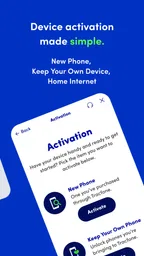
For a first-time user, I would keep the first session simple. Install it from your device’s app store, open it, and look for the account path that matches your situation. Have the information you normally use to identify or access your Tracfone account available before you begin. I would not rush through account entry or guess at details: a small typo can turn a quick check into a frustrating sign-in loop, especially when you are trying to deal with a phone plan at the same time.
Start with the account you actually use
The most reassuring first step is to make sure you are working with the right Tracfone account, rather than trying to explore every screen at once. If you manage service for more than one phone or help a family member with their account, pause before entering details and decide whose service you are trying to review. That simple habit avoids a common kind of confusion: seeing account information and assuming it belongs to the handset currently in your hand.
I’d also begin while you have a stable connection and a few uninterrupted minutes. That is not because the app requires a complicated setup, but because account tasks are easier when you are not trying to finish them in a rush between errands. If you get interrupted, note what you were trying to do before leaving the app; when you return, you can confirm you are still looking at the intended account instead of repeating an action blindly.
The app’s minimum operating-system requirement is version 7.0. If you are installing it on an older device, check the software version first rather than assuming the download or sign-in issue is an account problem. On a supported phone, give the app a moment to open and follow the account prompts shown on your screen. I would avoid relying on a remembered menu path from someone else: screens and account flows can change between versions, so the labels currently in front of you are the safest guide.
Make the first useful visit a small one
Your first meaningful success does not need to be a major account change. I’d define it as getting into the correct account and confirming that you can reach the information you opened the app to find. That could be a simple confidence check before you depend on the app later. Once you have verified that the account is the right one, you can decide whether it is worth using for your regular plan-management routine.
A realistic example: imagine you are leaving home and want to know whether your Tracfone service is the one you expect to be using. Rather than waiting until you are away from your usual notes, open the account app while you still have time to check the account details. If everything looks right, you have reduced the chance of discovering a mismatch when you need your phone. If something does not look right, you can investigate before the issue becomes urgent instead of making a guess while out.
One useful workflow is to treat the app as a reference point, not as your only memory of the plan. When you finish a successful account check, make a note of anything you will need later in a place you already trust, if that is part of your routine. The benefit is not duplicating every screen; it is avoiding the assumption that opening an app once means you will remember where everything is when you are in a hurry. For a shared household, being clear about which person’s account you checked is especially worthwhile.
I would also use the first visit to learn the difference between account access and phone service itself. If a call or message is not working, an account app may help you inspect the service relationship, but it is not the same thing as testing the handset, checking its settings, or confirming that you have usable reception where you are. Separating those possibilities can save time: first establish whether you can access the account, then troubleshoot the phone connection through the appropriate route.
Where new users can get confused
The most likely misunderstanding is expecting a carrier account app to behave like a general communications hub. My Tracfone is not a substitute for the calling and texting tools you already use, and installing it does not itself make a weak signal stronger. It is also not a neutral place to compare every carrier’s plans. Its value is tied to Tracfone service, so a person who wants broad carrier comparisons may be better served by researching providers before choosing one.
Another point worth keeping in mind is that account details and device details are related but not interchangeable. You might have a phone in front of you and still need to verify that the account you opened belongs to that phone or the person using it. This matters if you help someone else, have more than one line, or have changed devices. Before acting on an account screen, take a moment to confirm the identity of the account you are viewing.
If something does not work as expected, avoid repeating the same sign-in attempt over and over. Check that you entered the account information carefully, confirm the device meets the minimum software requirement, and try again when your connection is steady. If the issue appears to concern the phone’s network rather than the account screen, handle those as separate problems. This may sound basic, but it prevents a common spiral in which a user changes account details to solve a handset or connection issue that has a different cause.
The average rating of 3.2 across around 58,000 ratings, alongside roughly 21,000 written reviews, tells me that experiences are not uniformly smooth. I would take that as a reason to keep expectations practical, not as proof that the app will fail you. Account tools are judged especially harshly when a person opens them during a stressful service problem, so a calm first visit is a better test of whether the interface works for your needs than waiting until you are already in a rush.
When another option makes more sense
If you do not use Tracfone, the app has little reason to occupy space on your phone. If you are still choosing a provider, compare service options and coverage for the places you actually go before committing; a well-organized account app cannot compensate for a network that does not suit your daily routes. And if you want a dedicated tool for messaging, video calls, or managing several carriers together, this is the wrong category of solution.
Even an existing Tracfone customer may prefer another way to handle an occasional account task. If you are comfortable using the account through another channel and rarely need to check it from your phone, the app may offer only a modest convenience. On the other hand, people who often need to confirm service information while away from home are more likely to appreciate having an account companion installed and ready.
My practical advice is to judge it by one question: does it help you reach the account information you need with less friction than your current routine? Give it a fair test on a low-pressure day, using the account you expect to manage. If it makes that routine clearer, keep it. If you find yourself repeatedly unsure which account you are seeing or prefer your existing method, there is no reason to force it into your habits just because it is available.
A sensible next step after setup
Once you have confirmed that you can access the correct account, make the app part of a simple check-in routine only if that routine is useful to you. For example, you might open it before a trip or before relying on your phone for an important day, so that you can address an account concern while you still have time. That is a better use than waiting for a problem and then trying to learn the interface under pressure.
My Tracfone is free, and I would describe it as a focused convenience rather than an essential app for every phone owner. TracFone Wireless, Inc. has kept the product current through version R28.0.2, while its long history and broad adoption make it familiar territory for many customers. Still, the mixed average rating is a fair cue to keep your first expectations modest and test the account flow for yourself.
Overall, I’d recommend My Tracfone to a Tracfone customer who wants a direct account companion and is willing to verify that the information on screen belongs to the right service. I would skip it if you are looking for a universal carrier manager, a stronger connection, or a new way to communicate with other people. For the right user, the win is uncomplicated: install it, sign in carefully, confirm the account you need, and decide from that first successful check whether it deserves a regular place on your phone.
What we like
- Check your airtime balance without calling customer service.
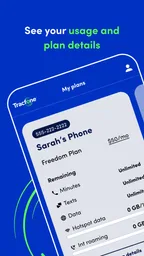
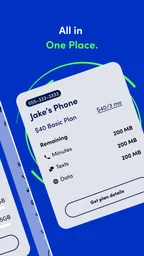
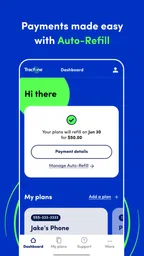
- View service plan details in one place.
- Buy additional airtime through the app.
- Track data usage to help avoid running out unexpectedly.
- Manage several Tracfone lines from one account.
What could be better
- Some account changes may still require customer service.
- Features can vary depending on your Tracfone device and plan.
- Balance and usage details may take time to update.
- A working internet connection is needed to access account details.
- The app offers limited help for troubleshooting device issues.





