



My SafeLink review
 Analysis by Appsdrops
When a phone is locked, even a small task can feel like a detour: unlock the screen, find the right app, and work out where to go next. My SafeLink is built around a more direct starting point, with easy SafeLink access from the lock screen. It is a free communication app from Mgames LLC, aimed at people who want a simpler route to SafeLink and may also be considering Lifeline service.
A more direct starting point
The app’s promise is straightforward rather than flashy. Instead of positioning itself as a general-purpose messaging platform, it focuses on putting SafeLink access closer at hand. That makes the key question less about how many extras it offers and more about whether its basic path feels clear: open the phone, reach the app, and continue with the SafeLink task you had in mind.
That focus suits an app people may use for practical communication needs. If you are looking for SafeLink access, a clean route matters more than a crowded collection of unrelated tools. I appreciate that the central purpose is easy to understand from the name and short description. There is little guesswork about the general role it is meant to play.
The app also points users toward applying for Lifeline. That makes it potentially relevant both to people already using SafeLink and to someone exploring the service for the first time. Those are different starting conditions, though. An existing user may want to get to an access point quickly, while a new applicant is likely to need a clear sense of what to do next. A useful experience depends on keeping those paths understandable rather than making every visitor figure them out from scratch.
What the workflow sets out to do
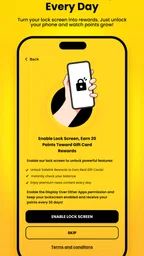
At its best, the flow begins with a specific need: you want to reach SafeLink without navigating through a long chain of screens. The lock-screen emphasis is the app’s defining idea, because it addresses that first moment of friction. If you regularly pick up your phone to handle a SafeLink-related task, reducing the distance between that intention and the relevant access point can make the experience feel more convenient.
From there, the user needs to recognize where the app leads and decide what to do next. The Lifeline application prompt gives the product a second practical purpose, but it also raises the importance of clear transitions. A user who is already enrolled should not have to wonder whether an application path is meant for them; someone considering Lifeline should be able to tell that applying is a separate step from simply opening SafeLink access.
I see the strongest appeal here in the straightforward premise. Quick access is valuable when the next step is obvious, especially in a communication app tied to a service people may rely on for everyday tasks. The promise is not that every part of the process disappears; it is that reaching the relevant starting point should take less effort.
From opening the app to reaching the next step
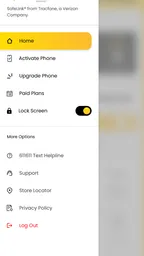
A sensible user journey starts by installing the app and opening it when a SafeLink need comes up. The intended convenience is access from the lock screen, so the first thing to judge is whether that route feels natural in your own routine. If it is easy to spot and understand, the app can become a useful shortcut rather than another icon you have to search for.
Next comes the handoff: the point where access turns into an action. For an existing SafeLink user, that may mean continuing toward the service-related task they came to handle. For someone exploring the Lifeline option, the app’s prompt signals a route toward applying. The important distinction is that access and application are not necessarily the same destination. A well-organized experience helps people identify which one fits their situation before they move forward.
That handoff is where simple apps either earn trust or create confusion. A shortcut is only genuinely helpful if it takes you to a place that makes sense. Clear labels and a predictable sequence can keep the process comfortable; vague choices can send users back to searching or guessing. Because the app’s main role is narrow, I would expect its value to come from making these essential transitions feel easy to follow.
There is also a practical difference between reaching an entry point and completing a broader service process. The app is presented as a way to access SafeLink and apply for Lifeline, so users should approach it as a route into those tasks rather than assume that opening the app automatically completes them. Keeping that expectation in mind makes the workflow easier to understand: start with the relevant need, choose the matching path, and continue through the steps associated with that task.
Who may find the approach useful
My SafeLink is most relevant to people who already have a reason to reach SafeLink or are interested in Lifeline. Its communication category fits that service-oriented purpose, though the appeal is more focused than that of a broad chat app. If you are simply looking for an all-in-one messaging tool, this is not the role its description emphasizes. If your goal is SafeLink access, the narrower scope may be exactly what makes it appealing.
The app is free and rated for Everyone, which gives it a broad audience in terms of cost and age classification. It has an average rating of 4.1 from around 11,000 ratings, alongside roughly 4,800 written reviews and more than a million installs. Those figures suggest that it has reached a sizeable group of users, though the rating alone cannot tell you whether its particular workflow matches your needs. I would use them as background, then focus on whether the access route is relevant to the task you actually have.
Compatibility is another practical part of the decision. The app requires Android 7.0 or later, so it can suit users with devices running that version or newer. The current version is 2.1.8, and the app was released on April 29, 2020. Those details help set expectations when checking whether it fits your device and whether you are looking at the current release.
Where the flow can feel less smooth
The workflow’s strength and limitation come from the same place: its focused purpose. A direct SafeLink entry point can be convenient when you know what you need, but it does not automatically make every related task equally simple. Someone arriving without a clear idea of whether they need access or an application path may still have to pause and work out which direction applies.
There is also a natural handoff between the app and the wider service process. Whenever an app points a user toward a task beyond the initial access screen, the clarity of that transition matters. The experience can feel seamless when the next action is plainly signposted; it can feel like a break in the flow when a person has to stop and interpret what to do. For a practical utility, that distinction can matter more than a long list of extras.
Another point to consider is what you expect from a communication app. My SafeLink’s stated purpose centers on SafeLink access and Lifeline applications, not a full suite of general communication features. Users who want broader tools may find the scope limited, while people who came specifically for its stated function are less likely to view that focus as a drawback. Matching expectations to the app’s purpose is the easiest way to judge it fairly.
The lock-screen idea is most useful when it becomes part of a familiar routine. If you only need SafeLink occasionally, the difference between a shortcut and opening an app normally may feel modest. If you often return to the same service-related tasks, a more direct starting point can be easier to appreciate. In other words, the benefit depends on how closely your habits match the workflow the app is designed to support.
The overall experience
What I like about the concept is its practical starting point. Instead of asking users to learn a complicated system, it focuses on helping them reach SafeLink more directly and making Lifeline application a visible part of the journey. That gives the app a clear identity and makes it easier to decide whether it belongs on your phone.
My main advice is to think about the task you want to complete before installing it. If you need SafeLink access or want to explore applying for Lifeline, the app’s purpose lines up with that need. If you expect a broad communication hub or a tool that handles every part of a service process automatically, the focused description suggests a different kind of experience. A clear expectation makes the handoffs easier to follow and helps prevent disappointment.
Overall, My SafeLink is a focused option for users who want a simpler starting point for SafeLink and a route toward Lifeline applications. Its appeal rests on convenience and clarity rather than breadth. For the right user, that can be enough: begin with a specific need, reach the relevant access point, and continue along the appropriate path. If that is the flow you are looking for, this free app is worth considering.
What we like
- Offers a simple way to organize saved links in one place.
- Can help reduce clutter in your browser bookmarks.
- Quick access to saved links can save time during daily browsing.
- Useful for keeping important web addresses easy to find.
- A focused link-saving tool may be easier to use than a full note-taking app.
What could be better
- Its usefulness depends on whether it supports your preferred devices and browsers.
- Saved links may need manual organization as the collection grows.
- A link manager offers limited value if you rarely save web pages.
- Access to links may be inconvenient without an internet connection.
- Check its privacy policy before storing sensitive or personal URLs.





