
Microsoft Edge review
 Analysis by Appsdrops
I judge a mobile browser less by how impressive it feels on day one than by whether I still reach for it weeks later. Microsoft Edge makes a convincing first impression if you already use Microsoft services, but its real case is quieter: it can become a practical everyday browser without demanding much upkeep. If you are choosing a communication app in the broad sense of staying connected to information and services, Edge fits through browsing rather than messaging. It is a free app from Microsoft Corporation, and I found its usefulness depends less on novelty than on whether its approach suits your routine.
What feels useful in the first week
Edge is familiar quickly. You open it, search, visit pages, and return to them; there is no steep learning curve before it becomes useful. That makes the first few days less about learning a new system and more about deciding whether you want another browser on your phone. If Microsoft is already part of your work or personal setup, that decision is easier because Edge can feel like a natural extension of your existing habits.
A realistic example is planning a weekend trip while messaging friends. I might search for a place, compare its hours with another page, and keep the useful results open while switching back to the conversation. Edge is handy in that kind of ordinary, stop-and-start browsing: the browser is a place to gather and revisit information, not a replacement for the chat app where the plan is discussed. That distinction matters if you are expecting a communication app to handle calls or messages directly.
Its scale suggests that it is not an obscure experiment: it has passed 100 million installs and has a 4.7 average from around 1.6 million ratings. Those numbers can reassure a cautious installer, but they do not settle the personal question of fit. I would still judge it by how well it handles the pages and accounts I use, rather than assuming popularity makes it the right default for everyone.
One useful first-week habit is to treat the browser as a deliberate home for tasks rather than installing it and leaving it as a spare. For example, I would open work research in Edge for a few days and notice whether it makes it easier to keep that browsing separate from casual searches. This is a more revealing test than tapping around the settings once: a browser earns its place through repeated small conveniences, not through a checklist of features.
Where it fits beside other browsers
Compared with the browser that came preinstalled on a phone, Edge is most compelling when you want Microsoft’s version of the browsing experience or already rely on Microsoft services. Compared with other dedicated mobile browsers, the basic job is familiar: enter a search, open a page, and move between sites. I would not switch solely because the app has a different icon. I would switch if its place in my wider routine reduces friction, or if I prefer having my Microsoft-related activity in one browser.
The trade-off is that adding a second browser can create uncertainty. Links may open in the browser you did not intend, and saved pages or browsing habits can end up split between apps. Before making Edge your default, I would use it for a defined set of tasks and decide whether that separation helps. If you already have a browser that handles your needs comfortably and you do not use Microsoft services, the benefit of changing may be small.
Why it can keep earning a place
After the novelty wears off, recurring value comes from routine. Edge is at its best when I can use it consistently for the same kinds of tasks: checking information while out, following a link from a message, or returning to a page I need later. Those are not dramatic moments, but they are exactly where a mobile browser either becomes dependable or fades into the app drawer.
A practical tip is to test one complete workflow rather than judging isolated visits. Start with a link from a message, read the page, move to a second source, then come back to the original information later. If that sequence feels simple, Edge may suit your habits. If you keep wondering which browser holds the page you need, the extra app is creating organizational work instead of saving time.
Another useful use case is keeping a browser available for quick research without treating every search as a reason to reorganize your phone. If you are comparing a product, for instance, Edge can serve as the place where you open several descriptions and return to them while deciding. The value is not that a browser makes the decision for you; it is that a consistent browsing destination can make a small research task easier to resume.
This is also where expectations should stay grounded. Edge is a browser, not a general-purpose communication hub. If your priority is direct contact, group coordination, or a particular messaging network, choose an app built around that job. Edge can support the browsing around a conversation, but it should not be installed under the assumption that it replaces the apps where your actual conversations happen.
Keeping the setup manageable
The maintenance burden is modest if you keep your setup simple. The main ongoing choice is whether to use Edge regularly enough to justify its place and whether you want it to open links by default. I would avoid moving everything over on day one. Try it alongside your current browser, then make a conscious choice after you have used it for real tasks. That approach makes it easier to notice both the advantages and the small annoyances.
Edge is listed as free, with in-app purchases ranging from $9.99 to $199.99 per item. I would not assume that an optional purchase is necessary for basic browsing; first decide whether the app’s everyday role is useful to you. If you encounter a purchase prompt, pause and check what it applies to rather than treating payment as a routine requirement. That is sensible advice for any app with optional purchases, especially when the core reason for installing it is a basic task such as viewing web pages.
The app is rated for Everyone, so its age classification is broad. That label is not a substitute for a parent’s judgment about what a child can reach through a browser, however. If a younger family member will use it, I would think about the websites and device settings relevant to that child rather than treating the rating as a guarantee about every page they might encounter.
Its current version is 157.0.4341.53. For a browser, staying current matters because browsing is an activity people return to constantly, but I would keep the practical maintenance simple: let the app update through the app store settings you normally use and revisit your default-browser choice only when your habits change. There is little value in repeatedly tinkering with an app that already does the job.
What may become tiring
The main source of fatigue is duplication. If your existing browser already handles bookmarks, saved sessions, and the links you open every day, Edge can become one more place to check. A second browser is worthwhile only when its specific role is clear. Without that role, even a well-made app can feel like clutter because it asks you to remember which browser contains which page or account.
Another possible frustration is expecting seamlessness where your own habits are not aligned. If you use several devices, accounts, or browsers, it is worth checking how you actually move between them before committing to Edge as your main home for browsing. I would not assume that every part of a mixed-device setup will behave exactly as it does in a single-browser routine. The test is whether the workflow you personally need is smooth, not whether the app’s name matches another service you use.
There is also a less obvious cost to switching: the time spent relearning where you put things. Even when a browser is straightforward, moving your default habits can create a short period of friction. My advice is to migrate only when you can name the reason. “I want my Microsoft-related browsing here” is a clear reason; “I have heard this browser is popular” is not enough on its own.
Some people should skip Edge. If you want a dedicated messaging app, it is the wrong category of tool. If you are content with your current browser and do not need a separate Microsoft-oriented option, installing another browser may add little. And if you prefer to keep all browsing in the phone’s default app, there is no need to change simply for the sake of trying something new.
Who should keep it installed
I would recommend Edge to someone who wants a capable mobile browser and has a practical reason to use Microsoft’s ecosystem, or who simply prefers Edge after comparing it with the browser already on their device. It makes sense for people who regularly open links, research a subject in several visits, and want one consistent place for those tasks. Its broad reach—more than 100 million installs—shows that many people have found a role for it, but your own repeated use is the better measure.
For someone deciding between Edge and a typical preinstalled browser, I would compare the experience on the tasks that actually recur: opening links from messages, returning to research, and choosing which app handles new links. Don’t base the decision on a single quick search. Give each browser the same everyday job for a few days, then keep the one that feels less cumbersome. If you cannot identify a meaningful difference, keeping the familiar option is perfectly reasonable.
Microsoft released Edge on November 29, 2017, and the app has had time to establish itself beyond a short-lived novelty. That history does not guarantee that it will suit your phone, but it reinforces the right way to judge it: by the everyday browser role it can fill, not by a burst of curiosity at installation.
The long-term verdict
My verdict is that Microsoft Edge can earn lasting space, but it does so through steady usefulness rather than a reason everyone must switch. I like it most as a browser with a clear job: open links, support quick research, and give Microsoft users a familiar place to browse. Its maintenance demands are easy to keep modest, while the biggest drawback is the possibility of splitting your habits across multiple browsers.
Give it a fair trial if you have a reason to use it, and judge it after ordinary days rather than a novelty-driven first session. If it becomes the browser you reach for without thinking, keep it. If you repeatedly return to your old default, remove the duplicate and simplify your setup. That is the standard I would use for any app competing for permanent space: it should make a recurring task easier often enough to justify staying.
What we like
- Syncs bookmarks and passwords across devices with a Microsoft account.
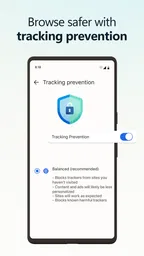
- Built-in tracking prevention helps limit cross-site tracking.
- Collections make it easy to save and organize pages.
- Immersive Reader offers a cleaner view of supported articles.
- Vertical tabs can make tab management easier on larger screens.
What could be better
- Some features work best when you use other Microsoft services.
- The interface can feel crowded with optional tools and shortcuts.
- Syncing requires signing in with a Microsoft account.
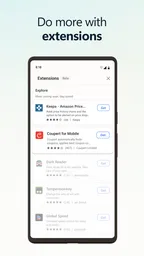
- Extensions are more limited than on desktop Edge.
- Some pages may not display correctly in Immersive Reader.





