




Meta Ads Manager review
 Analysis by Appsdrops
When a small business shares a home office—or when a household helps one person run a shop—ad management can quickly become a coordination problem. Meta Ads Manager puts campaign work on a phone, which is useful when the person responsible is away from a computer. I see it as a practical companion for checking and handling Meta advertising, not as a replacement for careful planning or a shared team process.
Useful when campaign work follows you home
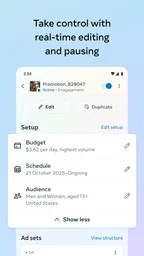
A realistic example: you run a local bakery, and a family member helps with photographs or order packing. You are out buying supplies when you remember that a promotion is still running. Instead of waiting until you return to a laptop, you can open the app, review the campaign, and make an appropriate adjustment if the account and campaign setup allow it. That kind of short, purposeful check is where a mobile manager earns its place.
The app is a free business tool from Meta Platforms, Inc., and it was released on June 29, 2015. It has grown well beyond a niche utility: it has more than 10 million installs, with an average rating of 4.1 from about 605,000 ratings and roughly 4,500 written reviews. Those figures suggest broad use, but they do not guarantee that every workflow will feel smooth on every phone or suit every advertiser.
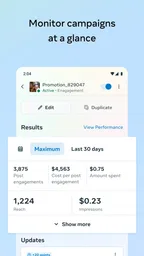
Its strongest role is keeping campaign oversight close at hand. A phone is well suited to checking whether activity looks as expected, responding to a task that cannot wait, or reviewing work between other responsibilities. For building a complicated campaign from scratch, comparing several options side by side, or carefully writing and editing a lot of material, I would still choose a larger screen when possible.
Keep household help separate from account access
Shared devices make convenience tempting: one person logs in, then another uses the same phone to help with the business. I would avoid treating that as a casual household shortcut. Advertising accounts can involve spending decisions and business information, so each person should be clear about whose account is open and who is making changes. The app should not be mistaken for a family-sharing tool or a general household dashboard.
Before handing over a phone, I would close the app or otherwise make sure the right account is active. If several people contribute, agree in advance on who reviews campaigns, who makes edits, and who is responsible for checking the result. This simple boundary is more useful than relying on memory after a busy day. A helper who only needs to suggest a change can send the recommendation to the account owner rather than tapping through the live campaign themselves.
That distinction matters especially when a shared device is used for personal and business tasks. Keep business work intentional: open the app for a defined task, confirm the account context, make only the agreed change, then pass the phone back. I find this safer and less confusing than leaving an advertising app open for whoever happens to pick up the device.
Coordinate around decisions, not just notifications
Mobile access can make a team more responsive, but it can also create overlapping edits. If one person adjusts a campaign while another is reviewing it elsewhere, the second person may not know what changed or why. A useful household routine is to say what you intend to do before changing a live campaign, then tell the other person when the work is complete. For larger decisions, keep a separate note of the agreed goal and the reason for the adjustment.
One non-obvious advantage of using a phone is that it can support a quick review without turning every check into a long session. I would decide beforehand what question I am answering—such as whether a campaign needs attention—rather than browsing screens without a purpose. That reduces the chance of making a reactive change just because a number looks different from the last time I looked.
The trade-off is that a quick glance can invite overconfidence. A campaign is part of a wider plan, and a single mobile view may not provide the context you need to judge every decision. When a change affects the campaign’s direction, budget or creative approach, I would pause and review it carefully with the person responsible. The convenience is real, but it does not make advertising decisions automatic.
What the phone is good at—and where a computer helps
Compared with managing ads only through a desktop browser, the app’s main appeal is access away from the desk. That helps a sole proprietor who handles operations throughout the day, or a small team whose main decision-maker is not always at a computer. It is also more directly focused on Meta advertising than a general business or social-media app, so it makes sense when the work you need to do is specifically campaign management.
The desktop route remains the better choice for extended, detail-heavy work. A full-size screen makes it easier to keep multiple pieces of a campaign in view, review text carefully, and discuss decisions with someone beside you. The mobile app is not a magic shortcut around the attention that ad setup requires. I would use it to stay informed and handle suitable tasks, then move to a computer if the work becomes intricate or if I need to compare many details at once.
It is also worth separating campaign management from general social posting. If your main need is to write everyday updates or coordinate household content, a dedicated publishing workflow may be more appropriate. This app is most compelling when the actual task is managing advertising rather than simply keeping a social account active.
Age, trust, and sensible boundaries
The app carries an Everyone content rating, but that should not be confused with a recommendation for children to manage a business advertising account. The work involves commercial decisions and account access; in a household, an adult or the person formally responsible for the business should remain in charge. A child can help with a creative idea or offer feedback without being given responsibility for campaign changes.
For adults sharing work, trust is less about handing over a phone and more about agreeing on accountability. Decide who can make changes, who checks the work, and how to flag a concern. If someone is not meant to edit a campaign, do not leave the device in a state that invites an accidental tap. These are ordinary habits, but they matter more when a business task happens in the middle of family life.
I would also keep expectations realistic: the app supports work connected to Meta advertising, not every part of running a business. It cannot substitute for a clear household agreement, a campaign plan, or a conversation about who is responsible. Its value depends on the people using it being disciplined about those things.
Who should install it
I recommend giving it a try if you already manage Meta ads and need to check in while away from your computer. It is a sensible fit for a small-business owner who wants a mobile way to stay connected to campaign work, or for a team member who has a clearly defined role in the advertising process. The current version is 501.0.0.52.105, and the app is listed for everyone, though account responsibility should still stay with the appropriate adult or business owner.
I would skip it if you do not run Meta advertising, want a shared family app, or expect a phone to make complex campaign planning effortless. I would also avoid making it the only place you manage serious, detailed work if you regularly need a wide view and time to compare decisions. In those cases, a desktop workflow—or a different tool aimed at your actual task—is likely more comfortable.
A practical household verdict
For a household helping with one small business, Meta Ads Manager is most useful when it has a clearly assigned operator and a narrow job: keep an eye on advertising and handle appropriate tasks while away from a desk. It brings convenience without resolving the harder questions of access, trust, or coordination. Set those boundaries first, and the app can be a helpful extension of a business routine. Without them, a shared phone can turn a quick check into uncertainty about who changed what.
My overall view is positive but measured. The app makes sense for people already working with Meta ads, especially when the day does not happen at a desk. I would treat it as a mobile control point rather than the whole advertising operation: use it for timely oversight, communicate before meaningful edits, and move to a larger screen when the decision deserves more attention.
What we like
- Monitor campaign performance from your phone
- Edit budgets and schedules while away from your computer
- Get notifications about important campaign activity
- Manage multiple ad accounts in one place
- Review ad previews before publishing
What could be better
- Some advanced tools are easier to use on desktop
- Campaign changes may take time to appear
- Requires a Meta account with advertising access
- Frequent notifications can become distracting
- Performance reporting depends on reliable internet





