




Messenger - Texting App review
 Analysis by Appsdrops
I find a separate texting app most useful when a household shares a tablet or keeps an older Android phone around for calls and messages. In that setting, a clear, familiar place for SMS and MMS can make practical coordination easier: checking a pickup message, sending a photo, or keeping ordinary texts apart from social feeds. Messenger - Texting App is built for that straightforward role, with messaging tools that include blocking, a driving mode, and a private box. I would consider it for someone who wants those options close at hand, while remembering that a messaging app is only as private and organized as the device and its users allow.
How it fits into a shared household
The app’s appeal is less about replacing every way a family communicates and more about giving text messages a dedicated home. If one person uses SMS for school, work, appointments, or delivery updates, a messaging-focused app can make those conversations easier to reach than a general-purpose chat service. That can matter on a secondary phone, where the owner may not want to install a large collection of social apps.
A realistic example is a parent using an Android phone to coordinate a late change to a pickup plan. One person can send a text, another can reply with an MMS photo or a quick update, and the conversation stays in the familiar mobile messaging lane rather than depending on everyone having the same chat account. That is a practical advantage of SMS-based communication, though standard messaging costs or availability may depend on the user’s mobile plan and device setup.
The app is listed in the communication category and is developed by Emoji SMS Messenger. It has reached over 10 million installs, with an average rating of 4.5 from around 92,000 ratings and roughly 8,100 written reviews. Those figures suggest that many people have found a use for it, but they do not tell me whether its particular layout or extras will suit a given household. I would still try it on the device where it is meant to be used before making it the default routine for everyone.
Set boundaries before handing over a phone
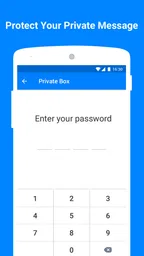
On a shared device, the most important setup question is not which theme or visual style to choose; it is who can open the phone and see its messages. A private box may help keep selected conversations less visible within the app, but I would not treat that as a substitute for a device passcode or a separate user account. Anyone who can use the same unlocked phone may be able to reach other apps, notifications, or account settings.
That distinction is especially useful when an adult lends a phone to a child to make a call or check a message. I would set the phone’s lock first, decide whether notifications should show message previews, and then explain which conversations are appropriate to open. A private area can be a convenience for organizing sensitive threads, but it should not be presented as a complete security boundary or a guarantee that messages are inaccessible elsewhere on the device.
There is also a practical difference between sharing a phone and sharing an app. If two adults take turns using one handset, each person may encounter the same conversation history and contact list. That can be awkward even when everyone trusts one another, because replies may be sent from the wrong person’s device or private messages may appear in a place another user can browse. For distinct identities, separate devices or properly separated operating-system profiles are a better fit than expecting one messaging inbox to keep users apart.
Useful coordination without another group account
For day-to-day household planning, SMS can be the fallback that reaches people who do not use the same messaging platform. I like that approach for short, time-sensitive updates: “I’m outside,” “the appointment moved,” or “please bring the parcel in.” It avoids making coordination depend on everyone joining a particular social service. MMS also gives the conversation a way to carry photos, which can be handy for showing a label, a notice, or the item someone is meant to collect.
The trade-off is that SMS and MMS do not automatically behave like a modern internet chat service. Group conversations, media handling, and delivery can vary with the phone, carrier, and other participants’ messaging apps. If a household regularly shares large files, relies on read indicators, or needs synchronized conversations across several devices, a dedicated internet-based messenger may be more convenient. I would use this app for ordinary mobile texts rather than assume it replaces every feature of a cross-platform chat service.
Blocking is one of the more useful tools for keeping an inbox manageable, particularly on a phone used for practical household contact as well as unsolicited messages. A sensible workflow is to review an unfamiliar sender before blocking, since a legitimate appointment reminder or delivery update can look unexpected. Blocking can reduce unwanted contact in the app, but it is not a reason to assume every unwanted message will be handled automatically or that it changes how a carrier processes texts.
Driving mode is another feature that makes more sense as part of a routine than as a promise of distraction-free driving. I would set up whatever driving-related behavior the app offers before a trip and keep the phone out of reach while moving. The safe choice is still to avoid reading or replying behind the wheel; a mode can support a safer habit, but it cannot make interacting with a screen while driving harmless.
Age, trust, and what the app can—and cannot—do
The app’s content rating is Everyone, which is a broad age suitability label rather than a household supervision system. It does not tell me that a child’s messages are monitored, that contacts are restricted, or that the app manages screen time. If a younger family member will use the phone, I would make those decisions through the device’s own settings and an adult’s guidance rather than relying on the app to provide parental controls.
That matters because messaging is inherently social: a child can receive texts from people outside the household, and a shared phone can expose conversations to whoever has access to it. Before handing over a device, it is worth agreeing on who may use it, how to respond to unknown senders, and when to ask an adult for help. The private box may serve an organizational purpose, but I would avoid using it to imply that a child’s communications are being safely supervised.
For adults sharing a phone, trust is equally important. A private box can create a little separation inside the messaging experience, yet it does not solve the larger issue of shared access. If a household needs genuinely separate personal communications, a shared handset is the wrong place to draw that line. The app works best when its role is clear: a convenient SMS/MMS client, not a multi-user identity manager.
Everyday friction and choosing an alternative
One limitation of a dedicated texting app is that it becomes most useful only when the people you contact are reachable by ordinary text. Friends who mainly use internet messaging may not see the same continuity across devices, and a person switching between several messaging services can end up checking more than one inbox. Before moving a household’s habits over, I would test a few real conversations and confirm that the app handles the messages and notifications the way the main user expects.
It is also worth checking whether it suits the phone’s existing setup. The current version is 1.9.0 and it requires Android 6.0 or later, so it is aimed at Android devices rather than iPhones. If everyone in a household uses iOS, or if seamless syncing between phones, tablets, and computers is the priority, the built-in messaging option or a widely used cross-platform service may be a better choice. I would not choose this app on the assumption that it will bridge different operating systems in the same way as an internet messenger.
There is no upfront charge to install it, while optional in-app purchases range from $0.99 to $59.99 per item. I would treat the free entry point as a chance to judge the everyday messaging experience first, then consider any purchase only if its purpose is clear to me. That price range is broad enough that I would check the purchase screen carefully before confirming anything, especially on a phone used by more than one person.
Compared with a phone’s standard messaging app, this one stands out through its combination of blocking, driving mode, and a private box. Those extras may be worthwhile if they address a real annoyance in the household. If the built-in app already handles texts reliably and nobody needs those tools, changing the default can introduce needless adjustment: people have to learn a new inbox, and an adult may need to confirm which app receives messages. I would switch for a specific benefit, not simply because a separate app is available.
Who I would recommend it to
I would recommend Messenger - Texting App to an Android user who wants a dedicated place for SMS and MMS and sees value in tools for blocking senders, driving-related use, or keeping selected conversations in a private box. It can also make sense on a household’s secondary phone when one person is responsible for the inbox and everyone understands that the device itself is shared.
I would skip it for a household that needs separate user identities, strong parental supervision, or consistent chat histories across many devices. I would also look elsewhere if most important conversations already happen in a particular internet messenger, or if the built-in texting app is doing the job without friction. In those cases, another inbox may add more maintenance than convenience.
The app is free to start, rated for Everyone, and was released on May 3, 2018. Those details offer useful context, but my decision would come down to the device’s role. If it is a single user’s Android phone and SMS remains part of everyday life, the extra controls could make the experience more comfortable. If it is a genuinely shared family device, I would first establish access boundaries and expectations, then test the app with routine conversations before depending on it.
My household verdict is cautiously positive: it is a practical option for straightforward texting, especially when its specific tools solve a problem the default app does not. I would not mistake the private box for a full privacy system or driving mode for permission to interact with a phone on the road. Used with sensible device-level boundaries, it can be a useful communication app; for complicated family sharing or feature-rich group chat, another setup is likely to serve better.
What we like
- Works over Wi-Fi or mobile data to avoid SMS charges.
- Supports group chats for conversations with multiple people.
- Lets you share photos and videos in chats.
- Offers voice and video calls within the app.
- Can sync conversations across supported devices.
What could be better
- Requires an internet connection for messaging and calls.
- Both callers need compatible access for in-app calls.
- Frequent notifications can interrupt your day.
- Some features may vary by device or region.
- Using calls and media can consume substantial data.





