
Messenger SMS - Text Messages review
 Analysis by Appsdrops
Messenger SMS - Text Messages is a straightforward choice for people who want a dedicated place for ordinary text conversations rather than another all-purpose chat service. I like the appeal: SMS works with phone numbers and does not ask every contact to join the same social platform. But that simplicity also sets a boundary. This is best considered a messaging app for everyday texting, not a replacement for internet-based chats, voice calls, or a feature-rich communication suite.
A focused tool for everyday texting
As a communication app from SMS Messenger, Text App, it keeps its purpose easy to understand: handling SMS messages. That focus matters if your conversations are mostly practical—checking when someone will arrive, confirming an appointment, or replying to a message from a business—rather than sharing media and keeping up with group chats all day.
The app is free to install and is rated for Everyone. Its current version is 3.0.1, and it requires Android 6.0 or later. Those details make it a plausible option for people with an older compatible Android phone, though the minimum operating system does not guarantee that every device will feel equally quick or offer the same experience.
One of its clearest strengths is the low barrier to use. SMS does not require the other person to install the same app or sign up for the same service. If a relative, local shop, or colleague can receive texts on their phone, the basic communication habit remains familiar. That makes this kind of app useful as a practical inbox, especially for people who do not want every conversation tied to a social account.
Where a dedicated SMS inbox earns its place
My favorite use case is keeping routine messages separate from the noisier parts of a phone. Imagine you are coordinating a pickup: one person texts that they are running late, another sends the location, and a shop sends a confirmation. A dedicated SMS app gives those exchanges a clear home without asking you to move the conversation to a new platform.
That distinction is especially useful when the other person’s preferred way to communicate is simply texting. Rather than trying to persuade a family member to install a messenger or troubleshoot a group’s mix of services, you can keep the conversation in the familiar phone-number-based channel. The trade-off is that SMS is built for direct, relatively simple exchanges; people seeking rich shared media or more elaborate group features may prefer an internet messenger.
There is also a practical workflow benefit in treating text messages as a channel for things that need a quick answer, not as a full personal archive or project space. I would use it for short confirmations, reminders sent by other people, and time-sensitive coordination. For long discussions, shared documents, or conversations that depend on consistent media handling across different devices, I would choose a tool designed around those needs instead.
The store summary describes a faster, simpler, safer approach to SMS, but I would judge those ideas by the everyday experience rather than take them as guarantees. A clean, focused app can reduce distraction simply by doing less. It cannot, by itself, make every message arrive instantly or turn standard texting into the same kind of online service as a chat platform.
What the popularity tells me—and what it does not
The app has a 4.5 average from around 368,000 ratings, with about 30,000 written reviews. It has also passed 50 million installs. That is a substantial audience for a dedicated texting app, and it suggests that many people find the basic proposition useful. Popularity is reassuring, but it is not a substitute for checking whether the app’s approach suits your phone, habits, and preferred messaging channels.
I would also keep the difference between an SMS app and a messaging network in mind. With many internet messengers, the experience can depend on the other person using the same service and having data access. SMS is more familiar and broadly compatible, but the richer features people expect from modern chat apps are not automatically part of the SMS experience. Choosing between them is less about which app is universally better and more about what your conversations actually require.
The main limitation: SMS is still SMS
The biggest drawback is not a surprising flaw in the app; it is the nature of the channel it serves. If you want a single place for voice notes, large media exchanges, calls, or highly active group conversations, a focused SMS app is unlikely to be the right center of your communication life. I would not install it expecting it to replace every messenger on the phone.
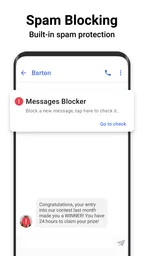
There is another important distinction for anyone who sees “safer” language and assumes that ordinary texts work like encrypted chats. A messaging app’s positioning should not be confused with a promise that every SMS conversation has the privacy properties of a service built around encrypted internet messaging. For sensitive conversations, I would choose a communication method whose protections are clear and appropriate to the information being shared, rather than rely on the general idea of a safer texting app.
SMS can also be less convenient when a conversation crosses devices or needs to be continued from a computer. Internet messaging services often make those workflows central to the product. If your day involves moving between a phone, tablet, and desktop, test how well your chosen setup fits before making a dedicated SMS app the default hub for everything.
Finally, while the app is free, it includes optional in-app purchases ranging from $0.99 to $59.99 per item. That does not change the basic fact that it can be downloaded without paying, but I would review any purchase prompt carefully and decide whether the offered item matters to my use. People who want a completely uncomplicated, no-purchase experience should pay attention to what is optional rather than assume every part of the app works identically at no cost.
Small habits that make SMS easier to manage
For a tidier routine, I would decide what belongs in SMS before moving over to a new messaging setup. Keeping short confirmations and practical one-to-one exchanges there, while leaving ongoing group plans in a shared chat service, prevents the two channels from competing for the same job. This is a useful distinction when some contacts text and others expect a particular online messenger.
I would also make a habit of checking the recipient before sending anything that is private or time-sensitive. The familiar, phone-number-based nature of SMS makes it easy to send a quick message, but that convenience can encourage rushed replies. A brief pause to verify the conversation is a simple safeguard, particularly when several contacts have similar names or a message contains details that should go to only one person.
For appointment reminders and confirmations, I would treat texts as useful prompts rather than the only record I keep. A message can make it easy to find a time or address again, but important plans may deserve a separate calendar entry. That workflow uses SMS for what it does well—quick, direct communication—without asking the inbox to become a complete organizer.
Who should choose it, and who should look elsewhere?
I would recommend Messenger SMS - Text Messages to someone who wants a simple Android home for conventional texting, communicates with people who do not share a particular chat app, and prefers to keep routine messages distinct from social feeds. It is also a sensible candidate for someone who values a familiar phone-number-based approach and does not need every conversation to include advanced online features.
I would skip it as a primary messenger if most of your communication depends on active group chats, frequent media sharing, cross-device continuity, or features that only work when everyone joins the same service. In those cases, an internet messaging app is likely a better fit. I would also avoid treating it as a privacy upgrade for sensitive conversations without first understanding the protections offered by the communication channel itself.
For people comparing it with the standard messaging option already on an Android phone, the practical question is not whether a separate app sounds appealing; it is whether this one gives you a more comfortable way to manage texts. If your current inbox is working well, switching may not change much. If you want a dedicated alternative and your needs are modest, the focused purpose is its strongest argument.
A measured recommendation
Messenger SMS - Text Messages is most convincing when judged on its narrow brief: a free app for ordinary SMS communication, from a developer focused on messaging. Its large install base and strong average rating make it easy to understand why people try it, but neither figure means it will be the ideal fit for every texting routine.
My verdict is positive with a clear boundary. I would consider it for dependable, familiar everyday texting on a compatible Android device, especially when messages are short and contacts use different services. I would not expect it to replace a modern internet messenger or solve the limits of SMS. If you want a straightforward texting option and are comfortable with those trade-offs, it is worth a look; if your conversations demand richer tools, choose an app built for that instead.
What we like
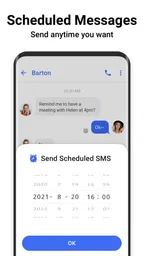
- Supports scheduled messages for sending texts later.
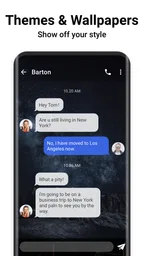
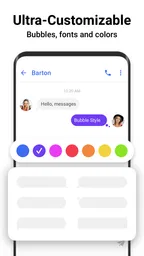
- Lets you organize conversations with custom colors and themes.
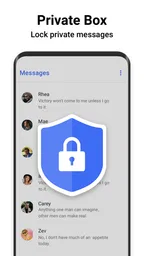
- Includes a private inbox for keeping selected messages discreet.
- Offers message search to find older conversations quickly.
- Supports dual SIM phones for choosing a line when texting.
What could be better
- Some features may require an in-app purchase.
- Ads can interrupt the messaging experience.
- Customization options may feel overwhelming to new users.
- Message delivery depends on your carrier and network connection.
- Availability of features can vary by Android version.





