



Messenger Kids – The Messaging review
 Analysis by Appsdrops
When I’m choosing a messaging app for a child, the key question isn’t which one has the most features. It’s whether the experience feels simple enough for a child while giving the adults responsible for them a meaningful role in how they connect. Messenger Kids is built around that family-and-close-friends use case rather than trying to be an all-purpose social network. That focus makes it worth considering, though it also means it won’t suit every household or every child.
This is a free communication app from Meta Platforms, Inc., intended for children and rated Everyone. It has an average rating of 3.8 from around 264,000 ratings and more than 50 million installs. Those figures suggest it has reached a large audience, but they don’t tell me whether it fits a particular family. The more useful test is whether you want a child’s conversations to happen in a dedicated, family-oriented space instead of in the same messaging app adults use.
What matters when choosing a child’s messenger
I’d start by deciding who the child needs to contact and who should help manage those connections. If the goal is to make it easier for a child to talk with relatives and trusted family friends, a separate app designed for that audience has a clearer purpose than an ordinary messaging app. If the child mainly needs to reach people who already use a parent’s preferred service, switching everyone may create more hassle than it solves.
Age and readiness matter just as much as the app itself. A child may be comfortable with a simple video call but still need an adult’s help when a conversation becomes confusing, a contact changes, or they want to use a new service. I’d treat Messenger Kids as one part of a family’s communication routine, not a substitute for talking with a child about who they contact and what to do when something feels uncomfortable.
The app is free, which makes trying it less of a financial commitment than choosing a paid communication tool. That does not make it cost-free in the practical sense: someone still needs to help set it up, explain the boundaries, and make sure the child knows how to use it. I’d decide in advance which relatives and friends are appropriate contacts so the first experience is useful rather than a confusing list of people.
There is also a platform question. A dedicated app only helps if the child and the people they want to reach can use it comfortably. Before moving a family conversation, I’d ask whether grandparents, caregivers, and close friends are willing to join the same routine. For occasional calls with one relative, an existing family-approved option may be easier. For a child who needs a more distinct place to message trusted people, the separate identity of this app can be a genuine advantage.
Where Messenger Kids earns its place
The strongest reason I’d choose Messenger Kids is its narrow, understandable purpose: child-focused messaging and video calls with family and close friends. It avoids asking a parent to turn a general-purpose chat app into something child-friendly through household rules alone. The app’s framing makes the intended audience and use clearer, which can help adults explain why this is the place for certain conversations.
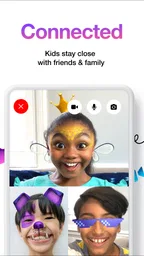
Video calling is especially useful for children who want to see a relative rather than just exchange short messages. A child might call an aunt after school to show a drawing, or check in with a grandparent while a parent is making dinner. Those are small, ordinary moments, but they illustrate why a child-oriented communication space can be more appealing than handing over an adult’s phone and opening a general messenger.
A practical tip is to make the first call a shared activity. I’d sit nearby, help the child start the conversation, and give them a simple way to end it when they’re finished. That turns the app into a skill-building tool rather than a screen handed over without context. Once the child is comfortable, the adult can step back as appropriate while keeping communication expectations clear.
Another useful approach is to keep the contact circle purposeful. Rather than treating any messaging app as a place to collect everyone a child knows, I’d think of it as a small bridge to the relatives and close family friends they actually talk to. This keeps the app’s role easy to understand and reduces the chance that a child sees access to a messaging tool as permission to contact anyone they encounter elsewhere.
Messenger Kids has been available since February 14, 2018, and its current version is 332.0.0.64.215. I wouldn’t use version numbers or longevity as a substitute for checking whether an app works well for your household today, but they do provide useful context when you’re comparing a dedicated children’s messenger with a newer or more general alternative. The important question remains whether the app’s focused role fits your family’s habits.
For a child who is just beginning to communicate independently, the separation from an adult’s everyday messaging space can also make household expectations easier to explain. I’d describe which people belong in the child’s communication circle and why, then revisit that conversation as the child grows. The app can support that routine, but the family still supplies the judgement and guidance that make the routine sensible.
When another kind of app may be better
If a family already uses a general messaging service for everyday conversations, adding a separate app may divide attention. Relatives may miss messages, forget which app the child uses, or prefer not to install another one. In that situation, an existing service that the adults already understand may be the more practical option, provided the family is comfortable with its setup and supervision approach.
For a child who only needs to call a parent or caregiver, a device’s standard calling tools may be enough. A dedicated messaging app can feel like extra complexity when there is no need for a broader set of family conversations. I’d also look elsewhere if the main goal is a tightly managed school communication channel, a work-style team chat, or a service shared by a group that does not use this app. The best alternative depends on the people involved, not on a generic claim that one messenger is better than another.
It is also worth considering whether the child is ready for messaging at all. If they struggle to understand who is an appropriate contact or when to ask an adult for help, waiting and practicing calls together may be wiser than installing any messaging app. The Everyone age rating describes the app’s content classification; it does not decide whether a particular child is ready for independent communication.
Families should also be comfortable with Meta as the developer. Some parents prefer to keep a child’s communication in a different ecosystem or to minimize the number of services their family uses. That preference is a legitimate reason to choose another route. I wouldn’t install this simply because it is widely used: the adults should be comfortable with the app and able to support the child’s use of it.
The real switching cost is the family routine
Moving to Messenger Kids is less about transferring a child’s messages and more about getting the right people to participate. A child may be ready to use it, but the experience will be thin if the relatives they want to call stay on a different service. Before making it the default, I’d ask a few close contacts whether they are comfortable using it, then try one planned call rather than reorganizing every family conversation at once.
That small trial can answer practical questions: Does the child understand how to begin and end a call? Can the adults keep the contact circle aligned with their expectations? Do relatives remember to use the app? If the answer to those questions is yes, it may be worth making it part of the family routine. If everyone keeps reverting to another messenger, the extra app may not be earning its place.
I’d also agree on a simple household rule before the first independent use. For example, a child can know which relatives are appropriate to contact and which adult to approach if a message makes them uneasy. This is not a special technical feature; it is a way to make the app’s intended family use meaningful in daily life. Clear expectations are more helpful than assuming that the app alone can manage every situation.
The app’s scale can help reassure a parent that it is not an obscure communication product: it has around 43,000 written reviews as well as its broader rating history. Still, reviews reflect many different families, devices, and expectations. I’d use them as background, then judge the experience through a short trial with the actual child and relatives who will use it.
My recommendation for families
I’d recommend Messenger Kids to parents who want a distinct place for a child to video call and message family and close friends, and who are willing to help establish the routine around it. Its focused purpose is its clearest strength. It can make a call with a grandparent or a quick message to a trusted relative feel like the child’s own communication, without asking the family to treat an ordinary adult messenger as the only option.
I’d skip it if the people the child needs to reach won’t use it, if the family already has a simpler arrangement that works, or if the child is not ready to follow basic contact boundaries. In those cases, a familiar family calling method—or waiting until the child is ready—may be the better decision. The app is free and rated Everyone, but neither fact removes the need to make a thoughtful choice for your own household.
Overall, I see this as a useful, specific tool rather than a universal answer to children’s online communication. Try it with a small, familiar group, make the first call together, and see whether it naturally fits your family’s day. If it does, it can give a child a straightforward way to stay close to trusted people. If it creates another routine everyone has to remember, choose the simpler alternative without guilt.
What we like
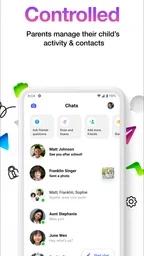
- Parent-managed contacts help limit who children can message.
- Children can make video calls with approved contacts.
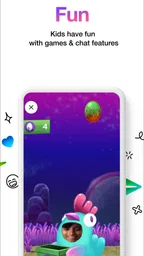
- Fun stickers and drawing tools make chats more engaging.
- Parents can review contact requests before they are approved.
- The app offers a child-focused space separate from regular Messenger.
What could be better
- A parent must have a Facebook account to set up the app.
- Children may need an adult's help to resolve account issues.
- Availability and features can vary by country and device.
- Some families may prefer messaging without a social platform account.
- Screen time can increase if children use chats and games often.





