
Messages review
 Analysis by Appsdrops
I like Messages best as a practical alternative for people who want texting to feel a little less hurried. Its appeal is not that it tries to replace every communication tool on a phone; it is that it focuses on ordinary SMS and adds scheduling and other smart touches to that familiar routine. In my view, that makes it worth considering if you often remember a message at the wrong moment, or want a straightforward place for text conversations without adopting a broader social platform.
There is a useful distinction to keep in mind before installing it: this is a messaging app, not a promise of a new way to communicate with everyone. SMS still depends on the usual phone-number-based habits, and the value of changing apps comes down to whether its workflow suits you better than the texting option already on your device. The scheduling feature gives it a more specific reason to try than a simple change of appearance.
Where scheduled texting earns its place
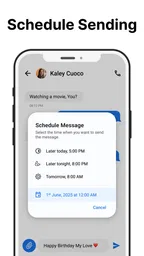
The most persuasive use case is sending a message at the right time without having to remember that time yourself. I might draft a reminder for a family member in the evening but prefer it to arrive the next morning, or prepare a birthday message before the day gets busy. Scheduling turns those small intentions into something I can handle when they occur to me, rather than relying on memory or setting a separate reminder to send the text later.
That convenience is also a matter of social tact. A message composed late at night can be queued for a more considerate hour, while a practical note can be prepared during a quiet moment and sent when it is relevant. I would still review the recipient and wording before relying on a scheduled message, especially for anything time-sensitive. A delayed text is helpful only when the timing and details are right.
Scheduling can also reduce the friction of recurring personal routines. For example, I can prepare a one-off message about meeting arrangements in advance instead of interrupting the rest of my day to send it at the last minute. I would not treat it as a full task-management system, though. Its strength is handling a text I already know I want to send, not organizing every responsibility around that text.
The app’s pitch is deliberately focused: fast, simple SMS with scheduling and smart features. That focus suits people who want to stay with familiar text conversations rather than move friends and relatives to a new service. It also makes the app easier to judge. If you want more control over when ordinary messages go out, there is a clear reason to explore it; if you do not, the case for switching is less compelling.
A familiar category with a distinct trade-off
As a communication app from SMS Text Messages, Messages sits in the everyday texting category rather than the group-chat or social-network space. That matters because SMS is useful precisely when the other person does not need to join a separate community or learn a new service. Compared with a typical built-in texting app, the main reason to consider this one is its emphasis on scheduling and smart tools, not a different underlying social experience.
Compared with internet-based messengers, the trade-off is just as important. Those apps can be a better fit when your conversations depend on rich media, elaborate group features, or a shared platform that everyone already uses. Messages makes more sense when the task is simply to send a text to a phone contact and when a scheduling option could save you effort. I would choose based on the people I contact and the kind of messages I send, rather than assume one app should handle every conversation.
The developer’s name is SMS Text Messages, and the app has an average rating of 4.0 from around 19,000 ratings, with about 1,400 written reviews. That gives a prospective user a broad signal of how it is being received, but I would not use a rating alone to decide whether it fits my routine. For a texting app, the deciding questions are more personal: whether its message flow feels comfortable, whether scheduling is genuinely useful to you, and whether your usual contacts are reachable in the way you expect.
What to check before making it your default
One sensible way to try it is to start with low-stakes messages. I would send a normal text, then test a scheduled note to someone who knows I am trying a different app. That small trial lets me see whether the app’s basic rhythm works for me before I trust it with an important reminder. It is a practical habit for any replacement messaging app, but especially useful when the feature that sets this one apart is about timing.
I would also be deliberate about the difference between drafting and sending. Scheduling is not the same as remembering to check whether plans have changed. If I prepare a message about a meeting and the arrangement shifts, I need to revisit that scheduled text rather than assume the app knows the new context. The feature saves a step; it cannot make a decision about whether the message is still appropriate.
For people who communicate with the same few contacts often, a little experimentation can show whether scheduling is a genuine habit or merely an attractive idea. Try it for a useful reminder or a message you would otherwise postpone, then notice whether it made the exchange easier. If you find yourself rarely using the option, the familiar SMS basics may not justify changing from the app you already know.
Messages is free to install, rated for Everyone, and has more than five million installs. It was released on August 17, 2023, and its current version is 1.59, with Android 7.0 as the minimum operating-system requirement. Those details make it accessible to a wide range of Android users, but they do not settle the more important question of fit: a free app is still an unnecessary addition if its particular workflow does not help you.
Who will appreciate it—and who may not
I would recommend giving it a try if you regularly think of texts ahead of time, need to send reminders at a chosen moment, or want an SMS-focused option that adds scheduling to the routine. It is especially suited to someone who prefers composing messages when convenient instead of keeping a mental note to send them later. The feature can be quietly useful rather than something you interact with constantly.
I would be less enthusiastic about recommending it to someone who is already happy with a built-in messaging app and never misses a chance to send a text. The benefits are likely to feel modest in that case. It may also be the wrong primary choice if nearly all of your conversations happen in a particular internet messenger, where your contacts, group discussions, and shared media already live. Switching the SMS app will not make those other conversations disappear or become more convenient.
There is also a cost consideration beyond the initial download. The app is free, but it offers in-app purchases priced at $49.99 per item. I would check what an offered purchase covers before buying anything and decide whether the free experience already handles the way I use it. That is a sensible boundary for a utility app: pay only if a clearly useful addition matters to your own routine, not simply because an option appears in the app.
My verdict on Messages
My overall view is that Messages has a clear, everyday purpose: it brings scheduled sending and smart features to ordinary SMS, which can make texting more considerate and less dependent on memory. The best evidence of its value is not a long list of promises but a simple scenario: write a message when you have a moment, then arrange for it to reach someone when the timing makes sense. For people who have wanted that workflow, it is a meaningful improvement over sending everything immediately or trying to remember later.
Its limitation is the same focus that gives it character. If you need a full-featured internet messenger, or your current texting app already fits your habits, Messages may not change enough to become indispensable. I would test it with a few ordinary conversations and one low-risk scheduled message before making it my default. For SMS users who value timing and a straightforward routine, it is a sensible app to try; for everyone else, switching is optional rather than necessary.
What we like
- Messages works smoothly with Android phones and tablets.
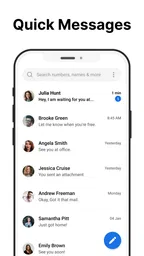
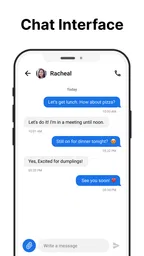
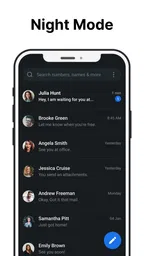
- The interface makes conversations easy to find and manage.
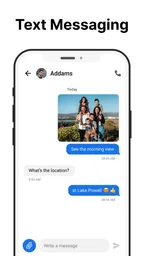
- Users can send photos and videos in their chats.
- Spam protection helps flag suspicious messages.
- Scheduled sending lets users choose when a message goes out.
What could be better
- Some features depend on the phone carrier and region.
- RCS features require compatible devices and network support.
- The app may ask for access to contacts and other phone data.
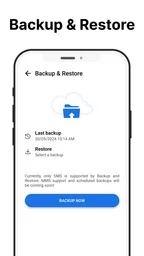
- Message backups may require a separate setup.
- Some users may prefer more options to customize the interface.





