

Messages - Text Messenger App review
 Analysis by Appsdrops
I’d consider Messages - Text Messenger App if I wanted a dedicated home for ordinary SMS and MMS, especially if scheduling texts and screening unwanted messages matter more to me than extra chat features. Its value depends partly on the kind of messaging I do: a short text to someone nearby has different needs from a picture message sent while I’m moving between networks. I’d treat it as a practical messaging option, not assume it can replace every conversation app.
Everyday texting, with connectivity in the picture
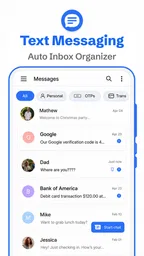
This is a communication app from Apps Specials. The core job is familiar: sending and receiving SMS and MMS. The added appeal is a focus on managing messages, including spam protection and the ability to schedule a text. Those tools can make a simple inbox more useful, but they don’t change the basic dependence of mobile messaging on a working connection and the phone’s messaging setup.
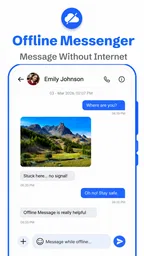
That distinction matters in real life. If I’m sending a routine SMS, I think about whether my phone can reach the mobile network, rather than whether the recipient is currently using the same app. MMS can be more sensitive to connectivity conditions, so I wouldn’t judge a delayed picture message as proof that the app itself is broken. A stable signal and a moment to check the message state are often more useful than repeatedly tapping send.
The app has a 3.9 average from around 15,000 ratings, with roughly 229 written reviews, and it has passed one million installs. That gives me a sense that it has found an audience, though popularity alone doesn’t tell me whether its inbox will suit my habits. I’d use the rating as context, then decide based on whether its SMS-and-MMS focus fits the way I communicate.
Where scheduling helps—and where it does not
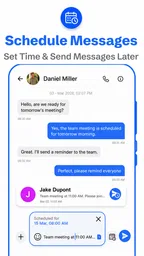
Scheduling is the feature I’d put to work before treating it as a novelty. If I remember late in the evening that I need to text someone the next morning, setting the message up in advance can help me avoid either waking them or trusting myself to remember later. It also suits recurring personal routines, such as sending a reminder at an appropriate time, provided I’m careful to review the recipient and wording before scheduling.
There is an important practical trade-off: scheduling a message is only useful if the app and phone can carry out the send when the planned time arrives. I wouldn’t rely on a scheduled text for anything urgent or consequential without checking how it behaves on my own device. For a flexible reminder, it’s convenient; for a time-critical update, I’d send the message myself and confirm it has gone through.
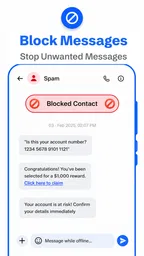
Spam protection is another potentially useful part of the package. Unwanted texts can make a normal inbox harder to scan, and filtering can reduce that distraction. I’d still review anything filtered from time to time, especially if I’m expecting a message from a new contact or a service I don’t regularly hear from. A filter is a helpful assistant, not a substitute for checking whether an important message has been misplaced.
Using it while moving between places
On a commute, I might draft or schedule a straightforward note before leaving, then check for a reply when I have a moment. That is a better fit than composing a long message while distracted or trying to send several attachments in a weak-signal spot. If a text appears to stall, I’d first check signal and wait briefly rather than create duplicate messages by pressing send repeatedly.
At home or work, where reception is more dependable, MMS is easier to treat casually—but I’d still be patient with a picture message. Sending media is not the same as sending a short text, and a slow connection can make the experience feel less immediate. When a photo is important, I’d make sure it has actually been sent before closing the conversation or assuming the recipient has received it.
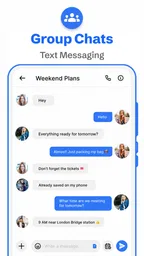
This app is for people who still rely on phone-number messaging, including users who want a separate tool for texts rather than a feature-rich social platform. It may also suit someone who benefits from planning a message ahead or wants help keeping spam out of view. If most of my conversations happen through internet-based group chats, reactions, voice notes, or shared media, I’d probably stay with the service my friends already use instead of expecting this app to replace it.
What to do when a message does not arrive
When sending fails, I’d separate a connection problem from an inbox-management issue. First I’d check whether the phone has a usable mobile signal and whether other ordinary communications are working. Next I’d inspect the conversation to see whether the message is still pending or whether I may have sent it already. That simple pause can prevent duplicate texts, which are especially awkward when the first message was delayed rather than lost.
If a message is missing, I’d also look beyond the main inbox, since spam protection can affect what I notice. A legitimate message from an unfamiliar number might be treated differently from a conversation I regularly use, so checking filtered messages is a sensible habit when I’m waiting for something important. I would not assume every missing text is a filtering mistake; the sender, network, and recipient’s setup can also affect delivery.
Recovery is easiest when I keep the message itself simple. If a long MMS does not go through, I might send a brief SMS explaining that I’ll resend the image later, rather than repeatedly attempting the same transfer. That is a small workflow adjustment, but it avoids leaving the other person uncertain and reduces the chance that several delayed copies arrive together.
Keeping messages manageable without over-relying on filters
For a data-conscious routine, I’d use SMS for short, practical details and reserve MMS for cases where a photo or other media genuinely helps. That is less about assuming the app can control data use and more about choosing the right kind of message for the situation. A concise text is usually easier to send and read when either person has a patchy connection; a media message can be worth the wait when the image is the point.
I’d also keep scheduled messages modest and specific. A reminder such as “I’ll call after work” is safer to schedule than a message whose meaning depends on what happens later. If plans change, I’d revisit the scheduled text rather than let an outdated note go out automatically. This is the kind of small safeguard that makes scheduling more dependable in practice.
Messages is free to install, with in-app purchases listed from $2.49 to $29.99 per item. I’d start by checking whether the free experience covers my normal texting routine before paying for anything. Since the app’s central appeal is straightforward SMS and MMS management, the purchase decision should come down to whether any paid option solves a real need for me, not simply because it is available.
Who will get the most from it
The app is rated for Everyone, and its current version is 2.4.7. It requires Android 8.0 or later, so I’d check the phone’s operating system before planning a switch. It was released on August 13, 2024, and the developer is Apps Specials. Those details are useful for deciding whether it can run on a particular device, but the more personal question is whether I want a focused text messenger or a broader communication platform.
Compared with a phone’s usual messaging option, the reason to try this one is its combination of message scheduling and spam protection alongside SMS and MMS. The trade-off is that a dedicated app is another interface to learn, and the features only help if they fit the way I handle messages. I wouldn’t switch just to get a different-looking inbox; I’d switch if scheduling or spam management would make a recurring annoyance easier.
I’d skip it if I need a service built around internet messaging, dependable group coordination across multiple platforms, or a particular set of chat features I already use elsewhere. I’d also avoid relying on any messaging app as the sole channel for urgent information. For time-sensitive plans, a quick confirmation through a method both people know is working is a better safeguard than assuming an SMS or MMS will arrive instantly.
My connectivity verdict
My view of Messages - Text Messenger App is that it makes the most sense as a practical SMS-and-MMS tool for people who want a little more control over when messages go out and which unwanted texts distract them. Its strengths are easiest to appreciate in ordinary routines: preparing a considerate morning message, keeping a personal inbox less cluttered, or choosing a short text when reception is unreliable.
Its limits are just as important. Scheduling does not make delivery certain, spam filtering deserves occasional attention, and media messages can feel less dependable when connectivity is poor. If those are trade-offs I can work with, I’d give it a try as a focused alternative to a basic messaging setup. If my conversations depend on richer online chat or instant group updates, I’d choose a service designed around those needs instead.
What we like
- Simple layout makes everyday messaging easy to navigate.
- Message search helps locate older conversations quickly.
- Custom notifications make important chats easier to notice.
- Contact photos add a personal touch to conversations.
- Useful tools help organize busy message threads.
What could be better
- Some features may depend on your phone or carrier.
- The app may show ads in the free version.
- Customization options may be limited on some devices.
- Message delivery can vary with network coverage.
- Switching from another messaging app may take time.





