




Messages: SMS Texting App review
 Analysis by Appsdrops
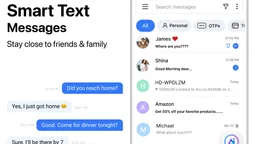
I tend to judge a texting app by the small moments: whether I can find the right conversation quickly, whether a message goes out when I need it to, and whether the app fits the way people in a household actually share information. Messages: SMS Texting App is a straightforward communication app for SMS and MMS, with scheduling and message organization as its main practical draws. It is worth considering if you want a focused place for ordinary texts rather than another social platform, though it is not a substitute for a shared family account or a full coordination service.
Where it fits in a shared household
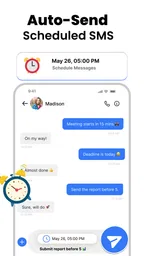
Imagine I need to tell a relative to pick up a package, but I know they may be driving or busy when I remember. Scheduling a text lets me write the reminder while it is on my mind and choose a more useful time for it to be sent. That is a modest feature with real value: it can help avoid a late-night ping or keep a practical reminder from getting lost in my own day.
The app’s focus on SMS and MMS also suits people who need to reach contacts through familiar phone messaging rather than persuade everyone to join the same chat service. For a household coordinating errands, appointments, or a quick change of plans, that simplicity can matter more than group-chat extras. I would still treat it as a personal messaging tool, not a shared household inbox: each person should use their own device and messaging setup rather than assume the app creates a common account or shared history.
That distinction is especially useful when several people take turns using one device. A text app can make it easy to send a message from the device, but it does not make the sender’s identity self-explanatory. Before sending anything important from a shared phone, I would check which person’s conversations are open and make sure the recipient will understand who is writing. For sensitive topics, a personal device is the safer, clearer choice.
Keeping setup and account boundaries clear
Messages is developed by Apps Specials and is free to install, with optional in-app purchases priced from $1.99 to $49.99 per item. The app is listed as suitable for Everyone, but an age label is not a household-use plan. Adults setting up a phone for a child should still decide who owns the device, who can access its messages, and what expectations apply to texting. Those are family decisions, not something I would assume the app settles for them.
On a shared device, I would establish a simple rule before relying on scheduled messages: the person who creates one should know when it is due and check that it is still appropriate if plans change. A reminder composed for one person may become confusing if another household member is now using the phone or if the situation has changed. Scheduling is helpful precisely because it separates writing from sending, but that separation also makes a quick review worthwhile.
I would also avoid treating a scheduled text as a dependable substitute for urgent contact. It is better for a routine reminder than for an emergency or a last-minute change where I need to know the other person has received the message. If the timing matters, I would send the text directly and follow up through an agreed method. That is a practical boundary, not a flaw unique to this app.
Organizing messages and coordinating plans
The most useful workflow I see is to use scheduling for predictable, low-pressure communication and keep immediate conversations immediate. For example, I might prepare a reminder about a morning appointment the night before, then use the regular conversation for any change to the plan. This keeps the app from becoming a mental checklist while avoiding the false confidence of assuming a scheduled text can adapt on its own.
Message organization is the other stated strength, and it matters most when a phone handles a mix of family, work, and practical conversations. Rather than relying on memory, I would use whatever organization tools are available in the app to make important threads easier to revisit, then develop a habit of checking the conversation itself before replying. A saved or organized thread can reduce searching, but it does not replace confirming the latest details in a changing plan.
There is a useful trade-off here compared with the usual alternatives. A built-in messaging app may be the easiest option if it already handles texts reliably and has the organization features you need. A social messaging service may be better when a group needs reactions, richer collaboration, or communication across devices and accounts. Messages makes more sense when the task is conventional SMS/MMS plus better control over when a text is sent, not when the household needs a sophisticated shared calendar or project board.
For shared household coordination, I would keep the content concise and specific: who is doing what, and when. A scheduled message such as a pickup reminder works better than a long set of instructions that could become outdated. If several people need to respond or divide responsibilities, a group conversation or a dedicated planning tool may be clearer than sending separate texts. The app’s strengths are most apparent when the communication is simple enough for a text to handle.
Age, trust, and everyday use
The Everyone content rating makes the app broadly accessible, but it should not be confused with a guarantee that every conversation is appropriate for every child. Text messages can contain personal information, and a younger user may need guidance about who to contact and what not to share. I would focus on those habits and on the household’s device rules rather than assume the age rating provides supervision.
Trust also means not using scheduling to speak for somebody else. On a family phone, a message sent later can look as if it came from whoever happens to be associated with the device, even if another person wrote it earlier. I would make authorship clear when that could affect a decision, and I would not schedule a message from a device that other people use without checking who can see or manage its conversations.
In day-to-day use, the app’s appeal is its narrow purpose. It is not trying to turn routine texting into a social feed. That can be a relief for someone who wants a place to handle ordinary messages and set a time for a reminder. On the other hand, anyone expecting a full suite of family safety controls, shared task lists, or elaborate group planning should look elsewhere rather than infer those capabilities from the app’s communication focus.
What the app’s track record suggests
Messages has a 3.9 average rating from around 191,000 ratings, and it has passed 10 million installs. That suggests a substantial audience, though I would not treat popularity as proof that it will fit every phone or household routine. The app’s current version is 2.7.12, and its listed minimum operating system is Android 7.0, so compatibility is worth checking against the device before making it part of a family’s routine.
The in-app purchase range is broad enough that I would pay attention to any purchase screen before confirming a transaction, especially on a device used by more than one person. The app is free to start, but that does not mean every optional item is included. If a child or another family member can use the device, clear purchase expectations help prevent surprises. I would evaluate the basic texting and organization workflow first, then decide whether any paid option is genuinely useful.
Its large audience and ordinary messaging focus make it approachable, but the rating also leaves room for mixed experiences. I would install it with a specific need in mind—perhaps scheduled reminders or a more manageable message list—and judge whether those parts improve the routine. If the default phone app already does the job, switching solely because this app has a large install base may not be worthwhile.
My household verdict
I would recommend Messages: SMS Texting App to someone who mainly wants conventional texts, occasional MMS, scheduled messages, and a way to keep conversations easier to manage. It is particularly handy for non-urgent reminders that are easy to forget when the moment to send them is inconvenient. My strongest practical tip is to use scheduling for stable plans, review queued messages when circumstances change, and reserve urgent coordination for a direct conversation.
I would skip it if the main goal is a shared family account, built-in supervision, a communal inbox, or a complete system for dividing household tasks. Those needs call for tools designed around shared access and explicit coordination, while this app is centered on personal messaging. For a shared phone, I would also be cautious about who can see existing conversations and who is responsible for messages set to send later.
Overall, Messages: SMS Texting App feels like a practical option rather than a household management solution. Its free entry point and focused communication tools make it easy to consider, while optional purchases and the need to manage account boundaries call for a little care. If your household simply needs ordinary texting with more intentional timing, it may fit well; if you need everyone to collaborate around the same plans and permissions, a different kind of app will serve you better.
What we like
- Supports scheduled messages for sending texts later
- Lets you pin important conversations for quick access
- Includes spam blocking to help filter unwanted texts
- Offers customizable notification sounds for conversations
- Supports group messaging for keeping chats together
What could be better
- Some features may require a paid subscription
- Ad-supported features can interrupt the messaging experience
- Advanced options may take time to locate
- Message delivery depends on your carrier and network
- Some features may not work with every device or carrier





