






Messages - SMS Text Messaging review
 Analysis by Appsdrops
I like a messaging app best when it makes ordinary conversations easier to manage rather than demanding attention of its own. Messages – SMS Text Messaging is built for the familiar task of sending texts, with extra tools aimed at keeping a crowded inbox more orderly. Its appeal is less about changing how people communicate and more about giving everyday SMS a few practical safeguards and ways to regain control.
Texting without adding another social layer
As a communication app from CoreSuite Apps, Messages – SMS Text Messaging keeps its focus on messages rather than trying to become a social network. That makes it a reasonable option if you want a dedicated place for SMS and prefer not to move routine conversations into a separate online service. It is free to install, rated for Everyone, and has an average score of 4.4 from around 870 ratings, with more than 100,000 installs.
The basics are easy to understand: open a conversation, read what came in, and reply. The useful distinction is the supporting toolkit. Backup can help protect message history, a spam blocker can help reduce unwanted interruptions, and private chats offer an added way to keep selected conversations apart from casual inbox traffic. Those tools matter most when texting is still central to coordinating work, family, appointments, or day-to-day plans.
I would not treat those features as a reason to change how everyone in your life communicates. SMS remains SMS: this is a fit for people who want to handle text conversations more deliberately, not a replacement for every messenger, group platform, or calling app. If your contacts mostly use an internet-based service for richer media and large groups, the usual option may still be more convenient.
Where it fits into a daily routine
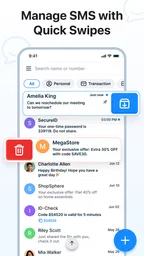
A realistic use case is a busy weekday when several kinds of messages arrive at once: a family update, a delivery notification, and an unfamiliar number trying to get your attention. A spam blocker can make that mix less noisy, while private chats can help separate a conversation you do not want sitting in plain view among routine exchanges. The point is not to check more often; it is to make each check feel easier to sort.
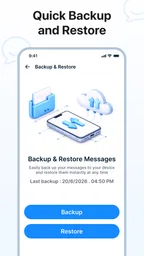
Backup is also worth thinking about before you need it. If you rely on SMS for details you may want to refer back to, keeping a backup habit can reduce the risk of losing a useful thread when changing devices or dealing with a reset. I would still approach backup as a layer of protection, not a reason to keep every conversation forever. Decide which messages are worth retaining and review that choice periodically.
Conversation flow and the value of a cleaner inbox
The strongest case for this app is that it brings several SMS concerns together: everyday conversation, unwanted messages, privacy, and message history. That combination can make the inbox feel less like an undifferentiated stream. When a text arrives, it helps to know whether it deserves a reply now, can wait, or should not be allowed to interrupt you again.
There is a useful workflow here: deal with important conversations first, put sensitive ones in the private-chat area, and treat suspicious messages cautiously rather than engaging with them. This is a small change, but it can improve clarity. Instead of scanning every notification as if it were equally urgent, you can make a more deliberate choice about where your attention goes.
The trade-off is that extra organization requires some upkeep. A private area only helps if you remember where you placed a conversation, and a spam filter is not a substitute for judgment. I would review how the app handles messages before relying on it for anything important, and I would keep an eye on whether legitimate texts are being separated in a way that suits your habits.
For people who want advanced group coordination, expressive reactions, or a common experience across many devices, a mainstream internet messenger may offer a smoother flow. Messages is more compelling when your priority is ordinary SMS and the practical work around it. It does not need to be the center of every conversation to be useful; it can simply make the conversations that still arrive by text less distracting.
Attention, interruptions, and useful limits
Texting often feels urgent because it is immediate, even when the message itself is not. A dedicated SMS app cannot decide what deserves your attention, but spam blocking and a more organized approach can help reduce avoidable interruptions. I find that the best habit is to check messages at a natural pause rather than letting each incoming text dictate the rhythm of the day.
There is a limitation worth keeping in mind: a spam blocker can help with unwanted messages, but no filter should be treated as perfect. If you are waiting for an important text from an unfamiliar number, check filtered or separated messages rather than assuming nothing useful has arrived. That small check is a sensible safeguard, especially when appointments, deliveries, or one-time arrangements depend on SMS.
Private chats can support discretion, but the feature name alone should not be taken as a promise about every aspect of security. I would use it as an organizational and privacy-minded option, while avoiding the assumption that it makes a conversation suitable for sharing information that should never be sent by text. For highly sensitive matters, a service designed around that specific need may be a better choice.
Boundaries that keep texting manageable
One practical way to use Messages is to set a simple personal rule: respond when it is convenient, not merely because a notification appeared. Then use the app’s tools to support that boundary. Spam control can limit some unwanted contact, while separating selected conversations can make it easier to decide when to open them. The benefit is modest but real: your inbox becomes something you manage, rather than a queue that sets your schedule.
Another useful habit is to keep the backup decision intentional. Before relying on message history, consider whether you actually need old threads and whether your backup routine matches that need. A long archive can be handy for finding an address or an arrangement, but keeping everything without thought may create clutter. I would retain what has practical value and clear out conversations that no longer serve a purpose.
There is also a human boundary to consider. A filter can reduce unwanted messages inside the app, but it cannot prevent people from contacting you through other channels or resolve a difficult relationship. If a particular conversation is stressful, the app’s organization may help you handle it on your terms, but the broader decision about whether and how to respond remains yours.
Who should choose it—and who may prefer another app
I would consider Messages if I wanted a free SMS-focused app that brings spam blocking, private chats, and backup into one place. It is especially plausible for someone whose texting needs are straightforward but whose inbox has become hard to scan. The current version is 1.0.22 and requires Android 7.0 or later, so it is aimed at Android users with a compatible device rather than people looking for an iPhone messaging replacement.
I would be less likely to recommend it to someone already satisfied with their phone’s built-in messaging app, especially if that app handles their contacts and notifications cleanly. Switching only makes sense if the additional tools solve a real problem. Nor would I choose it as my main option for conversations that depend on rich group features or a shared cross-platform chat experience; the familiar alternatives in that category may make more sense for those needs.
The app is free, with optional in-app purchases listed at $7.99 per item. That makes it easy to try the basic experience, but I would check the purchase details in the app before paying for anything and decide whether the added value matches how often I use the feature. The developer is CoreSuite Apps, and the app has 26 written reviews alongside its broader ratings, so I would treat the overall score as one signal rather than a guarantee that every workflow will suit me.
My verdict on its everyday rhythm
Messages – SMS Text Messaging is most useful when you want SMS to feel calmer and more manageable, not when you expect a new way to communicate. Its combination of spam blocking, private chats, and backup addresses three different sources of friction: unwanted contact, conversation visibility, and the risk of losing useful history. Used thoughtfully, those tools can help you give texts clearer boundaries and spend less attention sorting through noise.
I would try it if SMS is still a regular part of your day and your current inbox feels too exposed or cluttered. I would stay with a built-in app if it already does the job, and choose a richer messenger if most of my conversations happen in groups or across platforms. My recommendation is to treat it as a practical SMS organizer, not an all-purpose privacy guarantee or a universal messaging solution. That is a modest role, but for the right person it is exactly the one worth having.
What we like
- Supports SMS and MMS messaging for everyday communication.
- Lets you organize conversations in a familiar inbox layout.
- Offers notification controls for incoming messages.
- Can work without mobile data when your carrier supports SMS.
- Provides a straightforward option for users who prefer texting.
What could be better
- SMS and MMS charges may apply depending on your carrier plan.
- Advanced features can vary by device and Android version.
- Messages may lack end-to-end encryption.
- Spam filtering may not catch every unwanted message.
- The app may not sync conversations across all devices.





