




Messages - SMS Text Message review
 Analysis by Appsdrops
Choosing an SMS app is less about finding the most elaborate messenger and more about finding one that fits the way you communicate every day. I look for a clear texting experience, practical tools that reduce small hassles, and enough flexibility for both one-to-one conversations and group chats. Messages - SMS Text Message is aimed squarely at that everyday use: it is a free communication app from Fronex Lab, presented as a fast SMS app with scheduling, group chat, and smart features.
What to consider before choosing an SMS app
Before switching, it helps to separate the essentials from the extras. If most of your conversations are straightforward texts, a good fit should make it easy to keep up with messages without turning the basic task of sending one into a project. If you often need to coordinate with several people, group chat can matter more. And if you regularly want a message to go out later, scheduling may be a more meaningful convenience than a long list of features you rarely touch.
That practical checklist is where this app makes its case. Its description points to three useful areas: fast texting, scheduled messages, and group conversations, alongside smart features. Those are familiar needs rather than niche promises, so the app’s appeal is easy to understand. I’d consider it most seriously if I want an SMS-focused option that brings those capabilities together without asking me to pay for the download.
There is also the question of trust and familiarity. A messaging app becomes part of a daily routine, so changing it can feel more significant than changing a casual utility. Messages has a 4.1 average from around 4,200 ratings, with roughly 328 written reviews. Those figures offer some context about how people have responded, but I’d still judge the app by whether its approach suits my own texting habits.
The everyday tools that matter
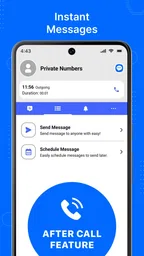
Scheduling is one of the most practical ideas in the app’s feature set. It can be useful when I want to prepare a message at a convenient moment but send it later, such as when coordinating plans or remembering to follow up. The appeal is not that every text needs a timetable; it is that the option can help when timing matters. If scheduled sending is already part of how I communicate, having it in an SMS app may make that routine feel more straightforward.
Group chat addresses another common situation: keeping several people in the same conversation instead of repeating the same information in separate texts. That can be handy for family plans, friends arranging a meetup, or any small group that needs to stay on the same page. The feature is relevant to everyday communication, though its value depends on how often the people I contact use group conversations and whether SMS is where those conversations naturally happen.
The promise of fast texting is similarly direct. Most people do not want their messaging app to demand attention for its own sake; they want to get into a conversation, send a thought, and move on. A simple focus on SMS can be appealing if I prefer a familiar style of communication over a broader platform with many different social features. The app’s smart features are part of its pitch, but I’d treat that phrase as a general indication of added convenience rather than assume a particular tool or behavior.
Where Messages may be the right fit
For a straightforward SMS routine, Messages puts practical communication tools at the center. That makes it worth considering if I mainly want to send and receive texts, occasionally organize a group conversation, and appreciate the option to schedule a message. Rather than positioning itself around a specialized audience, it speaks to common texting tasks, which gives the app a broad potential use case.
The no-cost price also lowers the barrier to trying it. I can consider whether its style suits me without committing to a purchase. That does not automatically make it a better choice than an app I already know, but it does make a casual comparison more approachable. The app has passed 500,000 installs, suggesting that it has reached a substantial audience, while the rating and written feedback provide additional signals to weigh alongside my own experience.
Its age rating is Everyone, so the app is presented for a general audience. For a household where different people use phones for ordinary texting, that broad positioning may be reassuring. Still, the real decision is personal: I’d choose it because the described functions match a communication habit, not simply because it has an accessible rating or a sizeable install count.
The app is at version 17.0 and supports Android 7.0 or later. That makes the operating-system requirement a useful part of the decision, especially if I am setting it up on an older Android device. It is also worth checking that the phone I intend to use meets that requirement before making a switch. Messages was released on June 17, 2025, so it is a relatively recent option compared with long-established messaging choices.
When another kind of messaging app may suit you
Messages is not automatically the right answer for every communication style. Someone whose conversations depend on a particular social platform may prefer to stay with that platform, especially if the people they talk to already use it. Likewise, a person who values a wider messaging environment may find that an SMS-centered app is not the category they want. Those are differences in purpose, not shortcomings that can be settled without knowing how someone communicates.
It helps to compare alternatives by category rather than by assuming one universal winner. An SMS-oriented app is a natural place to start when ordinary text messaging is the priority. A broader messaging platform may make more sense if most conversations happen within that service. A communication tool built around workplace or community coordination could be a better fit when chats need to serve a more specific group. Each category answers a different need, so the best option depends on where conversations already happen and what I need them to do.
There is also a strong case for keeping the app already built into a phone if it does everything I need. Familiarity has real value: I know where my conversations are, and the people I text do not need to change their routines. Switching makes more sense when I have a clear reason, such as wanting the scheduling or group-chat emphasis offered here, rather than simply wanting to try something new.
Thinking through the cost of switching
Although Messages is free, changing messaging apps still has a practical cost in time and attention. I would want to think about how comfortable I am learning a different interface, how I manage my existing conversations, and whether the people I contact will notice any change in the way we communicate. The app’s listed features provide a reason to explore it, but convenience only counts if the new routine actually feels easier.
A sensible way to decide is to start with the task that most often frustrates me. If I frequently need to send a text later, scheduling is a clear point of interest. If I repeatedly coordinate with several people, group chat deserves a closer look. If neither situation comes up much, the app may not offer enough reason to leave a familiar setup. This keeps the choice grounded in actual habits rather than a feature list alone.
I would also compare the app with the communication options already available on my device and the services my contacts use. The right choice is not necessarily the one with the most features; it is the one that supports the conversations I have without adding unnecessary steps. Since Messages focuses on SMS and everyday conveniences, its strongest case is for people who want those priorities in one place.
My recommendation
I’d recommend Messages - SMS Text Message to Android users looking for a free SMS app whose headline conveniences include scheduled messages and group chat. It has a clear, approachable purpose, and those tools can make ordinary texting more flexible for people who will use them. Its broad audience, meaningful adoption, and 4.1 average make it a reasonable candidate to compare with the app already handling your texts.
I would not switch just because the app advertises smart features or because trying a new messenger sounds appealing. I’d switch if its emphasis matches a real need: sending a text at a chosen time, managing conversations with a group, or simply looking for an SMS-focused alternative. If another kind of messaging service better matches where my contacts are, that category may be the more natural choice.
Overall, Messages is best viewed as a practical option rather than a universal replacement for every messaging tool. Its pitch is easy to grasp, its core use cases are familiar, and the free price makes it approachable for anyone curious about a different SMS experience. If you use Android 7.0 or later and want a text app centered on everyday communication, it is worth considering; if your current setup already fits your habits, there is no need to switch without a clear benefit.
What we like
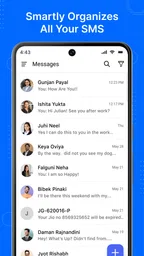
- A clean inbox makes recent conversations easy to find.
- Message previews help you scan incoming texts quickly.
- Contact photos make chats easier to recognize.
- Conversation threads keep related messages together.
- Quick access to contacts simplifies starting a new chat.
What could be better
- Spam protection may not catch every unwanted message.
- Notifications can become distracting during busy conversations.
- Texting features depend on your mobile carrier and plan.
- Older devices may run the app less smoothly.
- Some features may vary by phone model or Android version.





