





Messages For Android review
 Analysis by Appsdrops
I look at a messaging app differently from a game or a photo editor: it may sit between me and important details, from a delivery update to a family member’s change of plans. That makes trust and predictability just as important as a tidy screen. Messages For Android is a free communication app from Akshay Mehta, and its purpose is straightforward: handling text messages. I’d consider it when I want a dedicated SMS app, but I’d also take a careful look at its available choices before making it my default for sensitive conversations.
A focused role, with trust worth checking
The app has an average rating of 4.0 from around 8,100 ratings, with about 1.4 thousand written reviews and over one million installs. Those figures suggest that it has found an audience, but they do not tell me whether it suits my habits or how it handles a particular message. For a communication tool, I treat popularity as context, not as proof of privacy or reliability.
Its public description is brief, and the app’s name and “Messages” label make its intended job clear. That simplicity can be useful if I want an app centered on SMS rather than a service built around social feeds, group communities, or internet-based chat. The trade-off is that a short description gives little practical guidance. I would not assume that familiar features from another messaging app—such as cloud syncing, encryption, or advanced organization—are present here without seeing them in the app itself.
The app was released on February 1, 2024, and its current version is 5.8. It is rated for Everyone and supports Android 8.0 or later. That makes it a possible option for people using a range of Android devices, including some older ones, although compatibility alone does not guarantee the same experience on every phone. If a messaging app behaves differently on your handset, the phone’s SMS settings and manufacturer software can matter as much as the app.
Before switching, I would check which app is set as the phone’s default for SMS and what the setup screen asks me to approve. That is a practical trust check, not a claim about this app’s permissions: the choices shown on your device are the ones to evaluate. I would also read the current privacy information and any in-app explanations before moving private conversations into a new app. For a messaging tool, a little attention at setup is worthwhile.
What I would verify before making it my default
On Android, an SMS app’s role can depend on whether it is selected as the default handler. I would look for the system prompt that identifies the app taking that role and make sure I understand the effect before accepting. If I only want to explore the interface, I would avoid rushing through setup or changing defaults until I am ready to use it for everyday messages.
I would also inspect the app’s visible settings for controls that affect how messages appear and how notifications behave. If a setting is unclear, I would leave it unchanged rather than assume what it does. This is especially useful on a shared or frequently unlocked phone, where message previews can reveal more than the sender intended. A notification preview is a convenience; it is also a moment when someone nearby might see private information.
There is a difference between a choice being visible and its implications being obvious. I would read labels carefully, check Android’s own app and notification settings, and revisit the settings after an update if the interface changes. This approach avoids relying on guesses about features or data handling that I cannot substantiate. It also gives me a clear way to decide whether the app’s controls match my comfort level.
Everyday messages and sensitive moments
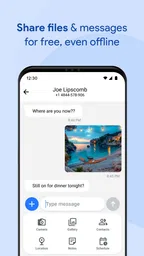
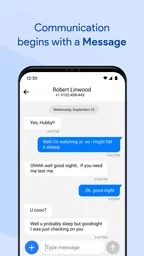
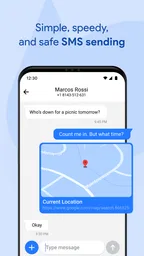
For ordinary logistics, a dedicated SMS app can be handy. Imagine a friend texting that a meeting place has changed while I am on the way. I can open the conversation, confirm the new location, and keep the exchange separate from email or a social platform. The practical benefit is not a special feature I would assume the app has; it is the familiar, direct use of SMS when both people are communicating by text.
Messages can also contain more sensitive material than a quick change of plans: a verification code, an appointment reminder, or a family update. In those moments, I would pay attention to the phone’s lock-screen behavior and whether notification text is visible. I would check those choices in Android rather than presume that installing a new messenger automatically protects the content. If someone else can regularly handle my phone, reducing message previews may matter more than changing the app itself.
For account security, I would distinguish SMS from internet chat. A text message arriving through a carrier is not automatically equivalent to an end-to-end encrypted conversation in a dedicated secure messenger. I would not use an SMS app as a substitute for a service with clearly explained encryption when discussing highly confidential information. That is a limitation of choosing SMS for the conversation, not a specific accusation about Messages For Android.
A useful habit is to treat one-time codes as temporary secrets: read them when needed, avoid forwarding them casually, and do not share them with anyone who asks unexpectedly. If I receive an unfamiliar message, I would verify the sender through another channel before following an instruction or sharing personal details. An app can present a message; it cannot establish that every sender is trustworthy.
How much control should I expect?
My test for a messaging app is whether I can understand what it is doing and make a deliberate choice about using it. I would review Android’s default-app selection, notification settings, and the app’s own visible options. If a control is missing or its effect is uncertain, I would not fill in the gap with assumptions. I would keep the phone’s existing setup until I had enough clarity to make a comfortable switch.
Messages For Android is free to install, with in-app purchases ranging from $9.99 to $44.99 per item. That means “free” does not necessarily describe every optional purchase. I would inspect the purchase screen and confirm what an item provides before spending money; I would not treat a paid option as necessary for basic texting unless the app clearly says so. If I do not need an optional extra, I can simply avoid buying it.
The app’s developer is Akshay Mehta. When evaluating trust, I would use the developer information and the privacy details shown through the app store as part of my decision, alongside what the app itself explains. I would not infer data practices from the developer’s name, the number of installs, or the fact that the app is rated for Everyone. Those details can help identify the product, but they do not answer every privacy question.
There is also a practical way to keep control during a trial: change one thing at a time. I might first inspect the app, then decide whether to make it the default, and only afterward adjust notifications. If I change several settings at once, it becomes harder to tell which choice caused an unexpected result. Keeping the old messaging option available until I am comfortable gives me an easy fallback if the new setup does not suit me.
Where it fits beside familiar alternatives
Compared with the messaging app already installed on many Android phones, a separate SMS app is worth trying only if its interface or available choices fit me better. The built-in option may be the simpler choice for someone who values continuity and does not want to change defaults. I would compare the actual screens and settings on my own device rather than assume that one app offers more organization or stronger privacy.
Compared with internet-based messengers, SMS has a different role. It is useful for reaching people through ordinary phone texting, but it is not automatically the best choice for rich group conversations, cross-device chat history, or sensitive discussions. If my friends and family already use a particular chat service, moving them to SMS may create friction. If I need stronger privacy guarantees, I would choose a service that clearly documents the protections I need instead of expecting an SMS-focused app to provide them.
This app is most plausible for someone who wants a straightforward Android text-message option and is willing to review the setup and settings. It is less suitable for a person who expects a clearly documented security model, extensive collaboration tools, or seamless conversation access across multiple platforms. Those are different needs, and a specialized alternative may serve them better.
My cautious verdict
I see Messages For Android as a possible everyday SMS choice, not an automatic upgrade over the app already on your phone. Its focused purpose and broad device compatibility may appeal if you want a separate place for text messages. The average rating and install count offer useful background, but I would base my decision on the app’s behavior on my own device and on whether its visible choices make sense to me.
My recommendation is to try it deliberately: review the setup prompts, inspect notification and privacy choices, and make it the default only when you are ready. I would keep especially sensitive conversations on a service whose protections are clearly explained, and I would avoid paying for an optional item unless I understand its value. If you want a simple SMS app and are comfortable checking those details yourself, it may be worth exploring; if you need explicit privacy assurances or advanced chat features, I would look elsewhere.
What we like
- Supports SMS and MMS messaging on compatible Android devices.
- Offers a familiar interface that is easy to navigate.
- Can send photos and other media through MMS.
- Works with contacts saved on your device.
- May be set as the default SMS app on supported phones.
What could be better
- Feature availability can vary by device and Android version.
- SMS and MMS charges may apply depending on your mobile plan.
- MMS delivery can be unreliable when mobile data is unavailable.
- It may lack advanced features found in third-party messaging apps.
- The app requires access to messages and contacts to work properly.





