
Maverik Rewards review
 Analysis by Appsdrops
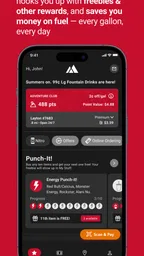
I judge a rewards app less by the prizes it advertises than by whether it makes everyday choices clear. Maverik Rewards is most useful when you already shop at Maverik and want one place to check on rewards, store locations, and opportunities to enter sweepstakes. It is a free business app from Maverik, Inc, and its focus is practical: give customers a reason to keep track of their visits and the benefits attached to them. My main advice is to treat it as a companion to shopping you already plan to do, not as a reason to spend more.
Useful context before signing up
The app has a 4.6 average from around 29,000 ratings, with over a million installs. That suggests plenty of people find it worthwhile, but ratings alone cannot tell you whether its rewards fit your routine. The deciding question is simpler: do you visit Maverik often enough for checking the app to be worth the small bit of attention it asks from you?
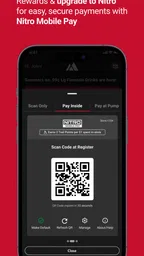
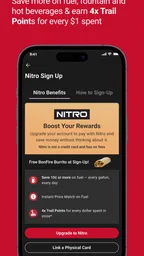
Its appeal is narrower than that of a general shopping or payment app. You are not choosing among many retailers or managing a broad household budget here. The experience is centered on Maverik, including ways to earn rewards, find stores, and take part in sweepstakes. If Maverik is already part of your regular errands or travel stops, that focus can make the app convenient. If it is not, the app has little reason to become a regular fixture on your phone.
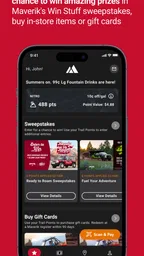
I also like to separate ordinary rewards from chance-based promotions when deciding whether a loyalty program is worthwhile. A sweepstakes entry can be a pleasant extra, but I would not count a possible prize as predictable value. The more grounded reason to use this app is whether its day-to-day rewards and store-finding tools are relevant to your own visits. That distinction helps keep expectations sensible.
The app is rated for Everyone, costs nothing to download, and was released in May 2014. It is now at version 7.4.3 and requires iOS 12 or later. Those details make the basic decision straightforward for compatible devices, though a free download does not by itself explain how an account works or what information a person may choose to share. I would look at the prompts shown during setup and make those decisions deliberately, rather than assuming every loyalty app handles them the same way.
What trust looks like in a rewards app
Trust here is not something I would infer from a polished screen or a large user base. The useful test is whether I can understand what I am being asked to do at the moment I do it: create or use an account, pursue a reward, enter a promotion, or look up a store. Those are different activities, and I would not treat consent to one as automatic consent to every other activity.
For a cautious first visit, I would install the app, review the account and privacy choices presented in the app, and pause before supplying details that do not seem necessary for the task I want to complete. If I only need to locate a nearby store, I would first see whether the location search can be used without granting device location access. If I am considering a sweepstakes, I would read its terms in the app before entering. These are sensible checks, not claims about particular settings or policies.
The developer is Maverik, Inc, which gives the app a clear connection to the retailer whose rewards it supports. That context is useful, but it does not answer every privacy question on its own. I would still make account choices based on the explanations shown to me, and I would avoid entering information simply because a screen makes it feel like a routine step.
Controls and choices to check for yourself
One practical way to approach any account-based rewards app is to distinguish between account access, device permissions, and promotional participation. They are not the same decision. A location permission, for example, is separate from whether you want to enter a sweepstakes; an account choice is separate from whether you want to receive promotional messages. I would review each request as it appears instead of tapping through a setup flow on autopilot.
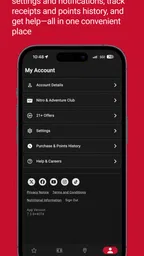
I cannot responsibly promise that a particular permission toggle, account deletion option, or communication setting is available without seeing it in the app. So my useful recommendation is procedural: check the app’s own settings and the phone’s permission controls, and confirm what each option changes before relying on it. If you decide not to allow location access, try store search by entering a place manually if that option is presented. If you decide to stop using the rewards account, check the account area for the available management choices before uninstalling; removing an app from a phone and changing an account are not necessarily the same action.
This may sound cautious for a simple loyalty tool, but it is exactly where a little attention pays off. People often grant location access just to get through setup, then forget it is enabled. I prefer to allow only what helps with a task I actually use. For a store finder, location can save typing when I am on the road; for someone who only checks rewards at home, manually searching may be a better trade-off.
Everyday use without overspending
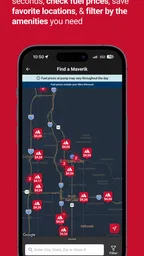
Imagine you are planning a drive and already expect to stop at Maverik. Before leaving, you can use the store-finding function to check for a convenient location, then look at the rewards side of the app as part of planning the stop. That is a coherent use: the app supports a decision you were already making. It is less compelling if you start changing routes or buying extra items just to chase a promotion whose value is unclear to you.
Another useful habit is to check the app before a visit rather than trying to navigate it while standing in line. If there is a reward or offer you care about, knowing what you want to do ahead of time can reduce last-minute fumbling. I would also keep a simple mental distinction between a reward I can actually use and a sweepstakes entry that only creates a chance of winning. That makes it easier to judge whether the program is adding value or merely adding another notification to manage.
For frequent customers, small rewards can be satisfying because the app gives a single place to follow the program. For occasional visitors, the payoff may be too modest to justify remembering another login or checking another app. I would not make a special trip solely because the app advertises free swag, a G-Card, or food; I would first decide whether the stop makes sense without the promotion. That is a useful guardrail for keeping loyalty programs in their proper place.
How it compares with other ways to manage rewards
Compared with a paper punch card, a dedicated app can make a retailer’s rewards and store search easier to keep together, especially when you are away from home. Compared with a general-purpose wallet or cashback app, however, this one is deliberately limited to Maverik. That is a strength if you want a direct connection to one retailer and a weakness if you prefer to see rewards from several businesses in one place.
A map app may be enough if your only need is finding a location. A general rewards organizer may suit you better if you collect points across many stores. Neither alternative necessarily replaces the Maverik-specific reward experience, but they can be better choices for people who do not want another retailer account. I would use this app when its store lookup or rewards are genuinely relevant, not simply because a retailer offers an app.
The same comparison matters for privacy-minded users. A paper receipt or a simple map search may involve less account management than a loyalty program, while offering fewer ways to track rewards. There is no universally right choice: the trade-off is convenience and potential benefits against the time and information involved in maintaining an account. I would choose based on how often I shop there and how comfortable I feel with the options presented during setup.
Who should keep it—and who can skip it
I would recommend trying Maverik Rewards if you already visit Maverik, like having store information on your phone, and are willing to check the terms of promotions before joining them. It is also a reasonable fit for someone who enjoys keeping retailer rewards organized digitally rather than relying on memory. Since the app is free, the main cost is not a download fee; it is the attention required to set it up and use it thoughtfully.
I would skip it if you rarely shop at Maverik, do not want another account, or prefer not to engage with sweepstakes and promotional offers. It is also not the best match if your priority is consolidating rewards from different retailers or finding stores without using a retailer-specific app. In those cases, a general map or rewards tool may be more useful, even if it cannot provide the same Maverik-focused functions.
For anyone who does install it, I suggest starting with one concrete purpose: locate a store, check a reward, or understand a promotion. Review the choices the app presents, allow only permissions that make that task easier, and then decide whether the experience earns a place in your routine. That approach answers the common practical questions without assuming that every customer needs every feature.
A measured recommendation
My overall view is that this is a focused loyalty app for people who already have a reason to visit Maverik. The strongest case for it is convenience: rewards, store finding, and sweepstakes participation are gathered around one retailer rather than scattered across separate routines. Its narrow scope is also its main limitation, and the potential of a promotion should never be mistaken for guaranteed savings.
I would give it a try if Maverik is already part of your regular shopping or travel pattern, while staying selective about account details, permissions, and promotional participation. If you only need directions, use whichever map tool you trust; if you want cross-store rewards, look for a broader organizer. The best reason to use this app is to make an existing Maverik visit more convenient, not to let rewards decide where or how much you shop.
What we like
- Earn rewards on qualifying purchases at Maverik locations.
- Redeem points for discounts and eligible items.
- Find nearby Maverik stores with the app.
- Access member offers and promotions in one place.
- Track rewards activity through your account.
What could be better
- Rewards require a registered account.
- Offers and redemption rules may vary by location.
- Points may expire under program terms.
- Some features rely on an internet connection.
- The app is useful mainly to Maverik customers.





