

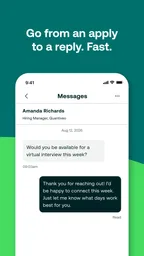

Job Search by ZipRecruiter review
 Analysis by Appsdrops
Looking for work on a phone can easily turn into a second job: checking listings, deciding which ones fit, and keeping track of where you have applied. I see Job Search by ZipRecruiter as a useful way to bring that routine into one place, especially if you want a broad starting point rather than a tool for one employer or profession. Its central appeal is that it tries to surface opportunities for you, but it works best as a discovery aid—not as a replacement for careful research or a tailored application.
How to decide whether it fits your search
Before choosing a job-search app, I would ask what is slowing you down. If you already know the exact company and role you want, applying through that employer’s own careers channel may be the more direct route. If you are still exploring, a general-purpose job app can help you see what kinds of openings are available and broaden your search beyond the names you already know.
ZipRecruiter is a business app from ZipRecruiter, Inc., and it is free to download. It is rated for Everyone, so its intended audience is broad, although the job-search task itself is naturally most useful to people considering work, changing roles, or helping someone else look. The app has a 4.9 average from around 497,000 ratings, with more than 145,000 written reviews, and it has passed 10 million installs. Those figures suggest substantial use, but they do not tell you whether the listings match your location, experience, or preferred schedule. Your own search results are the more meaningful test.
One practical question is whether you want suggestions or control. A recommendation-led service can reduce the time spent starting from a blank search, but its suggestions still need your judgment. I would treat each result as a lead to assess: Does the role match your experience? Is the location workable? Does the employer’s description make sense? That mindset helps prevent a busy-looking feed from being mistaken for a shortlist of suitable jobs.
Where ZipRecruiter earns its place
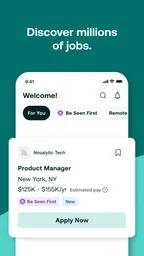
The app’s strongest proposition is convenience: instead of relying only on searches you remember to run, you can use it to discover jobs that might otherwise stay off your radar. That can be valuable when you are open to related titles or industries and do not yet have a fixed list of employers. It is also a sensible companion for a search conducted in short sessions, such as checking new possibilities during a commute or setting aside a few minutes after work.
For a concrete example, imagine that you are working full time and considering a move into a role with more responsibility. You may not have time to browse several career pages every evening, and you may not know every title employers use for the work you already do. A broad job-search app can help you spot adjacent roles and then decide which ones deserve a closer look. I would use that discovery stage to note the language employers use, then refine my search and application materials around the positions that genuinely fit.
A less obvious benefit of this kind of app is the way it can expose gaps in your search vocabulary. If your usual query produces little that feels relevant, nearby role names or descriptions may show that employers label familiar work differently. Rather than applying indiscriminately, use those terms as clues: search them deliberately, compare the responsibilities, and keep only the ones that reflect your actual skills. This turns browsing into useful research, even when a particular listing is not right for you.
I would also separate finding a vacancy from deciding to apply. A job card can make an opportunity easy to notice, but the decision should come after checking the details and the employer’s own information. My rule would be to save or otherwise keep track of promising leads, then review them in a calmer session before sending an application. That small pause is especially helpful when you are searching quickly on a small screen and are tempted to treat every plausible title as a match.
The current version is 26.15.0, and the app’s release history began on July 7, 2014. It supports operating systems from version 8.0 onward. That gives readers a straightforward compatibility check to make before installing: confirm that their device meets the minimum requirement, then see whether the current app suits their preferred way of searching. The long-running presence and large audience make it a familiar option, but they should not be confused with a promise that every search will produce an ideal opening.
When another route may serve you better
ZipRecruiter is not the only sensible way to look for work, and I would not use a single app as my entire plan. Employer career pages can be better when you have a target company in mind, because they let you verify a role directly with the organization. Professional networks may be more useful when relationships, referrals, or a visible work history are central to your search. Specialist job boards can be a better fit when your field has a narrow vocabulary or hiring norms that a broad service may not capture as neatly.
Those alternatives are not automatically better; they solve different problems. A company page can be precise but requires you to know where to look. A professional network can support outreach, but it may ask you to spend more time building and maintaining a profile. A niche board can reduce irrelevant results in a specialized field, yet it may not be the best place to explore a career change. I would use ZipRecruiter for breadth and discovery, then move to the channel that best suits the particular opening.
There is also a trade-off in recommendations themselves. Suggestions can save effort, but any recommendation system is only as useful as the information and choices behind your search. If the results feel off, do not assume the app has understood your goals perfectly. Reconsider the terms you are using, distinguish essential requirements from preferences, and check whether your search is too narrow or too broad. If repeated adjustments still leave you with little relevant, a specialist source or direct employer search is a reasonable next step.
People who need a highly structured application tracker may also prefer a dedicated system for organizing their search. A job-finding app can help with discovery, but it is still up to you to keep your own record of applications, follow-ups, interview dates, and contacts in a way that fits your routine. I recommend maintaining a simple separate note or calendar if you are applying across several channels. That prevents an appealing listing from becoming difficult to follow up on later.
Making the switch without losing momentum
Trying ZipRecruiter does not require replacing every method you already use. I would start by keeping my current routine intact and adding the app as another source of leads. After a short period of normal searching, compare the quality of what it surfaces with the jobs you find elsewhere. If it introduces relevant roles or useful search language, keep it in the rotation. If it mostly repeats results you already see or produces leads that do not suit your needs, there is little reason to make it your main channel.
To make that comparison fair, judge the app by relevance rather than volume. A long list is not necessarily helpful if the location, responsibilities, or level are wrong. Before opening the app, write down a few non-negotiables—such as the kind of work you can do and the locations you can accept—and a few preferences you are willing to compromise on. Then assess each promising result against those criteria. This gives you a consistent way to spot whether the recommendations are saving time or merely creating more browsing.
Another useful habit is to turn promising listings into targeted follow-up rather than rushing to apply. Read the role carefully, check the employer’s own description when appropriate, and adapt your résumé or other materials to the actual responsibilities. If the listing is vague or does not answer a question that matters to you, treat that uncertainty as a reason to investigate, not as a reason to assume the best. The app can put an opportunity in front of you; you still decide whether it merits your time.
Because the app is free, the main cost of trying it is attention. That matters: job seekers can lose hours to repeated browsing without making progress. I would set a modest time window for looking, save only roles that pass an initial relevance check, and reserve a separate session for applications. This approach makes a discovery tool more practical and reduces the chance that checking listings becomes a substitute for applying thoughtfully.
My recommendation for different kinds of job seekers
I would recommend Job Search by ZipRecruiter to people who want another broad source of openings, are exploring their next step, or find it difficult to know which titles to search. It is particularly useful as a starting point for discovering possibilities and refining the language of a search. Its free access makes it easy to test alongside existing methods, and its scale gives it a substantial audience, though neither factor guarantees a perfect personal match.
I would be less likely to make it the primary choice for someone pursuing a very specialized role, applying only to a short list of known employers, or needing a detailed system to manage every stage of an application. In those situations, specialist boards, direct company searches, professional contacts, or a separate tracking method may do more of the important work. You do not have to choose one route exclusively: use the app where it helps you discover leads and switch channels when precision or organization matters more.
My bottom line is that Job Search by ZipRecruiter is worth trying if you want job discovery to take less effort, provided you remain selective. Think of its suggestions as invitations to investigate rather than ready-made recommendations to accept. If you use it to uncover roles, learn the terms employers use, and then verify and pursue the best matches carefully, it can earn a useful place in your search. If it does not surface work that fits your real constraints, move on to a more focused source without feeling that you have to change your whole process.
What we like
- A free account lets job seekers save listings and track applications.
- Personalized job recommendations can make browsing more relevant.
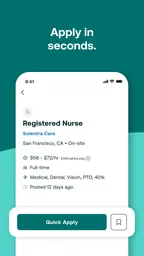
- One-tap applications simplify applying to some listings.
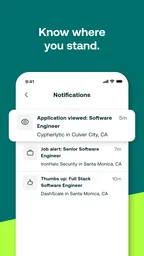
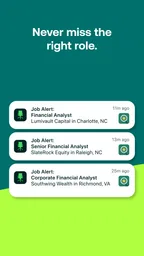
- Job alerts help users spot new openings quickly.
- Company profiles offer useful employer details before applying.
What could be better
- Some listings may no longer be available when opened.
- Not every employer accepts applications through the app.
- Frequent alerts can become distracting without careful settings.
- Application requirements vary and may require completing extra steps.
- Results can include roles that do not closely match your preferences.





