

Invoice Maker - Invoice Fly review
 Analysis by Appsdrops
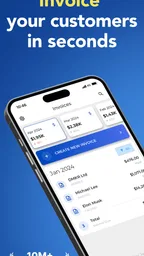
I see Invoice Maker - Invoice Fly as a practical way to put a professional-looking bill together when I’m away from a desk, not as a replacement for a full accounting system. Its strongest case is speed: it brings invoices, receipts, estimates, and bills into a phone-based workflow that suits freelancers and small operators who need to send a document promptly. The trade-off is that a focused document maker cannot stand in for the broader bookkeeping, tax, and business-management tools some users rely on.
Quick documents, with a clear purpose
Made by Labhouse Mobile, this free business app is aimed at the moment when paperwork needs doing but a laptop is nowhere nearby. I can imagine using it after finishing a small repair, completing a one-off design job, or agreeing on a project estimate during a client conversation. Rather than waiting until I’m back at my desk, I can prepare the relevant document while the details are fresh.
That mobile-first purpose is what makes Invoice Maker - Invoice Fly appealing. Invoices are the obvious use, but estimates and receipts matter too: an estimate can make a proposed job easier to understand before it begins, while a receipt gives a customer a record after payment. Having these document types in one app can reduce the temptation to create each one in a different tool and then hunt through folders later.
The app has a 4.7 average from around 141,000 ratings, with more than 3,000 written reviews. It has passed one million installs, which suggests it has found a substantial audience among people looking for a straightforward invoicing tool. Those figures are useful context, but the real question for me is whether a document-focused app fits the way you run your business.
Where the mobile workflow helps
The best everyday scenario is a small job with a simple payment arrangement. Say I finish a home visit, confirm what was done, and want to give the customer a clear record before moving on to the next appointment. A phone-based invoice or receipt workflow is more convenient than remembering the details later and rebuilding the document at a computer. The same logic applies to independent creatives who need to send a project estimate shortly after a client call.
There is also a useful distinction between an estimate and an invoice. I would treat the estimate as a proposal to review with the customer, not as proof that payment is due. Once the work is agreed or completed, I would prepare the appropriate invoice or receipt instead. Keeping that sequence straight helps avoid sending a document that gives the wrong impression about whether a price is still under discussion or has become a bill.
A practical habit is to gather the customer’s name, the work description, and the agreed amount before starting. On a phone, switching between conversations and a document editor can interrupt concentration. Having those details ready makes a quick invoice less error-prone, especially after a busy appointment or when several small jobs happen in one day. I would also review the finished document before sharing it; a fast workflow is only useful if the recipient can understand what they are being charged for.
Another worthwhile use is creating a consistent paper trail for small transactions. If I issue a receipt after payment and an invoice when payment is due, I can keep the purpose of each document clear for both sides. That does not automatically create a complete bookkeeping system, but it can make the basic exchange less dependent on informal messages and memory.
Useful when work happens away from a desk
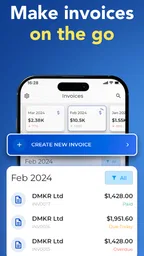
For someone who spends the day visiting customers, delivering services, or moving between locations, portability is more than a convenience. A phone is often already at hand, and the ability to prepare a document at the point of agreement can cut down on unfinished admin at the end of the day. I would expect this to matter most to solo workers and small businesses with uncomplicated billing needs, rather than teams managing many financial processes.
The app is listed as free, but it also includes in-app purchases ranging from $5.99 to $299.99 per item. I would check what is included before settling into a workflow that depends on a paid option. The range is wide enough that it is sensible to look closely at the purchase screen and decide whether the free experience covers the documents and routine you actually need. Avoid assuming that every feature or convenience will be included at no cost.
It is suitable for Everyone and was released on December 27, 2022. The current version is 2.49.0, and the minimum operating-system requirement is 7.0. That makes it worth checking device compatibility before downloading, particularly if you use an older phone. Compatibility alone does not tell me whether the app will suit a particular business, though: the more important test is whether its document workflow matches how you invoice and keep records.
What a document maker cannot replace
My main reservation is about scope. Making an invoice, bill, receipt, or estimate is only one part of running business finances. If you need a connected view of income and expenses, ongoing account reconciliation, detailed tax preparation, or shared approval across a team, a dedicated accounting platform may be a better starting point. I would not choose a document generator on the assumption that it will handle those wider responsibilities.
That limitation matters even for a sole trader. A neat invoice can help communicate a charge, but it does not by itself answer whether the payment has arrived, what expenses belong against it, or how the transaction should be included in wider records. I would pair a simple invoicing workflow with whatever record-keeping method I already trust, rather than letting sent documents become my only business archive.
There is a smaller but real mobile trade-off too: entering names, descriptions, and amounts on a phone can be slower than working at a keyboard, particularly for long or detailed jobs. If most of your invoices repeat the same complex line items, involve multiple stages, or need careful review by colleagues, a desktop-oriented system may save more time overall. For a short service description and a straightforward amount, the phone workflow is much easier to justify.
I would also be cautious about choosing it solely because it is free. In-app purchase options can affect the value calculation, so I would first test the tasks I perform most often and see whether the available workflow meets them. A person who only sends occasional simple invoices may have different needs from someone who expects to depend on the app for daily billing. The right choice is the one that handles the real routine without adding unwanted cost or extra bookkeeping steps.
Who is likely to get the most from it
I would recommend giving Invoice Maker - Invoice Fly a look if you are a freelancer, tradesperson, consultant, or other independent worker who needs to prepare basic business documents while out and about. It is particularly well suited to irregular jobs where a quick estimate or invoice is more useful than a large accounting suite. The combination of several document types is handy when one customer interaction can move from a proposed price to completed work and then a payment record.
It is less compelling for a business that already has a mature finance process, several staff members handling billing, or complex rules around its accounts. In that situation, duplicating records in a separate document app could create extra work or confusion. I would also suggest looking elsewhere if your priority is comprehensive financial reporting rather than producing customer-facing paperwork.
For occasional users, the key question is how often a phone-based document saves a trip back to the office or prevents a detail from being forgotten. For regular users, it is whether the app fits into a dependable routine: prepare the document, check the amount and description, send it through the method you normally use, and store the transaction in your main records. That small process discipline is more important than expecting an invoice app to manage the whole business automatically.
A sensible pick for simple billing on the move
My verdict is positive, with a clear boundary. Invoice Maker - Invoice Fly makes sense as a convenient mobile tool for invoices, bills, receipts, and estimates, especially when speed and portability matter more than deep financial management. Its rating and reach point to broad interest, and its free entry point makes it approachable, though the available in-app purchases are worth checking before building a daily routine around it.
I would choose it for straightforward client paperwork and keep a separate, reliable method for tracking the wider finances of a business. If you need a full accounting environment, or if complex billing is routine, a broader platform is likely the better fit. But for an independent worker who wants to prepare a clear document after a job or client conversation, this app has a practical purpose and a convincing place in the toolkit.
What we like
- Create professional invoices quickly from a mobile device.
- Save customer details for use on future invoices.
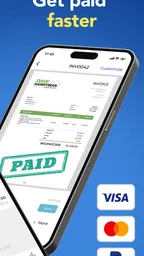
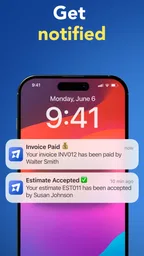
- Track invoice payment status in one place.
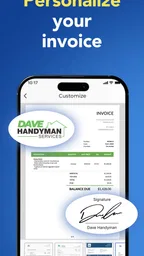
- Customize invoices with your business branding.
- Export invoices as PDF files for sharing.
What could be better
- Some features may require a paid subscription.
- Invoice delivery depends on your email or sharing app.
- Advanced accounting tools may be limited.
- Availability of payment options can vary by region.
- Managing many invoices on a small screen can be cumbersome.





