





Intuit QuickBooks for Business review
 Analysis by Appsdrops
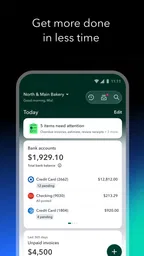
I judge small-business apps less by how many tools they advertise than by whether they make a busy day easier. Intuit QuickBooks is a business app from Intuit Inc that brings bookkeeping tasks onto a phone, including expense tracking, invoices, receipt scanning, and payroll-related work. Its strongest case is for owners who want to keep everyday records moving while away from a desk. In my view, the main question is not simply whether it has enough features; it is whether you are comfortable making a phone and a reliable connection part of your accounting routine.
When a connection becomes part of the workflow
QuickBooks is most useful when I can move a task forward at the moment it arises: record a purchase, prepare an invoice, or check business information while dealing with a customer. Those moments depend on the app being able to reach the services and records needed for the task. I would treat connectivity as part of the working setup, rather than assume every action will behave the same way without a network.
That matters in practical situations. If I am finishing an invoice between appointments, I want to know that I can complete the work and check its status before I move on. If reception is poor, I would avoid leaving a financial task half-finished and assume it has been saved. I would instead wait for a dependable connection, complete the action, and verify the result in the app before considering it done.
For a business owner who spends much of the day on the move, this approach can still be a good fit. The phone gives access to accounting work outside the office, but it does not remove the need to pay attention to whether a change has gone through. I see that as a sensible habit for any mobile finance tool, especially when a missed invoice or an incomplete expense entry could affect later bookkeeping.
Invoices and expenses are different kinds of mobile work
Invoicing is a natural phone task when the details are straightforward and I have the customer information ready. A quick turnaround can help me send a bill while the work is fresh in my mind. For a complicated invoice with unusual terms or many line items, I would prefer a larger screen and a quieter moment. The mobile app is convenient for keeping work moving, not necessarily the ideal place to compose every detailed financial document.
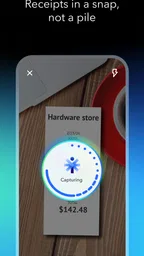
Expenses have a different advantage: they are easy to forget once the day gets busy. A receipt scanner can make capturing a purchase more immediate than collecting slips in a bag and sorting them later. My practical tip is to handle receipts in small batches while the purpose of each purchase is still clear. That context can matter as much as the image itself when reviewing records later.
Scanning should be treated as a starting point, not a substitute for checking the entry. I would review the captured information and correct anything that does not match the receipt before relying on it for bookkeeping. This small pause is particularly worthwhile after a rushed purchase or when a receipt has several items, because a convenient capture process is only useful if the resulting record is accurate.
Using it in the middle of a working day
Picture a self-employed tradesperson who buys supplies on the way to a job, finishes the work, and then needs to bill the customer before the evening. QuickBooks can help keep those separate tasks close together: capture the purchase while the receipt is available, then prepare the invoice when the job details are fresh. The benefit is less dependence on a pile of paperwork waiting at home. The trade-off is that the person still needs enough time and connection to check each record rather than rushing through every step on a small screen.
I would use the app in short, deliberate sessions instead of trying to do an entire bookkeeping day on a phone. Record the expense, review it, and leave more involved reconciliation or editing for a focused period. That division makes the app useful without pretending a mobile interface is automatically better for every accounting job.
Payroll is another reason some businesses may want QuickBooks in their mobile toolkit, but it is a task where care matters more than speed. I would not make a payroll change while distracted or with an unreliable connection. The app’s business scope is helpful, but financial actions deserve a clear review before I move on to the next item in a busy day.
What to do when a task stalls
A weak or interrupted connection can turn a quick action into an uncertainty: did the invoice go through, or is the expense still waiting? My advice is to pause before tapping repeatedly. Repeating a financial action without checking its status can create confusion, especially if the first attempt eventually completes. Restore a reliable connection, revisit the relevant record, and confirm what is there before trying again.
This is also why I would avoid treating the app as a replacement for a sensible record-keeping routine. For important receipts, keep the original until the digital record has been checked. For an invoice that needs to reach a customer promptly, confirm its status rather than assuming that leaving the screen means it was sent. These are modest precautions, but they reduce the risk of a small mobile interruption becoming an accounting cleanup job.
If a task is especially time-sensitive, I would choose a stable connection and a place where I can concentrate. A phone is easy to carry into a noisy shop, vehicle, or work site, but convenience does not make those settings ideal for reviewing numbers. When precision matters, waiting until I can see the details clearly is often faster than correcting a rushed entry later.
Keeping mobile bookkeeping under control
Because QuickBooks handles business records, I would be intentional about where and how I use it. A private, trusted connection is a better choice for financial work than an unfamiliar public network. I would also lock my phone and avoid leaving account screens open where customers or coworkers can see them. Those are general precautions rather than a special claim about the app, but they matter whenever business information is on a mobile device.
There is a useful workflow distinction between capturing information and making decisions from it. A receipt scan can preserve a detail for later review; deciding how it should be categorized may require more context. I would capture promptly, then set aside time to inspect entries and correct them. This reduces the chance that a quick on-the-go action turns into an unquestioned accounting record.
Owners should also consider how much of their bookkeeping they truly want to do from a phone. If the goal is occasional expense capture and simple invoicing, the mobile format can be a practical companion to a broader accounting routine. If the goal is extended financial analysis or frequent edits across many records, a desktop workflow may feel more comfortable. The app’s value depends on fitting the way a business operates, rather than forcing every task onto mobile.
Where it fits among business tools
Compared with a basic expense tracker, QuickBooks has a broader business focus: it brings expenses together with invoicing, bookkeeping, and payroll-related tasks. That breadth can reduce the need to jump between separate tools, especially for an owner who wants business records managed in one place. The compromise is that a broader accounting app can feel like more than someone needs if all they want is a simple way to note purchases.
Compared with handling everything in spreadsheets, a dedicated app is more suited to keeping routine records and invoices tied to an ongoing accounting workflow. A spreadsheet may still be preferable for a person who wants complete control over a custom process and is comfortable maintaining it manually. I would choose QuickBooks when I want accounting tasks organized through a purpose-built business tool, not simply because a specialized app is automatically better for every business.
It is free to install, with in-app purchases ranging from $0.99 to $420.00 per item, so I would check the current options in the app store and make sure the available plan suits the business before building a workflow around it. That distinction is important: a free download does not mean every service or level of use is included without cost. The app is rated for Everyone, but its financial features are intended for managing business activity, so I would still use it with an adult’s careful oversight where appropriate.
Who will get the most from it
I would recommend Intuit QuickBooks to a freelancer, consultant, or small-business owner who regularly needs to capture expenses and handle invoices away from a desk. It is especially appealing if those tasks are currently delayed because receipts get lost or billing waits until the end of the week. The mobile access is most valuable when it supports a clear routine: record promptly, check the details, and use a reliable connection for important actions.
I would be less enthusiastic if you only need a personal spending log, dislike managing business records on a phone, or rarely have dependable connectivity during work. A simpler tracker may be easier for personal expenses, while a desktop accounting setup may be better for someone who spends long sessions reviewing complex records. QuickBooks is not a magic fix for inconsistent bookkeeping; it still relies on the user to enter information carefully and review it.
The app has a 4.7 average from around 91,000 ratings, and it has passed 5 million installs. It first appeared on June 29, 2011, and its current version is 30.15.5+2. Those figures suggest that it is an established choice, but I would weigh them alongside the practical fit: the best accounting app is the one whose workflow you can maintain accurately.
My connectivity verdict
For me, QuickBooks works best as a mobile extension of a steady bookkeeping habit, not as an excuse to handle financial work hurriedly wherever I happen to be. Its mix of expense capture, invoices, bookkeeping, and payroll-related work can make everyday business administration more manageable, especially when I act while details are still fresh. The key is to verify important actions, avoid repeating them when a connection stalls, and save detailed review for a focused moment.
Intuit Inc has made a business app with a clear use for people who want accounting tasks close at hand. I would choose it if mobile access helps me keep records current and I am willing to check each entry. If my work routinely takes me beyond reliable connectivity, or if I prefer doing nearly all accounting on a larger screen, I would use a different setup for the main workload and treat mobile bookkeeping as optional. That balance is what makes this app useful rather than merely convenient.
What we like
- Tracks income and expenses in one place
- Creates and sends professional invoices
- Connects to many banks for transaction syncing
- Supports receipt capture with a mobile camera
- Offers reporting tools for business finances
What could be better
- Many features require a paid subscription
- Some bank connections may need occasional fixes
- New users may face a learning curve
- Pricing can rise as a business adds users
- Advanced features vary by subscription plan





