
Informed Delivery® Mobile review
 Analysis by Appsdrops
I find Informed Delivery® Mobile most useful when mail is a household concern rather than a private to-do list. It gives USPS customers a way to keep an eye on incoming mail and packages from a phone, which can make a practical difference when one person is away, a delivery matters to someone else at home, or a family is trying to avoid overlooking an important envelope. It is not a shared household dashboard, though, and that distinction matters: the service is tied to an individual USPS account, so people should decide whose account they are using and what they are comfortable sharing before treating it as a group tool.
Keeping an eye on mail when the household is busy
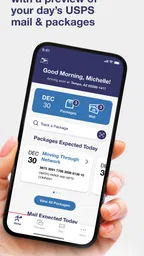
A realistic use case is a household where one adult usually checks the mailbox but is out for the day. Another person can ask whether anything important is expected, and the account holder can check the app rather than relying on memory or a trip to the mailbox. For packages, having a mobile view of what is on the way can also help people coordinate who will be home to receive them. I like that this makes ordinary mail easier to plan around without turning the app into a general-purpose family organizer.
The main value is visibility, not control. Informed Delivery® is designed around USPS mail and packages, so it is a natural fit for people who want a clearer picture of postal deliveries. It does not replace a household calendar, a shared shopping list, or direct communication about who is collecting something. I would use it as a useful source of delivery information and still send a quick message when another person needs to act on that information.
That boundary is especially helpful for shared living arrangements. Roommates may want to know that a package is due without sharing access to each other’s mail information. In that situation, the account holder can choose what to communicate rather than handing over account access. For couples or family members who already share responsibility for the mailbox, the app can support coordination, but the household still needs to agree on how the account is handled.
One account should have one clear owner
Before relying on the app together, I would first establish whose USPS account is being used and who is allowed to sign in. Mail can reveal personal details simply by showing that something is expected, even if nobody opens the envelope. That makes account boundaries more important than convenience. A shared phone may be handy for checking deliveries, but a personal account should not become an informal household login unless everyone involved understands the implications.
I would also avoid assuming that the app creates separate household profiles or permissions. The sensible approach is to treat the account as belonging to its named user and share relevant updates in conversation. If a household wants several people to have independent access, each person should consider their own account arrangements through USPS rather than passing around one person’s credentials. That keeps the responsibility for account access clear and reduces awkwardness over who has seen what.
For a person who manages mail for an older relative or someone who has difficulty checking deliveries, the same principle applies. Help with setup should be done with that person’s understanding and consent. It is better to make the account owner part of the process than to quietly use their details for convenience. In my view, a little care at the beginning prevents the app from creating more privacy tension than it solves.
Turning delivery information into a household routine
The app works best when it supports a simple routine: check what is expected, tell the person who needs to know, and decide who will handle the mailbox or package. For example, if one household member is leaving early and another will be home later, a quick check can help them decide whether someone should watch for a delivery. The practical benefit is not that every delivery becomes perfectly predictable; it is that people have a better starting point for planning.
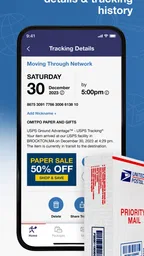
A useful habit is to separate “expected” from “received.” Seeing information about an incoming item is not the same as physically confirming that it has arrived or been collected. I would not use a notification or an app screen as proof that a package is safely inside the home. A quick message from the person who checks the porch or mailbox closes that loop and avoids confusion, particularly in homes where several people receive deliveries.
There is also a trade-off between convenience and noise. If everyone checks the app repeatedly, a household may end up discussing routine mail more than it needs to. I would nominate one person as the regular checker or agree to share only time-sensitive updates. That keeps the information useful and avoids turning a small visibility tool into another stream of interruptions.
For packages that matter to someone else, the account holder can relay the useful detail without sharing the entire account. That is a good middle ground for households with different privacy preferences. Someone expecting an important delivery gets a heads-up, while personal mail remains under the account owner’s control. This is more considerate than treating access to one person’s mail view as an automatic household privilege.
Age, trust, and choosing who should use it
The app is rated for Everyone, and the audience is not limited to one kind of household. Still, an age rating is not a substitute for judgment about account access. For children, I would keep the account with an adult and share only the practical information a child needs, such as that a package is expected. For teenagers who help with household errands, the right arrangement depends on family trust and whether they genuinely need access, not simply on the fact that they can use a phone.
For older adults, the app may be useful if checking a mobile screen is easier than making a separate trip to the mailbox, but comfort with account sign-in and phone use matters. I would set it up together and make sure the person understands what they are viewing. If they prefer a paper reminder or a family member’s verbal update, that may be the better solution. The app should make their routine easier, not pressure them into a digital process they do not want.
Trust is also relevant between adults. A shared address does not mean every person should have unrestricted visibility into everyone else’s mail. Housemates, adult children living at home, and partners may all have different expectations. My recommendation is simple: agree on the purpose first. If the aim is to coordinate packages, share package updates; if someone wants to inspect another person’s incoming mail, that is a separate privacy issue and should not be disguised as household convenience.
Where it fits among postal and delivery alternatives
Compared with checking a mailbox in person, Informed Delivery® offers a way to look for incoming mail and packages on a phone. Compared with carrier or retailer tracking, its appeal is its USPS focus: it makes sense when the item or mail you care about is moving through the postal service. For deliveries handled by other carriers, a carrier-specific app or the retailer’s own order page may be more useful. I would not expect one postal app to become a complete view of every parcel arriving at a home.
It also differs from a shared notes app or group chat. Those tools are better for assigning tasks, recording who collected a package, or keeping a durable household checklist. Informed Delivery® is better used as the place to check postal information, with a chat or conversation doing the coordination. Keeping those roles separate helps prevent people from mistaking a delivery view for a complete record of what happened at the door.
There are households for whom the app is not worth adding. If you rarely receive USPS mail or packages, already check the mailbox consistently, and do not need advance visibility, a new account and another app may add little. The same goes for someone who does not want mail-related information on a phone. In those cases, the ordinary mailbox routine or a direct update from the person who checks it may be simpler.
What the app’s standing says—and what it does not
Informed Delivery® Mobile is a free business app from United States Postal Service®. Its average rating is 4.8 from around 24,000 ratings, with roughly 2,300 written reviews, and it has over 500,000 installs. Those figures suggest that many users find a clear purpose for it, but they do not tell me whether it fits a particular household’s privacy preferences or delivery habits. I would judge it by whether USPS visibility solves a real problem in your home.
The current version is 1.3.3, and the app requires Android 8.0 or later. Its Everyone age rating makes it broadly accessible, but the account holder should still decide how the app is used. Because it is free, trying it does not require a purchase; the more meaningful cost is the time spent setting up an account and agreeing on boundaries if other household members will rely on its information.
One limitation to keep in mind is that the app can only be useful for the postal activity it covers. It is not a guarantee that a household member will notice a delivery, nor does checking a screen replace confirming the item has actually been collected. I would pair it with a simple household habit rather than expecting the app to manage the whole process automatically.
My household verdict
I recommend Informed Delivery® Mobile to people who regularly receive USPS mail or packages and want an easier way to keep track of what may be coming. It is particularly handy when one person is responsible for checking deliveries but another person needs timely updates. The strongest household use is modest and practical: one account owner checks, shares what matters, and coordinates collection without giving everyone automatic access to personal mail information.
I would skip it if your household rarely uses USPS, prefers not to manage mail through a phone, or expects a single app to coordinate every carrier and every person’s tasks. It is also not the right answer to a disagreement about privacy; clear consent and communication matter more than the convenience of a shared screen. For homes that understand those limits, it can be a useful companion to the mailbox rather than a replacement for common sense.
My overall view is positive because the app has a focused job and can make a small, recurring household task easier. Treat the account as personal, use the information as a prompt rather than a guarantee, and share only what others need to know. With those boundaries in place, Informed Delivery® Mobile is a sensible free option for keeping USPS deliveries from becoming a guessing game.
What we like
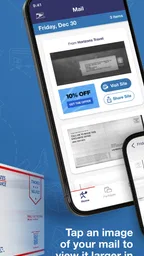
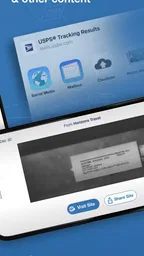
- Preview incoming mail with digital images before it arrives.
- Track packages from multiple carriers in one place.
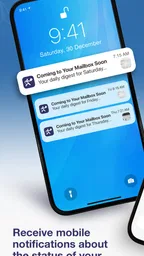
- Get notifications about mail and package updates.
- Report missing mail or packages through the app.
- Access the service at no cost for eligible USPS addresses.
What could be better
- Availability depends on USPS service eligibility at your address.
- Mail images may not appear for every piece of mail.
- Some mail previews can arrive later than expected.
- Package tracking updates depend on carrier data.
- A USPS account is required to use the app.





