


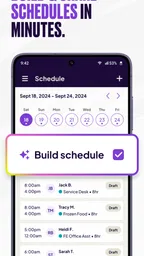
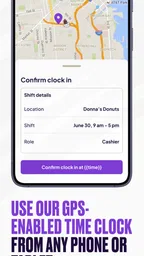
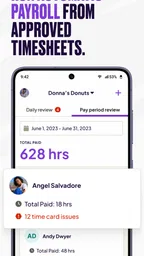

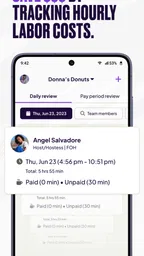
Homebase: Scheduling & Payroll review
 Analysis by Appsdrops
Running a small business means coordinating people, shifts, hours, and payroll without letting those tasks take over the day. Homebase: Scheduling & Payroll brings team scheduling and time tracking together with payroll and hiring tools, giving owners and managers one place to organize much of the employee workflow. I like the practical focus: rather than treating staff coordination as a one-off chore, the app is built around work that repeats every week and needs to stay understandable to the whole team.
That promise matters most when a business is growing beyond informal arrangements. A schedule kept in someone’s head or scattered across messages can become difficult to maintain as more people join the team. Homebase is aimed at small businesses that want a more consistent way to plan shifts, keep track of time, and handle related staffing tasks. It is free to download, with in-app purchases available, so the best way to think about it is as an accessible starting point whose paid options may suit businesses with broader needs.
Build a workflow that works before opening the app
Even a useful scheduling tool cannot decide how a business should operate. Before relying on any app, I would first clarify who prepares the schedule, how staff learn about their shifts, how working time is recorded, and who handles payroll. Those simple decisions make the difference between a tool that supports a routine and one that merely adds another place to check.
Homebase’s focus on team scheduling, time tracking, payroll, and hiring makes it relevant to several connected stages of managing staff. The benefit is not just having those subjects under one app name; it is the opportunity to make the process easier to follow. A manager can think about staffing as a cycle: bring people onto the team, plan when they work, keep an eye on their time, and move toward payroll with a clearer picture of the work completed.
I find that framing more useful than expecting an app to fix disorganized processes on its own. If shift responsibilities are unclear, putting schedules into a digital tool will not magically settle disagreements. If time records are not reviewed, tracking them does not automatically guarantee that payroll preparation is smooth. The app can provide a shared operational home, but a business still needs people to maintain the information and agree on how to use it.
For a small team, consistency is often more valuable than elaborate administration. A repeatable schedule-building habit, a predictable way to review working time, and clear ownership of payroll tasks can reduce last-minute confusion. Homebase is designed around those everyday needs, which gives it a more grounded appeal than a general-purpose productivity app that leaves managers to assemble a staffing system from unrelated tools.
Connecting the moving parts
Scheduling, time tracking, and payroll affect one another. A shift plan represents what a business expects to happen; time tracking helps account for the work that takes place; payroll is part of turning that work into compensation. Hiring sits further upstream, because adding team members changes the people and availability a manager needs to consider. Seeing these areas as a connected workflow is a sensible way to approach Homebase.
I would still treat each stage as something that deserves attention rather than assuming that one completed task settles everything downstream. A schedule needs to be kept current, time information needs to be handled responsibly, and payroll work needs proper review. The app’s broad scope may make coordination feel less fragmented, but good management remains the foundation.
Capture and organize the workday
For me, the most important question in a business app is whether it helps turn recurring information into an orderly routine. Homebase is built for teams that need to coordinate staffing, not simply for an individual keeping a personal to-do list. That makes it a potential fit for owners and managers who regularly need to think about who is working, when they are working, and how those hours relate to administrative work.
A central tool can also make it easier to establish where staff-related tasks belong. Instead of treating scheduling, time records, hiring, and payroll as entirely separate conversations, a business can make them part of a more coherent process. The value is particularly clear in workplaces where shift planning is a regular responsibility and where administrative tasks are handled alongside the day’s other demands.
Still, organization depends on the team using the same process. Managers should decide who is responsible for maintaining schedules and reviewing time information, while employees need to understand how the business expects them to engage with the system. Those habits help prevent an app from becoming a digital filing cabinet that no one checks until a problem appears.
The app’s business focus also sets expectations. It is not trying to be an all-purpose project planner or a broad office suite. Its appeal comes from dealing with the staffing tasks that small businesses repeatedly face. If a company mainly needs a personal calendar, this may be more specialized than necessary. If the challenge is coordinating people and the work they do, that specialization is a strength.
A repeatable routine beats a rushed reset
The most sustainable way to use a team-management app is to build it into a routine. A manager might set aside a regular time to review upcoming staffing needs, keep the schedule aligned with the team’s plans, and make time records part of the normal administrative cycle. Payroll preparation then becomes less of a sudden scramble and more of a familiar responsibility.
Homebase’s combination of scheduling, time tracking, and payroll supports that kind of thinking. I would approach it as a tool for making recurring responsibilities visible and easier to manage, rather than as a one-tap solution for running an entire business. When a process is repeated consistently, staff know where to look and managers have a better chance of spotting issues before they become urgent.
Hiring fits naturally into the same long-term picture. Bringing someone into a business is not isolated from scheduling: new team members affect staffing plans, while the demands of the business shape whom the owner needs to recruit. Having hiring included in the app’s overall purpose reinforces its focus on the employee lifecycle, from adding people to coordinating their work.
That broader view is appealing to small businesses that want to spend less energy keeping unrelated processes straight. It can also help managers think beyond the immediate shift and consider how staffing decisions affect the week ahead. The strongest results, in my view, come when the app is paired with simple rules: keep responsibilities clear, update information regularly, and review important records instead of assuming they are always correct.
Where a workflow can break down
No scheduling system can prevent every workplace complication. Staff availability changes, business demands shift, and managers may need to adjust plans. The practical test is whether the team has a dependable way to keep its information current and communicate responsibility for updates. If people follow different habits or managers let records become stale, even a well-focused app can lose much of its usefulness.
There is also a learning curve whenever a business moves from informal coordination to a more structured process. Owners may need to establish how the team will use Homebase, and employees may need time to become comfortable with the new routine. That is not a flaw unique to this app; it is part of adopting any tool that changes how people handle work. A clear introduction and patient follow-through can make the transition smoother.
Another point to consider is the difference between a free download and the cost of using optional paid services. Homebase is free to download, and in-app purchases range from $29.99 to $649.99 per item. For a business, the sensible approach is to assess its actual staffing needs and review the available options before committing. The right choice depends on how much support the operation needs and which parts of the workflow it plans to manage through the app.
I would also avoid treating an app as a substitute for careful oversight. Scheduling and time information can affect employees directly, so managers should make accuracy and clear communication part of their routine. Homebase can help organize the work, but it is still the business’s responsibility to use the system thoughtfully and to resolve questions with the people involved.
Who should bring Homebase into the team?
Homebase: Scheduling & Payroll is most compelling for small-business owners and managers who deal with shifts and employee coordination as a regular part of their work. It makes sense for teams looking for a focused place to organize scheduling and time tracking while also keeping payroll and hiring within the same broader workflow. The app’s business orientation is clear, and that makes it easier to judge whether it fits: the more central staffing is to the daily operation, the more relevant its purpose becomes.
It may be less suitable for someone who only wants a basic personal calendar or a general task list. Its value depends on having real team-management needs and being willing to establish a consistent process around them. Businesses that already have dependable systems should also consider whether they want to move those routines or maintain their current approach. Switching tools is worthwhile when it improves clarity, not simply because another option exists.
The app has been available since July 30, 2014, and its current version is 5.27. It has a 4.7 average across around 27,000 ratings, with over one million installs. Those figures suggest broad uptake, but the more useful consideration for an individual business is whether its workflow matches the app’s focus. Its content rating is Everyone, and its minimum operating-system requirement is version 12.
Overall, I see Homebase as a practical option for businesses that want to treat staff coordination as an ongoing system rather than a collection of disconnected chores. Its combination of scheduling, time tracking, payroll, and hiring gives managers a clear framework for organizing recurring work. It still calls for accurate information, consistent habits, and human review, but that is exactly why I would use it as part of a sustainable productivity routine—not as a replacement for one. For a small team ready to bring structure to its staffing process, Homebase is worth considering.
What we like
- Employees can check schedules from their phones.
- Shift reminders help staff keep track of upcoming work.
- Time clock tools make it easier to record hours.
- Team messaging keeps work conversations in one place.
- Payroll features can reduce repetitive pay calculations.
What could be better
- Some features may require a paid subscription.
- Payroll availability depends on your location and plan.
- Employees may need an invite from their manager to join.
- The app relies on internet access for many tasks.
- Setup can take time for teams with complex schedules.





