
HHAeXchange+ review
 Analysis by Appsdrops
I’d think of HHAeXchange+ less as a general business app and more as a work companion for caregivers whose agencies use the HHAeXchange system. That distinction matters: its usefulness depends on whether your employer’s day-to-day process runs through it. If it does, having a caregiver-focused app on your phone may make routine work easier to keep organized. If your agency uses a different system, this is unlikely to be a helpful substitute for the tools you already rely on.
It is a free business app from Homecare Software Solutions LLC, with an Everyone content rating. The app is aimed at caregivers in Illinois, Massachusetts, South Dakota, Michigan, and Texas. That regional focus is a practical boundary, not a small detail: before installing it, I’d check that your location and agency are supported, then ask your coordinator what tasks they expect you to handle in the app.
A focused tool for agency-based caregiving
The clearest way to judge this app is by the work it is meant to fit around. Caregiving involves more than time spent with a client: there are schedules to follow, changes to keep straight, and administrative details that can be easy to lose in texts or paper notes. A dedicated caregiver app can give those work routines a more consistent home, but it is most valuable when the agency has made it part of the process.
I would not approach it like a broad productivity app where every user can set up their own projects and workflows. Its purpose is narrower: supporting caregivers who work with organizations using HHAeXchange. That can be a strength. A tool shaped around a specific care-work relationship may be more relevant than a generic calendar or notes app, particularly when your employer expects information to be handled through its own system.
That same focus also creates a trade-off. A caregiver cannot assume the app will replace every work conversation, document, or scheduling channel. Agency procedures still matter, and your supervisor is the right person to explain which tasks belong in the app and which should be handled another way. I’d treat it as one part of a workplace process rather than a personal command center for every aspect of caregiving.
Where it fits into a real workday
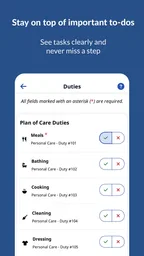
Imagine starting the day with a planned visit and then learning that the schedule has changed. In a well-established agency workflow, a caregiver-facing app can be a more sensible place to check the work information than trying to reconstruct the plan from a string of messages. The useful habit is to make one deliberate check before setting out, rather than relying on an old notification or yesterday’s notes.
That routine is especially helpful for caregivers who move between visits and have little time to pause. I’d check the relevant work details before leaving home, then confirm any change through the channel the agency has designated. This two-step approach is not redundant busywork: it reduces the chance of acting on an outdated plan, while avoiding the assumption that an app automatically resolves every scheduling question.
A second useful scenario is the end of a shift. Instead of trusting memory to fill in a work-related detail later, a caregiver can build the habit of completing whatever agency-required steps are expected while the visit is still fresh. The exact process should come from the employer, but the general lesson is specific to this kind of tool: its value often depends as much on consistent timing as on the screen itself.
For someone who shares care responsibilities with other staff, a centralized agency workflow can also be preferable to informal notes passed between people. It gives the employer a clearer process to organize, while the caregiver has a designated place to engage with that process. Still, the app should not be treated as a substitute for urgent communication. If a client’s needs or circumstances call for immediate attention, follow the agency’s direct escalation procedure rather than assuming an app entry will be seen in time.
What its current version tells me—and what it does not
The app was released on April 6, 2023, and its current version is 26.10.04. Those details show that it has a continuing version history beyond its initial release, but a version label alone does not tell me what changed, how often updates arrive, or whether a particular update altered a workflow. I would avoid treating a newer-looking number as proof that a specific feature has been added or improved.
For an existing user, the sensible way to handle an update is practical rather than speculative. Keep the app current through the app store, then check whether your agency has changed any instructions for using it. If a familiar step behaves differently after an update, ask the agency’s support contact for guidance instead of assuming that the work procedure has changed along with the software.
That separation between software and workplace process is important. Even when an app changes, the employer may still require the same steps; conversely, an agency may update its own procedures without a dramatic change to the app. I’d pay attention to communication from the agency and use the app as instructed, rather than relying on the version number to explain what is expected.
The rating offers a modest signal about how people experience the app, but it is not a guarantee that it will suit your particular agency or device. It holds a 3.8 average from around 2,900 ratings, and it has more than 100,000 installs. I read that as evidence of an established audience, not proof that every caregiver will find the workflow smooth. The more useful question for a new user is whether their employer actively supports it and can help with setup.
Making the setup less frustrating
Before relying on the app for a shift, I’d confirm three things with the agency: whether your account is ready, which tasks you are expected to complete in the app, and whom to contact if the information you see conflicts with a message from your coordinator. Those questions prevent a common kind of confusion: having an app installed but not knowing whether it is the official source for a particular work detail.
I’d also avoid saving sensitive client information in ordinary phone notes simply because the app workflow feels unfamiliar. Follow the agency’s approved process for work information and ask before moving details between systems. That is a better habit than trying to make a personal workaround, especially in home care, where information needs to be handled with care.
For a caregiver who is new to the agency, it may help to learn one routine at a time: first how to check the work information you need before a visit, then how to complete any required follow-up. Trying to master every screen in one sitting is less useful than confirming the few steps that affect your next shift. If instructions are unclear, ask for a demonstration using your own agency’s process; general advice from another caregiver may not match your employer’s setup.
Where the app may fall short
The most important limitation is its dependence on organizational fit. If your employer does not use HHAeXchange or has not enabled the relevant workflow for you, installing the app may not solve a real problem. A general calendar, a work-approved messaging channel, or your agency’s existing system would be more appropriate in that situation. I would not switch tools independently when the employer controls scheduling and documentation.
Another friction point is that a focused work app cannot remove the need for clear agency communication. If caregivers are unsure which information is current, or who handles a schedule correction, the underlying process needs clarification. An app can support a defined procedure, but it cannot make an unclear procedure clear by itself. That is why I’d judge the experience partly by the quality of the onboarding and support around it.
It may also be the wrong choice for someone looking for a personal care journal, a family coordination app, or a general health-management tool. Its audience is professional caregivers in a limited set of states, not every household arranging care. If you are a family member trying to coordinate relatives, a broader shared calendar or a tool designed for family caregiving will likely be a better match.
Device requirements are worth checking before installation: the minimum operating-system version is 10. If your phone cannot meet that requirement, the app is not a practical option on that device. In that case, ask your agency whether it provides another approved way to complete the work rather than depending on an unsupported phone or an unofficial workaround.
How it compares with familiar alternatives
Compared with a paper planner, a caregiver app tied to an agency has the potential advantage of aligning with the employer’s own workflow instead of leaving each worker to maintain a separate record. Paper can be dependable for personal reminders, but it is easier for a schedule change to leave different people with different versions of the plan. I would still keep personal reminders where allowed, but not let them replace the official process.
Compared with ordinary texting, an agency-supported system can offer a more orderly way to handle work tasks, provided the employer actually uses it that way. Texting is quick and familiar, but details can get buried among unrelated messages. On the other hand, if a message is urgent or the agency instructs you to call, an app should not slow down direct communication. The best option depends on the task, not on a blanket rule that one channel must handle everything.
Compared with a general scheduling app, the advantage here is specialization for caregivers working within the relevant HHAeXchange environment. The disadvantage is less flexibility for people outside that environment. A generic calendar may be easier for personal planning across jobs and family commitments, but it should not become the source of truth for agency-controlled work unless your employer approves that use.
Who I’d recommend it to
I’d recommend trying HHAeXchange+ if you are a caregiver in one of its supported states and your agency tells you to use it. It is especially worth considering if you need a consistent way to engage with your employer’s care-work process and are tired of piecing together work details from separate informal channels. The strongest reason to use it is not a broad feature claim; it is that it may fit the system your agency already relies on.
I’d be more cautious if you are choosing an app independently, have not been told how your employer uses it, or want a tool for personal household care coordination. In those cases, first confirm that the app is relevant to your work. Its business purpose and regional focus make it a poor fit for people who simply want a general planner or a way to arrange care outside an agency relationship.
HHAeXchange+ is free, has an Everyone age rating, and has reached a meaningful group of users, but those points are secondary to whether your agency supports it. My practical verdict is that it can be a useful, focused companion for the right caregiver, while remaining a limited choice for everyone else. Before depending on it, confirm your account and workflow with your employer, keep urgent communication direct, and watch agency guidance when the app or workplace process changes.
What we like
- The interface makes key features easy to find.
- Secure sign-in helps protect account access.
- Push notifications can keep users informed.
- The app is useful for managing care on the go.
- It offers a convenient mobile option for HHAeXchange users.
What could be better
- Access depends on having an HHAeXchange account.
- Some features may vary based on an employer's setup.
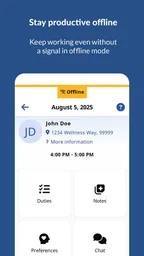
- A stable internet connection is needed for most tasks.
- Older devices may not support the latest app version.
- Notifications can be missed if app permissions are disabled.





