


Handshake: Jobs & AI work review
 Analysis by Appsdrops
When I look for work as a student, the hardest part is often not finding another listing; it’s keeping the search organized enough to act on good opportunities. Handshake: Jobs & AI work is designed for that early-career search, bringing job and internship discovery together with learning and AI-work opportunities. I find it most useful as one part of a steady routine—not as a substitute for deciding what I want, tailoring applications, or following up.
Start with a search plan, not an endless scroll
Before opening the app, I’d write down a few basics: the kinds of roles I’m willing to consider, where I can work, and what experience I want to gain. That small step matters because student opportunities can span internships, entry-level jobs, and other kinds of work. Without a plan, it’s easy to browse widely but make little progress.
Handshake is a business app from Handshake (Stryder Corp.), built around the transition from education to employment. Its focus makes it a more natural starting point for students than a broad job board aimed at every career stage. The distinction is useful: I would turn to it to explore early-career possibilities, then use my own judgment to check whether a particular role fits my schedule, goals, and qualifications.
The app is free, rated for Everyone, and has a 4.5 average from around 11,000 ratings. Those figures offer a quick sense of how it is received, but they don’t tell me whether the opportunities suit my field or location. I’d treat the rating as background, not as a promise that every search will produce a useful match.
A practical search plan can be as simple as choosing one priority for the week: find internships related to a course, identify roles that build a particular skill, or investigate paid work that fits around classes. This gives each browsing session a purpose. It also helps me decide when to stop scrolling and spend time on the more demanding parts of a search, such as preparing an application.
Make discovery manageable
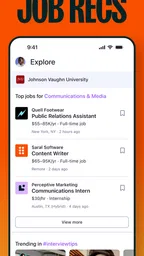
The main value I see in a student-focused platform is the chance to look across different kinds of early-career work without treating every listing as equally relevant. I’d read each opportunity closely rather than relying on its title. A familiar-sounding role can still ask for experience or availability that doesn’t fit, while a less obvious title may offer a useful first step.
For a student who is not sure what to pursue, browsing can also be exploratory. I’d use it to notice recurring skills and role names, then compare those patterns with classes, projects, or interests I already have. That turns the search into a form of career research rather than a race to apply to everything.
Capture opportunities before they vanish from memory
Job searching becomes messy when promising roles are scattered across different sessions and platforms. My advice is to create a simple record outside the browsing habit: note the role, why it caught your attention, what the application requires, and when you intend to revisit it. That record can be a document or whatever system you already use. It gives you a dependable place to compare options without assuming that seeing a listing once means you’ll remember it later.
This is especially useful when one opportunity needs a tailored résumé or a conversation with a professor, while another is ready for an application. I’d group roles by next action—research, prepare, apply, or follow up—rather than keeping a vague list of “interesting jobs.” The distinction prevents a common trap: collecting listings feels productive, but it doesn’t move an application forward.
Handshake’s wider emphasis on learning and AI work can make exploration feel broader than a conventional internship hunt. I’d still keep those possibilities connected to a goal. For example, if I want practical experience with a particular skill, I can compare an AI-work opportunity with an internship or entry-level role and ask which one offers the kind of experience I actually need. The right choice depends on the work and its terms, not simply on the category it appears under.
One useful habit is to save a short note about why a role is a fit before moving on. That gives me a starting point when I return to it and makes it easier to write a more specific application later. It also exposes weak matches early: if I can’t explain why I’m interested beyond “it sounds good,” I may need to investigate further before investing time.
Build a repeatable weekly routine
I would use the app in short, planned sessions rather than checking it constantly. At the start of a week, I’d review the roles I’ve already noted and pick a manageable next step. In a later session, I’d look for fresh possibilities and add only the ones that meet my criteria. A separate block of time can then go toward applications, which usually require more attention than browsing.
Here’s an everyday example: after a lecture, a student has a spare half hour and wants an internship related to their studies. They open Handshake with a clear goal, inspect a small set of relevant listings, and record the two that deserve a closer look. Later, they check requirements and decide which application to prepare. That routine is more useful than scrolling during every spare moment because it separates discovery from decision-making.
For students balancing coursework, a routine also helps keep the job search from taking over. I’d set a personal stopping point for browsing and reserve the rest of the effort for tasks that have a visible outcome: adapting application materials, asking for feedback, or submitting an application. The app can help surface opportunities; a calendar or reminder system can help make sure the next action actually happens.
Another practical approach is to review your criteria periodically. If a search produces only poor fits, I wouldn’t automatically conclude that the app is failing. I’d check whether my expectations are too narrow, whether I’m searching for roles at the wrong level, or whether I need to look in a different location or field. Conversely, widening every criterion can lead to an unmanageable pile of irrelevant options. The goal is a useful balance, not the largest possible feed.
Where the process can break down
No job-search app can remove the work of evaluating an opportunity. A listing still needs careful reading, and a promising title doesn’t establish that the role matches your needs. I’d check the responsibilities, qualifications, timing, and other practical details before spending time on an application. That extra step matters particularly when opportunities differ widely in what they offer.
The other friction point is attention. A platform that makes it easy to discover work can encourage too much browsing and too little follow-through. If you find yourself opening the app repeatedly without submitting anything or learning more about a role, change the routine: define a search goal beforehand and end each session with a concrete next action. That action might be investigating a requirement or deciding a listing isn’t right for you.
It also shouldn’t be your only route to work. A student may benefit from combining app-based discovery with career services, conversations with people in a field, campus resources, and other job boards. Those alternatives can be better when you need advice tailored to your circumstances, want to explore opportunities outside a student-oriented setting, or already have a specific employer in mind.
That comparison is important: a broad employment platform may suit someone with established experience who wants a wide view of the market, while a university career office may offer more personal guidance. Handshake makes the most sense when the student and early-career context is relevant to the search. I wouldn’t use it as a replacement for either targeted professional networking or specialist advice.
Who will get the most from it
I’d recommend giving Handshake a try if you’re a student or early-career candidate who wants one place to explore internships, jobs, and AI-work possibilities, and you’re prepared to manage the search actively. It can be particularly helpful when you’re still learning what roles exist and want to turn that exploration into a shortlist and a repeatable application routine.
It may be a poor fit if you expect an app to choose a career path for you, guarantee a suitable opening, or complete the application process on your behalf. It may also be less useful if your search is highly specialized or you need close personal coaching. In those cases, I’d pair it with a field-specific source or a person who can help assess your options.
Handshake has been available since August 15, 2018, and its current version is 5.22.0. It has more than one million installs and around 1,300 written reviews, which shows that it has reached a substantial audience of people exploring work and career opportunities. I’d still judge it by whether its listings and workflow help me take sensible next steps, not by popularity alone.
My overall take is that Handshake works best as a discovery tool inside a larger, sustainable job-search system. I’d use it to find possibilities, keep a separate record of the strongest matches, and reserve focused time for applications and follow-up. If you bring that structure to it, the app can make an early-career search feel more deliberate. If you only browse without a plan, it can just become another place to scroll.
What we like
- Free to browse job listings and create a profile
- Offers flexible shifts and entry-level opportunities
- Job recommendations can be tailored to your profile
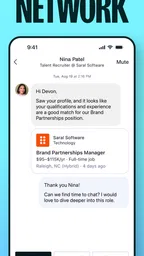
- Messaging tools help you connect with employers
- Useful for finding local work and campus jobs
What could be better
- Job availability varies by location and industry
- Some listings may require prior experience or credentials
- Application responses depend on individual employers
- Frequent notifications may need to be adjusted
- Some opportunities may involve off-platform communication





