
Grubhub for Drivers review
 Analysis by Appsdrops
I’d look at Grubhub for Drivers when I wanted delivery work that could fit around another job or a changing weekly schedule. Its purpose is straightforward: help drivers earn extra money by delivering Grubhub orders. That focus makes it different from the customer-facing food-ordering app; the useful question here is whether the driver workflow suits the way I want to work, not whether I want to browse restaurant menus.
In practice, a delivery shift is a chain of small decisions: getting ready, responding to available work, collecting an order, handing it to the customer, and deciding whether to continue. A driver app needs to support that rhythm without turning every pause into a hassle. Grubhub’s driver app is built for that specific role, but it is best treated as one possible source of flexible work rather than a promise of steady earnings.
Starting with the kind of work you want
The app is in the business category, and Grubhub is its developer. It is free to install, has an Everyone age rating, and is intended for people who want to drive and earn extra money. Those details make the basic audience clear: this is not a general job-search tool or a planner for restaurant employees. It is for people considering delivery driving through Grubhub.
I would begin by asking what “extra money” means in my own situation. If I have a few open hours and already have a suitable way to make deliveries, the idea of fitting work around other commitments may be appealing. If I need a fixed schedule, predictable take-home pay, or a guaranteed number of shifts, I would be more cautious. Delivery work is shaped by local demand and the practical costs of being on the road, so flexibility should not be mistaken for certainty.
That distinction also helps set expectations before opening the app. A driver app can organize the work it offers, but it cannot make a quiet period busy or remove the time spent travelling between stops. I would judge it by whether its opportunities fit my available time and whether a completed delivery makes sense after considering the whole trip—not just the moment I accept an order.
The app has a 4.4 average from around 78,000 ratings, and it has been installed over a million times. Those figures suggest that many people have tried it, but they do not tell me what a particular driver will earn or how busy a particular area will be. I would use popularity as background context, not as a substitute for testing the work pattern that applies to me.
Getting ready before the first delivery
A useful habit is to decide in advance how long I am willing to work and what kind of trip is worth my time. That gives me a practical reference point when an opportunity appears: I can consider whether it fits the time I have, rather than making every decision in a hurry. It is also sensible to have a charged phone and a plan for navigating safely before beginning a shift, since delivery work involves attention beyond the app itself.
I would also separate “using the app” from “being ready to drive.” A phone interface cannot replace checking that I can complete a trip safely or that I have allowed enough time for traffic, parking, and reaching the handoff point. The more realistic my starting plan, the less likely I am to feel pressured by an order that does not fit the rest of my evening.
From an available order to a completed handoff
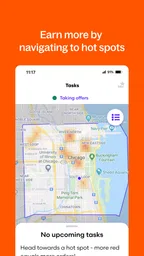
The core workflow is easy to picture: use the driver app to take part in Grubhub deliveries, then carry an order from the restaurant to its intended customer. The important work happens between those endpoints. I need to manage the restaurant stop, keep track of the delivery destination, and arrive prepared to complete the handoff. For a driver, those transitions matter as much as the moment an order is offered.
One practical approach is to think through a delivery as three separate legs: getting to the restaurant, moving from the restaurant to the customer, and finishing the drop-off. That simple mental checklist can help me notice where time is going. If a pickup takes longer than expected, for example, the trip may feel quite different from what it looked like when I first considered it. Treating each leg separately makes it easier to learn from a shift without blaming the app for every delay.
Restaurant pickup is the first handoff. I leave the driving portion of the trip and enter a setting where staff are handling food orders and other customers may be waiting. Patience matters here, and so does avoiding assumptions: arriving at a restaurant does not necessarily mean an order is ready to take away. I would build in enough attention to confirm I have the intended order before leaving, rather than rushing out and creating a more difficult problem at the customer’s door.
The second handoff is from driver to customer. That can be a quick exchange, but it still requires care: the right order needs to reach the right destination, and I need to follow the delivery instructions available for that trip. This is where a delivery shift can feel less like a continuous drive and more like a series of small service interactions. Drivers who dislike navigating unfamiliar stops or coordinating handoffs may find that part more tiring than the driving itself.
A useful, non-obvious trade-off is that the shortest-looking trip is not automatically the easiest one. A restaurant stop, an awkward parking situation, or a difficult final approach can add friction that distance alone does not capture. I would pay attention to the full route and the likely effort at both ends, rather than judging work solely by how close the restaurant and customer appear on a map.
A realistic evening with changing plans
Imagine I finish my main job earlier than expected and have a couple of hours free. I open the driver app because I want to make use of that time, but I still need to be home by a certain point. I can treat each delivery as a decision about whether it fits the remaining window, while keeping in mind that pickup and drop-off take time beyond the drive itself. If a trip would leave too little room for the rest of my evening, passing on that kind of work may be more sensible than stretching the plan.
That scenario shows where flexible delivery can be useful: it gives me a way to consider work around an existing commitment instead of treating every day as a fixed shift. It also shows the limit. If I have a hard appointment, a narrow time window, or no tolerance for a delay, delivery work may be a poor match at that moment. The app can support a workflow, but it cannot guarantee that every trip will fit neatly into a personal schedule.
For a new driver, I would keep early sessions manageable and pay attention to what actually slows me down. Is it reaching the restaurant, finding a place to stop, or completing the final handoff? That observation is more useful than simply counting completed trips, because it points to the part of the work that may affect whether I want to continue. It also helps me choose better times and routes for my own comfort without assuming every neighbourhood or shift behaves alike.
How it compares with other ways to earn
Compared with a conventional part-time job, Grubhub for Drivers is appealing when I value the possibility of fitting work around other responsibilities. A scheduled role may offer clearer hours, while delivery can involve more uncertainty about how a particular period will go. Someone who needs a dependable routine may prefer the former; someone with changing availability may be willing to accept more variability in exchange for a more adaptable way to work.
Compared with other delivery services, the broad job is familiar: collect food from a restaurant and bring it to a customer. The meaningful differences for a driver are local opportunity, the experience of the app, and whether the available work suits the driver’s own circumstances. I would not assume that one delivery service is best everywhere. If I already use another service, comparing the real experience of each in my area is more informative than relying on general claims about either one.
There is also a difference between delivery work and gig tasks that can be done entirely at home. Driving brings travel time, vehicle use, and physical handoffs into the equation. A person looking for work without transport or road-related costs should consider a different category of side job. Likewise, if I want customer-service work without navigating restaurant pickups and delivery destinations, a non-driving role will likely be a better fit.
My practical tip would be to review a shift as a complete block of time, including the stretches between deliveries and the return journey I may need afterward. A trip’s apparent value can look different once I account for the time required to get into position and wrap up. This is not a special feature claim; it is a way to make a more grounded decision about whether delivery work is serving my actual goal.
Where the workflow can become frustrating
The main limitation is the gap between wanting flexible work and knowing what a shift will produce. Demand can vary, and the app cannot remove ordinary delivery uncertainties such as restaurant delays, traffic, parking, or a complicated handoff. Those issues are not unique to Grubhub, but they have a direct effect on how pleasant and worthwhile a delivery feels. I would avoid planning essential expenses around an assumed level of work before I understand my own local experience.
Another point of friction is that a phone is only one part of the job. It helps coordinate the delivery process, but the driver still needs to make safe decisions on the road and manage interactions in person. If checking an app while moving, finding unfamiliar entrances, or handling time pressure would distract me, I would need to set clear boundaries and prioritize safety over speed. No delivery opportunity is worth taking risks to complete it.
The app may also be the wrong choice if I do not want the responsibilities that come with transporting food to customers. Some people prefer work with a workplace, manager, and known shift; others do not want to rely on driving at all. For them, a regular part-time position or a non-driving side job offers a better starting point. Grubhub is most compelling when the person already wants delivery work and is comfortable assessing each opportunity as it comes.
For installation context, the app was released on March 12, 2019, and its current version is 5.45. It requires Android 8.0 or later. Grubhub for Drivers has around 15,000 written reviews, but individual experiences can differ substantially with location, timing, and personal expectations. I would check that my device meets the requirement and then treat my own first few work sessions as a practical test of fit.
Who I would recommend it to
I would recommend considering Grubhub for Drivers if you already have the means to make deliveries, want to explore flexible side work, and are comfortable with restaurant pickups and customer handoffs. It makes the most sense for someone who can adapt to changing conditions and evaluate whether a trip fits their time and effort. The free price makes trying the app itself straightforward, though it does not make the work cost-free: the realities of driving still matter.
I would not recommend relying on it as a guaranteed source of income without first understanding how it works for you. If your priority is a fixed schedule, predictable hours, or work that does not involve travel, look at alternatives before committing to delivery driving. If you are curious and can approach it as a trial, begin with a realistic time window, keep safety first, and note which parts of the pickup-to-drop-off process feel smooth or frustrating.
My overall view is that this is a focused tool for people who want to deliver Grubhub orders, not a magic shortcut to easy earnings. Its value depends on the match between the app’s delivery workflow and the driver’s local circumstances. When that match is good, it can be a practical way to use spare time; when it is not, the restaurant waits, travel, and uncertain pace can outweigh the flexibility. That is the decision I would make before turning a free install into a regular part of my week.
What we like
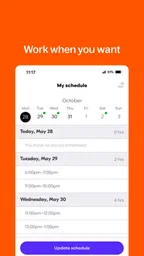
- Drivers can choose when to go online and accept deliveries.
- The app provides navigation to restaurants and customers.
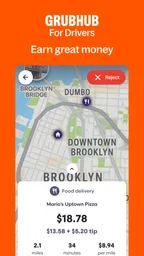
- Drivers can review delivery details before accepting an offer.
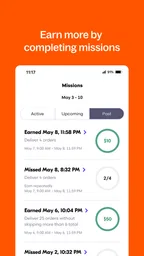
- Earnings and delivery activity are available in the app.
- In-app support can help with delivery issues.
What could be better
- Order availability can vary by location and time.
- Busy periods may involve long restaurant waits.
- Drivers cover their own fuel and vehicle costs.
- Customer demand can make earnings unpredictable.
- Navigation may require switching to another map app.





