


GoTo review
 Analysis by Appsdrops
I judge a business calling app less by how many buttons it offers than by whether it helps a conversation happen without making people think about the software. GoTo Mobile is aimed at that practical job: bringing calling, messaging, and meetings into one app. That combination can be useful when work moves between quick questions and scheduled discussions, though it does not automatically make the app a fit for every team.
One place for everyday business conversations
GoTo Mobile is a free business app from GoTo Group, Inc. It has a 4.7 average from around 153,000 ratings, and it has been installed over 5 million times. Those figures suggest broad adoption, but they do not tell me whether it will suit a particular company’s communication setup. The more useful question is whether your workplace already uses GoTo and needs a mobile companion for its calls, messages, and meetings.
The app is rated for Everyone, but its purpose is firmly professional. I would consider it for someone who needs to stay reachable while away from a desk, or for a small team that wants mobile access to its existing GoTo communication tools. If you are looking for a personal messenger or a standalone video-meeting service, it may be more than you need—or may not be the right choice at all.
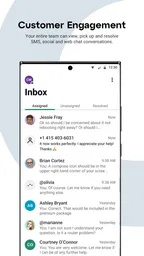
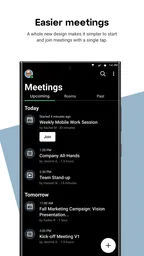
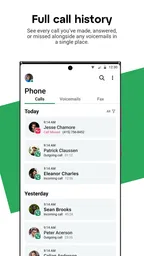
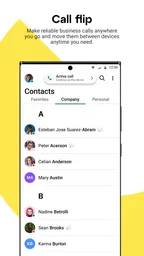
Its appeal is the overlap between three familiar tasks. A customer question might begin as a call, a follow-up might be easier to handle by message, and a longer discussion may call for a meeting. Keeping those activities in one work-focused app can reduce the need to switch between separate tools. That is a useful design goal, even though the real convenience depends on how your organization has set up its GoTo service.
Where a combined app helps
For me, the clearest use case is the person whose workday is not spent in one place. Imagine a manager leaving a meeting and heading to another site while a colleague needs an answer about a customer issue. A mobile business app can keep that conversation within reach, then provide a path to a fuller discussion if a quick exchange is not enough. The value is not that every task belongs on a phone; it is that the phone can bridge the gaps between desk-based work and being on the move.
A second, less obvious benefit is continuity of context. When calls, messages, and meetings are part of the same work tool, it is easier to treat them as different ways to resolve one business conversation rather than unrelated activities. I would use a message for a detail that does not need an immediate answer, a call when tone or back-and-forth matters, and a meeting when several people need to work through an issue together. Choosing deliberately can help avoid turning every small question into a meeting.
There is a trade-off, though: one app does not mean one simple workflow for every person. Businesses may have different calling arrangements and meeting habits, so the experience can depend on how GoTo is being used at work. Before relying on it for an important day-to-day task, I would check that the relevant service and account access are already in place rather than assuming an app install alone sets up a complete business phone system.
How it fits against familiar alternatives
Compared with using a separate phone app, chat tool, and meeting app, GoTo Mobile’s strongest case is consolidation. Fewer app changes can make it easier to keep work conversations together and avoid the small interruptions of jumping between tools. For a team already committed to GoTo, that can be more valuable than choosing the most feature-rich option in each individual category.
On the other hand, a dedicated chat app may be the better choice for a team whose work revolves around channels, searchable discussions, or a particular collaboration routine. A specialist meeting app may also suit people who mainly host larger or more elaborate online sessions. I would not switch tools simply because one app combines several functions; the deciding factor should be whether that combination matches how your colleagues actually communicate.
It is also worth separating a mobile companion from a full desktop workflow. A phone is convenient for checking in, handling a short call, or joining a discussion while away from a computer. It is less comfortable for long sessions that require extensive note-taking, comparing documents, or managing several tasks at once. I see the mobile app as a useful part of a work setup, not necessarily a replacement for every other way of communicating.
What the current version tells me—and what it doesn’t
The current version is 2026.11.2, and the app was released on September 17, 2019. That long span gives the product a substantial history, while the current version shows that it continues to have a maintained release line. I would treat those as signs of an established product, not proof of any particular improvement: a version number alone does not reveal which features changed or how a specific update affects an individual user.
For existing users, the practical lesson is to keep the app current when their organization depends on it, then check that the everyday tasks they rely on still work as expected after an update. If calls are central to your role, test a normal call; if your team uses meetings more often, verify that joining one remains straightforward. This is a more useful update habit than assuming every new version changes the experience in a major way.
The minimum operating system is version 9. That gives people with older compatible devices a potential route to install it, but compatibility does not guarantee that every phone will feel equally comfortable for business use. A device with a dependable connection and a clear microphone matters more to a work call than simply meeting the minimum software requirement.
Small workflow choices that make a difference
I would avoid treating calls, messages, and meetings as interchangeable. If a question needs a quick factual answer, a message may let the other person respond when free. If the issue is sensitive, complicated, or likely to need several clarifications, a call can save a long written exchange. When multiple people need to agree on a plan, a meeting is more appropriate. This simple division keeps the app useful without encouraging unnecessary interruptions.
Another practical tip is to decide when you should be reachable before a busy stretch of work. A mobile communication app can make it easy to respond from almost anywhere, but that convenience can blur the line between availability and constant attention. I would use it to handle genuinely time-sensitive work while setting reasonable expectations with colleagues about when a message needs an immediate response.
For a team evaluating the app, I would run a short real-world trial around its actual work rather than judging it from a quick installation. Have one person place a routine call, send a follow-up message, and join a meeting the way they normally would. Then ask whether the transitions feel natural and whether staff know which communication method to choose. That test can reveal more than a feature checklist because the main benefit is coordination between modes of contact.
Where I would be cautious
The main limitation is that a combined communication app is only as helpful as its fit with the organization using it. If coworkers are spread across different tools, GoTo Mobile may not reduce fragmentation by itself. If your business already has a preferred calling and meeting setup that everyone understands, adding another app could create more confusion rather than less.
I would also be cautious about choosing it solely because the app is free. The download price is not the same thing as a decision about business service, account access, or whether a company’s existing arrangements support the workflow you want. A prospective user should confirm with their workplace how GoTo is provisioned and which tools the team expects them to use. That avoids the frustrating situation of installing an app and discovering that the intended work process depends on organizational setup.
People who mainly want a personal messaging app should probably skip it. Its business focus is central, and the strongest reason to use it is access to work communication rather than casual chats. Likewise, someone who rarely needs mobile calls or meetings may gain little from carrying another work app. In those cases, a simpler tool that matches the person’s actual needs is a better choice.
Who I would recommend it to
I would recommend GoTo Mobile to employees and managers whose organizations already use GoTo and who need a convenient way to handle work conversations away from a desk. It is especially sensible for people whose day moves between short calls, follow-up messages, and occasional meetings. The app’s 5 million-plus installs and 2,600-plus reviews point to a well-used product, but your team’s own setup is still the deciding factor.
I would suggest that a team lead agree on a few basic habits before making it central to daily work: which questions belong in messages, when to call instead, and when a meeting is worth scheduling. That small bit of coordination can prevent the app’s multiple communication modes from becoming three competing inboxes. It also gives employees a clearer sense of when they need to respond and when a conversation can wait.
For organizations comparing alternatives, I would first map the tools people already use and identify what is genuinely inconvenient. If switching between separate apps is a recurring problem, a combined GoTo workflow may help. If the team’s pain point is something more specific—such as a specialized meeting process or a particular collaboration style—a dedicated alternative may solve it better. The right choice is the one that fits the work, not simply the one with the broadest label.
My verdict
GoTo Mobile makes the most sense as a work companion for people who can use its calling, messaging, and meeting tools as parts of one existing business setup. I like the practical idea of carrying several communication options in one place, especially for a day split between a desk and other responsibilities. Its value is clearest when the team shares the same habits and the app complements, rather than replaces without thought, the rest of its workflow.
I would not recommend it as a universal answer for every business or as a personal messenger. The app’s usefulness depends on organizational fit, and mobile communication cannot make long or complex work equally comfortable on a small screen. Still, for a GoTo-using team that needs a straightforward way to stay connected while away from a computer, it is a reasonable option to try. I would start with a few ordinary work tasks, see whether the transitions feel natural, and keep it only if it makes those conversations easier.
What we like
- Join meetings from a shared link without creating an account.
- Screen sharing makes it easier to follow presentations.
- Meeting controls are straightforward for new participants.
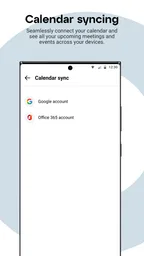
- Calendar integrations can simplify scheduling.
- Noise suppression can improve calls in busy environments.
What could be better
- Some features require a paid subscription.
- Video quality depends heavily on internet connection.
- The app may use substantial battery during long calls.
- Notifications can be distracting during meetings.
- Joining meetings may require microphone and camera permissions.





