


Google Chat review
 Analysis by Appsdrops
Google Chat is at its best when a conversation needs to stay connected to the work it supports. I like it less as a universal messenger and more as a practical place for colleagues to discuss a task, keep a group conversation going, and coordinate without scattering every decision across email threads. That distinction matters: if your team already uses Google Workspace, the app can feel like a natural extension of the tools around it; if your contacts and work live elsewhere, its appeal is narrower.
Where work conversations feel more manageable
Made by Google LLC, this free business app gives workplace chat a dedicated home on a phone. Its familiar Google identity is part of the draw, but the more useful question is whether it helps you find the right conversation at the right time. In my view, it does when a team uses chat to move work along rather than expecting it to replace every other communication tool.
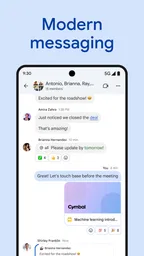
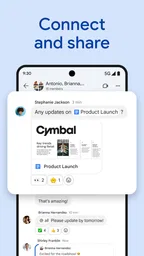
A simple everyday example shows the difference. Imagine you are away from your desk when a colleague asks whether a draft is ready. A focused team conversation can keep the answer, a follow-up question, and the next action together, rather than making you search through an email chain later. On a mobile screen, that can be more convenient than switching between several separate conversations—provided the team has agreed where project updates belong.
That last condition is important. Chat cannot make a disorganized team organized by itself. If people start parallel conversations for the same task, or treat every message as urgent, the app can become another source of interruptions. I recommend agreeing on a few simple habits: keep discussions tied to a clear topic, state what action is needed, and move decisions that deserve a lasting record into the place your team uses for that purpose.
A better fit for ongoing collaboration than casual messaging
Google Chat belongs to the business category, and the distinction shows in who is most likely to appreciate it. It is suited to coworkers who need to ask quick questions, coordinate a shared task, or keep a group conversation going during the day. It is less compelling if you simply want a personal messenger for friends and family, especially when those people already use another service.
Compared with ordinary email, chat is more natural for a short exchange that would be awkward as a formal message. Compared with a general-purpose messenger, its strongest case is the working context: colleagues may already use Google’s productivity environment, so a conversation can sit closer to their routine. But chat is not automatically better than email. Email still suits longer explanations, formal communication, and messages that need to be easy to revisit as correspondence. I would use each for the job it handles best rather than forcing everything into one inbox.
It also helps to be realistic about the trade-off between speed and record-keeping. A quick answer in a busy discussion can save time in the moment, but it may be harder to rediscover than a carefully written document or email. When someone shares a decision that will matter next week, I would make sure it is captured somewhere dependable rather than assuming a fast-moving conversation is a permanent project record.
Small habits that make the app more useful
One practical tip is to make the purpose of a conversation obvious from the start. A project group can easily turn into a catch-all room where status updates, urgent questions, and unrelated chatter compete for attention. Keeping the discussion focused makes it easier for someone who was away to catch up and reduces the temptation to send the same question to several people privately.
A second useful habit is to write messages so they stand on their own. Instead of sending “Is this done?” with no context, mention the task and what decision or update you need. That may sound like basic etiquette, but it matters on a phone: a colleague glancing between meetings should not have to reconstruct the subject from earlier messages before they can answer.
Third, separate a quick coordination exchange from work that needs careful review. Chat is handy for asking who can take a task or confirming a small detail; it is not the place I would rely on for a long brief, a detailed approval trail, or the only copy of an important decision. Keeping those boundaries clear lets the app be fast without making it the team’s accidental filing cabinet.
These are not reasons to avoid chat; they are ways to get more value from it. The app works best when people use it as a shared communication space with a little structure, not as a stream that must be watched every minute. If a team cannot agree on where updates belong, even a capable app will leave people checking multiple places and wondering which message is current.
What the audience response suggests—and what it cannot decide
The app has a 4.4 average from around 376,000 ratings, and it has passed 50 million installs. That level of reach suggests it has become a familiar option for many users, but popularity alone does not tell me whether it fits your particular workplace. A team that already communicates through Google’s services may find the transition straightforward; a team committed to a different collaboration setup may see little reason to add another destination for messages.
It has around 26,000 written reviews, another sign that people have spent time forming opinions about it. I would treat public reactions as a starting point rather than a guarantee. Work chat depends heavily on team habits, the tools an organization already uses, and how much interruption people can tolerate. Two colleagues can use the same app and have very different experiences because one team keeps discussions tidy while the other lets every topic spill into every conversation.
The app is free and rated for Everyone, which makes trying it relatively approachable for a broad audience. Google Chat was released on February 28, 2018, so it is not a brand-new experiment. Still, the right choice is not determined by age or reach: the key question is whether your coworkers will actually use it consistently and whether your organization’s existing workflow gives it a clear role.
Where it falls short as a one-stop solution
My main reservation is that a dedicated chat app can increase fragmentation when a workplace has not chosen a shared communication routine. If some people send updates in chat, others rely on email, and a third group discusses the same work elsewhere, the result is not seamless collaboration; it is more places to check. Before asking a team to adopt it, I would decide what belongs in chat and what belongs in the existing record of the work.
The other limitation is the nature of chat itself. Its immediacy encourages short, frequent messages, which can be useful for coordination but distracting when you need uninterrupted time. A person who wants a quiet task manager, a formal archive, or a single place for every type of communication may prefer a different tool or a combination of tools. Google Chat is most convincing when it has a defined job, not when it is expected to solve every workplace problem.
It may also be the wrong pick for a group that does not share Google-based work habits. If your collaborators are already settled into another business platform, introducing a separate channel can create more friction than benefit. In that situation, I would compare the cost of switching attention with the advantage of having a dedicated team conversation. Familiarity and consistency often matter more than adding another feature-rich destination.
Who I would recommend it to
I would recommend Google Chat to small teams, project groups, and coworkers who want quick workplace conversations alongside their established Google Workspace routine. It is especially appealing when a team needs a shared place for questions that do not deserve a formal email but should not get lost in personal messaging. For a new colleague joining an active project, a focused group conversation can also provide a practical place to ask for context and coordinate next steps.
I would be more cautious about recommending it to someone seeking a personal messenger, a deep project-management system, or a replacement for thoughtful written documentation. It can support coordination, but it should not be mistaken for a task plan or the authoritative home for every decision. If your team’s biggest problem is unclear ownership or scattered files, choosing a chat app alone will not fix it; agree on responsibilities and record-keeping first.
For a user deciding whether to install it, the most useful test is simple: ask whether the people you need to talk with already use it and whether you can name the kind of conversation it will handle. If the answer is yes, it is worth trying as a work-focused communication option. If the answer is no, you may get a better result by staying with the service your group already checks.
My verdict: useful when the team gives it a purpose
Google Chat earns its place through focused workplace communication, not by being the right tool for every message. I appreciate the way it can make quick coordination feel more direct than email, especially when colleagues already work within the Google ecosystem. Its biggest weakness is not a reason to dismiss it; it is the risk that another chat destination will add noise if a team has no shared rules about where conversations belong.
My recommendation is specific: choose it when your coworkers are likely to use it and you can keep discussions tied to clear work topics. Keep longer explanations and important records in the formats your team can reliably find later, and resist treating every message as urgent. With those habits, the app can be a convenient part of a business workflow. Without them, another messaging tool is unlikely to make collaboration feel any more organized.
What we like
- Works across Android, iOS and the web.
- Supports direct messages and group conversations.
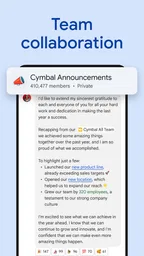
- Spaces help organize ongoing team discussions.
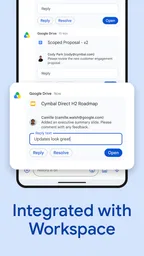
- Integrates with Gmail and Google Calendar.
- Offers audio and video calls through Google Meet.
What could be better
- A Google account is required to use the service.
- Some features work best within the Google Workspace ecosystem.
- Notifications may be easy to miss in busy spaces.
- Chat history settings can vary by account or administrator.
- The interface may feel crowded when many conversations are active.





