

Glassdoor | Jobs & Careers review
 Analysis by Appsdrops
I would choose Glassdoor | Jobs & Careers if I wanted one place to explore openings while also thinking about what it might be like to work for the companies behind them. It is more than a list of vacancies, but it is not a substitute for every part of a job search: the value comes from using its career and employer information alongside a clear idea of what you want next.
What matters when choosing a job-search app
A job app is most useful when it helps you narrow a broad search into realistic next steps. Before relying on one, I would ask whether it makes relevant roles easy to find, whether its employer context helps me evaluate a potential move, and whether I can keep my search organized without treating every alert or listing as an instruction to apply.
Glassdoor is a business app from Indeed, Inc., and its focus suits people who want to combine job discovery with career research. That mix is helpful when you are weighing more than a job title: perhaps the work sounds right, but you are uncertain about the organization, the role’s place in your career, or whether it is worth spending time on an application.
The app is free, which makes it easy to try without committing money just to see whether its approach fits. It is rated for Everyone, so it is presented for a broad audience. Glassdoor has a 4.7 average from around 748,000 ratings, and it has passed 10 million installs. Those figures suggest that it is widely used, though popularity alone cannot tell you whether the results will suit your location, profession, or experience level.
Set your search boundaries before browsing
I recommend deciding on a few practical filters before opening a stream of listings: the kinds of roles you would genuinely consider, the locations or work arrangements that are feasible for you, and what you are unwilling to compromise on. That small bit of preparation helps prevent a common problem with job apps: spending a long time browsing appealing titles that do not fit your actual constraints.
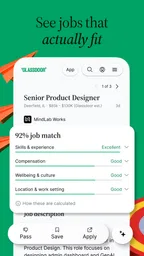
It also gives you a better way to judge recommendations. A personalized match is a starting point, not proof that a role is a good fit. Read the description carefully, compare its responsibilities with your experience, and decide whether the next step is worth your time. This is especially important if you are exploring a career change, where familiar job titles may conceal very different day-to-day work.
Where Glassdoor earns its place
The central strength I see is the connection between finding openings and making a more considered career decision. A conventional job board can be efficient when you already know the position and employer you want. Glassdoor is a stronger fit when you are still comparing possibilities and want employer context to inform that comparison, rather than judging a vacancy by its title alone.
That distinction matters in an ordinary search. Imagine you have a spare half hour after work and are considering a move into a different kind of role. You can use that session to look at openings, identify a handful that match your direction, and research the organizations before deciding which ones deserve a closer look. The useful outcome is not necessarily an application sent immediately; it may be crossing one option off your list or discovering that a role’s requirements call for a different plan.
One practical approach is to keep a short personal shortlist outside the browsing flow: record the role, why it caught your attention, and what you still need to verify. This reduces the chance of revisiting the same listing without remembering what interested you. It also helps separate genuine opportunities from jobs that merely look attractive in a quick scroll.
Another useful habit is to compare several openings against the same criteria rather than evaluating each in isolation. If one role offers a title you want but unclear responsibilities, while another has a more familiar title and a better match to your skills, writing down the trade-off can make the decision less reactive. Glassdoor’s combination of career exploration and employer research is well suited to this kind of deliberate comparison.
The app is also useful before you are ready to apply. If you are employed and quietly exploring, you can use it to understand what kinds of roles are appearing in your field and which organizations merit further research. That is a different goal from applying at speed, and it can make the app valuable even when you are not actively sending applications every day.
Where the experience can feel less decisive
No recommendation system can know your full circumstances from a search. A role may look relevant on paper but still be wrong because of its responsibilities, seniority, location, or timing. I would treat suggested matches as prompts to investigate, not as a ranked list of jobs that are guaranteed to suit you.
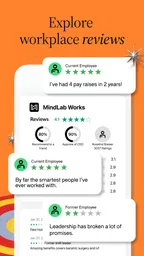
There is also a difference between employer context and a complete picture of a workplace. Research can help you frame questions and spot issues worth examining, but it cannot replace a careful conversation about the actual team, manager, expectations, and day-to-day work. A company-level impression should not decide an application by itself, particularly if the role is unusually specialized or the information you find is too general to answer your concerns.
Browsing can become its own form of procrastination. It is easy to keep comparing companies and openings without updating your application materials or contacting anyone. I would give each session a small goal: identify a few plausible roles, investigate one employer, or decide what skill gap to address. If you leave without a next step, the app may be helping you consume job-search information rather than move forward.
For someone who already has a specific employer and vacancy in mind, a company’s own hiring channel or a focused job-search service may be more direct. Likewise, if your field depends heavily on referrals, specialist communities, or a portfolio, Glassdoor should be one part of the search rather than the whole strategy. Its broad career orientation is not automatically an advantage when you need a narrow professional network or a highly specialized source of leads.
Choosing between Glassdoor and other approaches
The usual alternatives fall into a few broad groups. General job boards are often the straightforward choice when you want to scan many openings with minimal detours. Employer career pages make sense when you have already selected particular organizations and want to follow their hiring process. Professional networks and specialist communities can be a better match when introductions, reputation, or industry-specific discussion matter more than broad discovery.
Glassdoor occupies a useful middle ground for people who are not yet certain where to apply. Its appeal is the chance to connect a possible opening with research about the employer and a wider career question. If you are already sure of the target, that extra context may not outweigh the speed of a direct route. If you are still exploring, it can make the search feel less like collecting job titles and more like comparing actual choices.
I would not use any one app as the sole source of truth. Listings can change, and a job-search decision involves details that a mobile browsing session cannot settle. Use Glassdoor to build and refine a shortlist, then verify the role and application instructions through the employer’s current hiring materials before investing substantial time.
Making the switch without losing momentum
If you are moving from another job-search method, there is no need to abandon it on day one. Keep your existing notes and application routine, then use Glassdoor for a defined purpose: researching employers attached to promising openings or exploring roles beyond your usual search terms. After a few sessions, you can tell whether that additional perspective is improving your decisions or simply adding another place to browse.
To avoid duplicate effort, maintain one reliable record of applications and follow-ups, even if you discover opportunities in several places. Note when you applied, what version of your materials you used, and what response or next action is due. The app can help with discovery, but your own simple tracking habit is what keeps a multi-channel search manageable.
Glassdoor is available free, and its current version is 13.16.0, with Android 8.0 as the minimum operating system. It first appeared on March 13, 2013, so this is an established job-search product rather than a new experiment. A long presence and a large user base can be reassuring when deciding whether to try it, but the best test is still whether its mix of job discovery and company research gives you information you can act on.
Who I would recommend it to
I would recommend Glassdoor to people who are comparing employers as well as vacancies, especially anyone exploring a career move without a single fixed target. It is also a sensible companion for a working professional who wants to investigate options gradually, or for a job seeker who needs to turn a broad list of possibilities into a more thoughtful shortlist.
I would skip it as a primary tool if you want only the fastest route to a known employer, if your search relies mainly on specialist contacts, or if extra browsing tends to distract you from completing applications. In those cases, a direct employer channel, a focused board, or a professional network may fit the task better. You can still consult Glassdoor when company research would change your decision, but there is no need to make it the center of your workflow.
Overall, Glassdoor works best as a decision aid, not just a vacancy feed. I like it most when I use it to ask better questions about a possible move, compare employers with a consistent set of priorities, and choose a concrete next step. If that is what you need from a free business app, it is worth trying; if you already know exactly where to apply, a more direct route may save time.
What we like
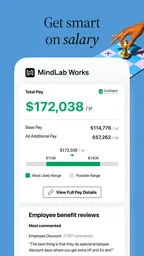
- Job listings include salary estimates to help compare opportunities.
- Company reviews offer insight into workplace culture.
- Users can save jobs and revisit them later.
- Career resources provide guidance for job seekers.
- The app supports job searches by location and role.
What could be better
- Some job listings may be outdated or already filled.
- Salary estimates may differ from actual compensation.
- Company reviews can reflect individual opinions and experiences.
- The app may request account creation for some features.
- Notifications can become distracting without careful settings.





