


GettingOut Visits review
 Analysis by Appsdrops
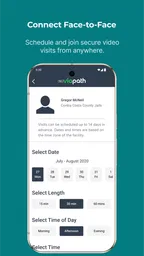
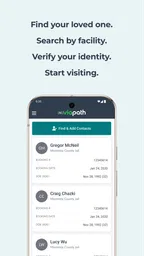
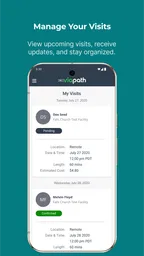
I think of GettingOut Visits as a focused tool for a particular kind of family call, not a replacement for the messaging and video-chat apps most households already use. It is designed for video visits with loved ones at select facilities, so its value depends on whether the facility involved supports it and whether the people on both ends can arrange a visit. That narrow purpose is also its main strength: when an ordinary call is not an option, a dedicated route to face-to-face contact can matter a lot.
When one household is arranging a visit
The most realistic way to use this communication app is as a shared household task. One person may be the main organizer, while a partner, sibling, or other relative helps choose a time and makes sure everyone who wants to take part is ready. The video call itself is only one part of the experience; the family also needs to coordinate around the visit and the facility’s arrangements.
That makes GettingOut Visits a different proposition from a general-purpose video app. With familiar chat services, you can usually start a call wherever and whenever the other person is reachable. Here, the first question is whether the relevant facility offers visits through the app. If it does, the app has a clear purpose. If it does not, installing it will not make it a useful substitute for ordinary calls.
For a household, I would decide early who will handle the practical details. A single organizer can keep the family from duplicating effort or assuming someone else has arranged the visit. That does not mean everyone needs to share one account or device; it means agreeing on responsibilities before the call is due. Clear coordination matters more than adding another app to every family member’s phone.
Make the device plan before the call
A simple routine helps prevent avoidable stress. The organizer can check that the intended device is available, that it is charged, and that the person joining knows when to be ready. If relatives will gather around one screen, decide who will hold or position the device so the person on the other end can see and hear the group. These are ordinary video-call considerations, but they become especially important when the visit is scheduled rather than spontaneous.
Shared-device use deserves a little thought. A household tablet may be convenient because it can stay in a common room, but it may also be used by several people for unrelated tasks. Before a visit, I would make sure the right person can access the app and that the device is not tied up with another family member’s activity. I would also avoid assuming that a shared screen automatically means shared account access; keep personal sign-in details private and let the person responsible for the visit manage them.
If more than one relative wants to participate, agree on that beforehand rather than trying to solve it while the visit is starting. A family might choose one person to join from the household device and let others sit nearby, or arrange a different plan if they need separate access. The best choice depends on the facility’s process and the app’s supported setup, so I would confirm those details before relying on a particular arrangement.
Set expectations around access and privacy
GettingOut Visits is published by Viapath and is free to download. A free app can still be part of a process with practical conditions around access and scheduling, so I would not treat downloading it as the same thing as having a visit ready. The useful first step is to establish whether the person’s facility supports this route and what the family needs to do to prepare.
Account boundaries are worth settling in advance, especially in a household where a phone or tablet changes hands. I would not leave a device signed in for convenience if other users can open it casually, and I would not pass around a personal login as a shortcut. Instead, decide who is responsible for opening the app and handling the visit. That keeps a sensitive family interaction from becoming an accidental shared-device session.
There is also a practical distinction between the person who arranges a visit and everyone who wants to be present. Families should not assume that one person’s setup automatically gives every relative independent access. If several people need to participate, ask how that works for the particular facility before making plans around a group call. This is a more reliable approach than discovering a limitation at the moment everyone is waiting.
Coordinate people, not just technology
For relatives who live in different homes, coordination can be harder than getting a phone ready. A family chat or a quick call outside the visit can help settle who is joining, who will be at the shared device, and what the plan is if someone is delayed. I would keep those arrangements separate from the visit itself rather than expecting GettingOut Visits to serve as the family’s general coordination hub.
One useful approach is to choose a lead organizer for each visit. That person can communicate the agreed time to everyone, make sure the household device is available, and tell relatives whether they are expected to join together or separately. This avoids two common snags: several people independently trying to arrange the same thing, and one person assuming the rest of the family has been informed.
Families should also plan for small disruptions. A device may need charging, a household member may need the room, or someone may not be ready when expected. Keeping the visit device in a predictable place and setting a reminder using the household’s usual calendar can reduce last-minute scrambling. Those steps do not add new capabilities to the app; they make the app’s specific role easier to manage.
How it compares with familiar video calling
Compared with broad video-call apps, GettingOut Visits is more specialized. General services are a better fit when everyone can contact one another freely and wants flexible calls for everyday catch-ups. This app makes more sense when a supported facility is part of the communication process and the family needs a route designed for that setting. In other words, it is not a universal upgrade over the tools people already know; it fills a different need.
That specialization creates a trade-off. A family can appreciate having a purpose-built way to make a video visit, but it may not become the app they use to share news, send casual messages, or call relatives on demand. I would keep the household’s regular communication tools for those tasks and use this one only where it fits the facility-supported visit. That division is clearer and avoids expecting a single app to cover every kind of family contact.
There is a further reason to keep expectations grounded: the app’s audience is narrower than that of a mainstream messenger. A rating of 3.3 from around 29,000 ratings suggests that users’ experiences are not uniformly positive, while its 1 million-plus installs show that many people have sought it out. I would treat those figures as context, not as a promise about how smoothly a particular household’s visit will go. Facility support and a well-prepared device matter more to the decision than popularity alone.
Age, trust, and who should use it
The app is rated for Everyone, which is a broad content-age classification. For a household, that is reassuring as far as the classification goes, but it does not replace adult judgment about who handles a device, account access, or a personal conversation. If a child is nearby during a family visit, an adult can decide whether the child should participate and help them understand that the call is a private family interaction.
I would recommend GettingOut Visits to relatives who need to arrange video contact through a facility that supports it, especially when face-to-face conversation is more meaningful than a voice call. It is also a reasonable option for a family willing to assign one person to organize the visit and prepare the shared device. The app is less compelling for people who simply want a flexible video-chat service for friends and family, or for households whose facility does not use this visit option.
Trust here is partly about how the family manages its own devices. Keep sign-in access with the responsible adult, avoid leaving a session open on a device used by many people, and make sure everyone understands who is joining. Those are sensible boundaries for any personal video conversation, but they matter even more when a household shares equipment and several relatives are involved in a visit.
What to expect from the current app
GettingOut Visits is a free communication app whose release date is September 21, 2017, and its current version is 6.0.0. It requires Android 7.0 or later. Those details make it possible to check basic compatibility before setting up a household device. If the family plans to use an older spare phone or tablet, I would check its operating system first rather than waiting until the day of a visit to find out whether it can run the app.
The practical question is not whether every household member should install it. It is whether the person who will manage the visit has a compatible device and a clear plan for access. On a shared tablet, make sure the responsible user can reach the app without exposing personal account details to everyone who picks up the device. On an individual phone, check that the organizer will have it available at the agreed time. A little preparation can make a scheduled call feel less like a technical task.
I would also separate troubleshooting from family coordination. If something goes wrong, the organizer should focus first on the app and device being used, while another relative can keep the rest of the household informed. That division avoids a crowd of people trying different fixes at once. It is a small but useful way to keep a meaningful visit from turning into a group debate about the phone.
My household verdict
My view is that GettingOut Visits is worth considering when the facility supports it and a family needs a dedicated way to arrange video contact. It is not the app I would choose for everyday calls or casual household messaging, and its value is limited if the facility is not part of its intended use. But for relatives who can use it, a planned video visit can be more personal than relying only on voice communication.
The best household setup is modest: one organizer, one prepared device, private account handling, and a shared understanding of who will join. That approach respects the app’s focused role without turning a family visit into a complicated technology project. If your household wants a general video-chat tool, use the familiar alternatives. If you need this specific kind of facility-supported visit, GettingOut Visits has a clear reason to be on the device—and careful coordination is what helps it serve that purpose well.
What we like
- Schedule and manage visits from a mobile device.
- The app can save time compared with arranging visits by phone.
- Visit details are available in one place.
- It supports remote visits where the facility offers them.
- A convenient option for families who live far away.
What could be better
- Features and availability vary by correctional facility.
- Some visits may require advance approval.
- A stable internet connection is needed for remote visits.
- Visit times can be limited by facility rules.
- The app may not support every facility or visitor need.





