






Eyecon Caller ID & Spam Block review
 Analysis by Appsdrops
I’m usually cautious about replacing the phone app I already know, so I judge a caller ID tool by what it changes in an ordinary week—not by how impressive it looks on day one. Eyecon Caller ID & Spam Block makes its case by putting names and photos alongside calls and bringing call recording into the same communication-focused experience. That can make unfamiliar numbers less opaque, but it also asks you to trust another app with a central part of your phone routine.
When caller identification feels useful right away
The first appeal is easy to understand: an unknown number appears, and I would rather see a recognizable identity than a string of digits. Eyecon is designed to add names and photos to unknown calls, which can make a call screen easier to interpret at a glance. The benefit is most noticeable when I receive calls from people or businesses I do not already have saved in my contacts.
Consider a practical case: I’m expecting a delivery or a callback, but I haven’t saved the caller’s number. A caller ID app may help me make a quicker decision about whether to answer. It is not a guarantee that every unfamiliar caller will be correctly identified, so I still treat an unexpected name or image as a clue rather than proof. That distinction matters: identification can reduce uncertainty, but it should not replace judgment.
Eyecon is a free communication app from Eyecon Phone Dialer & Contacts, and its focus is more specific than a general messaging service. The app has a 4.4 average from around 1.2 million ratings, with over 100 million installs. Those figures suggest broad adoption, although popularity alone does not tell me whether its caller information will be useful for the numbers I personally receive.
What the visual approach adds
Names and photos make caller identification feel more personal than a plain warning or number lookup. That visual emphasis can help when I’m scanning a call while occupied, but it also creates a trade-off: a photo can look persuasive even when I have not independently confirmed who is calling. I would use the display to decide what deserves attention, not as a reason to share sensitive details or act urgently.
The app’s call recording option is another reason someone might try it. Recording can be useful when I need to revisit details from a conversation, such as instructions or an appointment time. Before relying on it, I would check how recording behaves on my own device and make sure I follow the rules and expectations that apply to everyone on the call. A recording feature is only helpful if it works in the situation I need and is used responsibly.
One practical way to evaluate the app in its first week is to notice the calls it actually helps with. If the caller display regularly makes an unfamiliar call easier to assess, that is meaningful value. If most incoming calls are already saved contacts, or the identification rarely changes what I do, the visual layer may be more novelty than necessity.
Does it earn a place in the monthly routine?
Caller ID is not a feature I want to admire once and forget. Its lasting value depends on whether it keeps answering a recurring question: “Do I recognize this caller, and do I need to respond?” Eyecon has a clear chance to earn a place if unfamiliar calls are a regular source of interruption. For someone whose phone mostly rings with known contacts, the standard phone app may already be enough.
The recording feature can also create repeat value, but only for people who have a concrete reason to revisit calls. I would not record everything just because the option exists. A better habit is to use recording selectively, when a conversation contains information I genuinely need to retain, while keeping consent and local requirements in mind. That keeps the feature purposeful instead of turning it into another setting to manage.
Compared with the usual alternatives, Eyecon sits between a basic built-in dialer and a dedicated caller lookup or blocking tool. The built-in option is simpler and often avoids adding another interface to everyday calling. A more narrowly focused blocking app may suit someone whose main concern is filtering unwanted calls, while Eyecon is more appealing to someone who values a visual identity layer and recording in one app. I would choose based on the problem I actually have, not on the number of features in the description.
It is also worth asking whether the app fits the way I handle contacts. If I already keep my address book carefully updated, a caller’s name and image may add little. If I frequently receive calls from numbers outside it, the extra context has a better chance of helping. This is a useful test before making Eyecon part of a long-term routine: notice whether it changes decisions, rather than merely changing the appearance of the call screen.
Small habits that make the experience more useful
I would start by using the app for incoming calls without immediately changing every calling habit. That makes it easier to judge whether the identification is helpful on its own. When an unfamiliar caller matters, I would verify important claims through a separate trusted channel rather than relying only on a displayed identity. This is especially sensible for requests involving money, account access, or personal information.
For recordings, I would decide in advance what kinds of conversations justify keeping a record. That simple rule can prevent a useful tool from becoming a source of clutter or an uncomfortable default. If a call does not contain anything I need to revisit, there may be no reason to record it. If it does, I would check the resulting recording soon afterward rather than assuming the feature has captured everything I need.
These habits highlight a broader point: caller identification is an aid, not a substitute for a safe calling routine. A name or photo can help me sort calls, but it cannot establish the caller’s intentions. Eyecon is most useful when I treat it as one piece of context and keep my own judgment in the loop.
What ongoing use asks of you
Adding a dialer or caller ID app means adding another part of the phone experience to maintain. I would check that Eyecon remains the app I intend to use for the relevant calling tasks and revisit its settings if the call flow stops matching my preferences. I would also pay attention to how it behaves after an app update, particularly if recording or caller identification is central to why I installed it.
The current version is 4.2026.10.29.2115, and the listed minimum operating system is Android 7.0. That makes the app relevant to a range of Android devices, but compatibility alone does not settle whether it will suit a particular phone or calling setup. I would try it on the device I use every day and judge the actual call experience before depending on it for something important.
There is also a financial detail to keep in mind. The app is free to download, but it offers in-app purchases ranging from $0.49 to $149.99 per item. I would check the purchase screen carefully before buying anything and decide whether a paid option solves a problem I have noticed in regular use. The existence of optional purchases does not mean every user needs to spend money; it does mean I would not assume every part of the experience is included at no cost.
Its age rating is Everyone, which makes the app broadly accessible, but that rating does not answer personal questions about privacy or comfort. Because caller identification and recording touch conversations and contacts, I would take a moment to review the app’s permissions and settings on my own device. I would also avoid enabling anything I do not understand or need. That small bit of setup is part of the real maintenance cost of adding a communication app.
Where the convenience can wear thin
The main friction is that a richer calling interface is not automatically a better one. If the extra display elements make calls feel busier, or if caller identities are not consistently useful in my own situation, I may prefer the straightforward phone app that came with the device. A feature that saves a few seconds is not worth keeping if it adds confusion every time I answer.
Another potential source of fatigue is the expectation that caller identification will settle every question about an unknown number. It cannot. A name or image may help me recognize a caller, but I still need to be careful with unfamiliar requests, and I should not treat a displayed identity as a security check. Anyone hoping for certainty rather than an extra clue may be disappointed.
Recording is similarly useful only when it fits the conversation and the user’s needs. It brings responsibility as well as convenience, and it may not be appropriate for every call. If I rarely need to revisit conversations, that feature will not be a strong reason for me to keep the app installed. If I do need it, I would make sure it works reliably in my normal calling workflow before depending on it.
The app has been available since August 31, 2016, and its large audience indicates that many people have found a reason to try it. Still, an established app is not automatically the right fit for every device or personal routine. A user who values minimal setup, sticks to saved contacts, or wants only basic call filtering may be happier with a simpler built-in option or a tool focused more narrowly on that need.
My long-term verdict
I see Eyecon as a practical option for people who regularly receive calls from numbers they do not recognize and would like names and photos to help with quick decisions. Its combination of visual caller identification and call recording gives it more lasting potential than a feature that only looks different on the first day. But the value is conditional: it depends on whether those tools solve recurring problems in your own calling life.
The strongest reason to keep it is repeated, useful context—not the novelty of a redesigned call screen. I would give it a fair trial, then ask whether it helps me handle unfamiliar calls more confidently and whether I actually use recording responsibly. If the answer is yes, the app may deserve a regular place on the phone. If the answer is no, removing it and returning to the standard dialer is a sensible choice.
For an app in the communication category, that is the right standard: it should make everyday calls easier without asking me to think about it constantly. Eyecon is free to start, carries an Everyone rating, and has a substantial user base, but I would still make the decision based on day-to-day fit rather than popularity. I’d recommend giving Eyecon a try if unknown callers are a recurring nuisance; I would skip it if I want the simplest possible calling experience or have no use for its added tools.
What we like
- Caller identification can reveal who is calling before you answer.
- The block list helps stop unwanted callers from reaching you.
- A visual contact list makes it easy to find people by their photos.
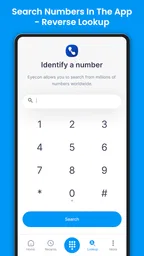
- Reverse lookup can help identify unfamiliar phone numbers.
- The interface is straightforward to navigate.
What could be better
- Caller details may be missing or inaccurate for some numbers.
- The app needs access to contacts for some features to work.
- Some features may require a paid subscription.
- Caller ID may not appear for every incoming call.
- Spam detection can occasionally flag legitimate callers.





