






Etsy Seller: Manage Your Shop review
 Analysis by Appsdrops
Running an Etsy shop means keeping up with details that rarely arrive one at a time: a buyer may ask a question while I am preparing an order, and a listing may need attention just as I am away from my desk. Etsy Seller is built for managing that shop from a phone. My overall impression is that it can make routine seller tasks more reachable, especially when I need to check in quickly, but it is best treated as a companion to Etsy’s wider selling tools rather than a complete replacement for a larger screen.
Reading the shop at a glance
The app’s purpose is clear from the moment you open it: this is a business app for Etsy sellers, not a separate marketplace for browsing handmade goods. Etsy, Inc developed it, and the free app is aimed at helping sellers manage their shop. That narrow focus is useful. I don’t have to sort through buyer-oriented features to get to the work I came to do.
At a practical level, a mobile seller app is most valuable when it helps me notice what needs attention without making me search through a desktop-style dashboard. Checking shop activity between other tasks, then deciding whether an order, message, or listing needs follow-up, is a natural phone workflow. The benefit is not that every shop task suddenly becomes effortless; it is that I can keep an eye on the business without being tied to a computer.
For readability, the key question is whether the information I need is easy to find and understand on a small display. Etsy Seller’s focused role gives it a sensible starting point: shop management belongs in one place, rather than being mixed with the buyer experience. I would still approach detailed work carefully. Reading a buyer’s message or reviewing a listing on a phone is manageable, while comparing several pieces of information at once is usually more comfortable on a larger screen.
Navigation also depends on how a seller organizes their day. I find mobile shop tools most useful when I open them with a specific purpose—check what needs attention, handle a brief task, and return later for deeper work. That keeps a phone session from turning into a string of taps without a clear result. If you are new to selling, it helps to learn the distinction between quick checks and tasks that deserve a more deliberate review before relying on mobile as your only workspace.
Useful for quick checks, less ideal for long sessions
A useful habit is to separate monitoring from editing. I would use the phone to stay aware of shop activity and to deal with straightforward items while I have a spare moment. For a complex listing or a decision that requires careful comparison, I would switch to a computer if one is available. This is not a knock on the app so much as a realistic trade-off: a compact screen makes the shop portable, but it also gives me less room to inspect details comfortably.
The app’s average rating is 4.6, based on around 58,000 ratings, which suggests many sellers find a mobile shop-management option worthwhile. That figure is a useful signal, not a promise that every workflow will suit every person. A shop with occasional orders may need only a few short visits, while a seller handling many ongoing tasks may want the broader view and working space of a desktop setup.
Comfort, control, and different ways of using it
Thinking about accessibility means looking beyond whether an app has a particular label. For a seller, comfort can depend on how much reading a task involves, whether a phone can be held steadily, how distracting the surroundings are, and how much time is available. Etsy Seller’s mobile format can help someone who finds it easier to work in short sessions or who needs to manage shop matters away from a fixed desk. It does not remove the ordinary challenges of using a phone for detailed business work.
Motor comfort is one reason short, purposeful sessions make sense. When a task involves repeated small taps or careful text entry, a phone can be tiring for someone with limited dexterity, hand pain, or difficulty holding a device. I would avoid trying to finish a long, intricate task while walking, carrying packages, or balancing the phone in one hand. A stable surface, a comfortable grip, and time to review each change make the workflow less stressful.
There is also a useful distinction between a task that is urgent and one that is merely convenient to do immediately. If a buyer’s question needs a timely response, a brief phone session may be preferable to waiting until I return to a computer. If I am editing wording that must be exact, I would rather give it focused attention than rush through it in a noisy place. That small choice can reduce mistakes and make the app more workable for different energy levels and physical contexts.
Sensory conditions matter too. A seller may open the app in a busy studio, on public transport, or during a quiet moment at home. In a noisy or distracting environment, I would keep the task simple: check what needs attention, make a note of anything requiring careful thought, and return to it when the surroundings are calmer. That approach is especially helpful when reading customer messages, where tone and detail are easy to miss if I am rushing.
Making mobile work fit the moment
A realistic example: I am packing an order at a shared worktable when I have a short break. I can use that moment to check whether the shop needs attention, then get back to packing rather than opening a laptop and losing my place. If I see something that calls for a careful decision, I can leave the actual revision for a calmer session. The strength here is continuity: the business can stay within reach without every task demanding a full desk setup.
For someone who prefers larger text, more room, or less frequent screen interaction, the best approach may be to use the app only for high-priority checks and do longer work elsewhere. I would not assume that a mobile interface automatically works well for every visual or motor need. The app can support flexible access simply by being on a phone, but the experience still depends on the person, device, and task.
Context can make mobile access particularly valuable for sellers who work from a market stall, studio, or home with limited desk time. It can also be a poor fit when the phone battery is low, the connection is unreliable, or the seller needs to compare multiple details side by side. In those moments, waiting for a more suitable setup is often wiser than forcing a delicate task into a cramped session.
Where it fits among seller tools
The usual alternative is to manage an Etsy shop through a web browser on a computer. A desktop browser generally gives more space for reading, typing, and keeping several details visible. Etsy Seller’s advantage is access when a computer is inconvenient. I see the two approaches as complementary: the phone is for staying connected and handling appropriate tasks on the move, while a larger screen is better for work that benefits from concentration and room to inspect.
That distinction also helps answer whether the app is enough for a new seller. If you mainly want to keep track of a small shop and deal with tasks as they arise, a dedicated mobile option is a sensible place to start. If you expect to build and maintain a large catalog entirely from a phone, I would think carefully about the amount of detailed editing involved and whether that screen will remain comfortable over time. The app’s role is shop management, not a substitute for good product photography, careful descriptions, pricing decisions, or a broader business routine.
The audience is specific: people who already sell on Etsy or are preparing to manage an Etsy shop. If you are a buyer looking to discover or purchase items, this is not the app I would choose for that purpose. If your work does not involve an Etsy shop, its focused design offers little reason to install it. That clarity is a strength for sellers, but it also means the app is not a general-purpose tool for running a business across different marketplaces.
Its scale gives some context without guaranteeing a particular experience. Etsy Seller has over five million installs and around 3,300 written reviews, alongside its average rating. Those figures show that it is an established option among sellers, but a busy shop’s needs can differ sharply from those of someone who receives occasional orders. I would judge it by whether its mobile workflow matches the way I actually run my shop, not by popularity alone.
Small choices that can prevent avoidable friction
My most practical tip is to use the app with a short checklist in mind. Before opening it, decide whether you are checking activity, handling a message, or reviewing a specific shop task. This avoids aimless navigation and helps preserve attention when you are tired or working in a distracting place. For consequential edits, pause before saving and reread the result; mobile convenience is not a reason to skip the same care you would use at a desk.
Another useful trade-off is to keep urgent communication separate from deep shop maintenance. Responding to a straightforward question may fit a brief phone session, while rewriting a listing or reviewing several parts of a shop is better done when you can concentrate. This is a simple workflow adjustment, but it makes the app more useful for sellers who have limited time or find context-switching draining.
The app is free, rated for Everyone, and currently at version 2.11.0, with Android support beginning at version 8.0. Its release date was September 10, 2021. I mention those details because they help establish the practical basics for someone deciding whether the app is suitable for their device, but they do not change the central question: will a phone-based shop workflow make your own selling routine easier?
A balanced choice for Etsy sellers
I would recommend Etsy Seller to someone who wants their shop close at hand and values quick access over a full desktop workspace. It is particularly appealing if you work in short intervals, move between locations, or want to check in without interrupting the rest of your day. The mobile format can support more flexible access, though it cannot guarantee comfort or ease for every person and task.
I would be more cautious if you find small screens difficult, need extensive typing, or prefer to see many details at once. In those cases, the app may still be useful for brief, priority checks, but a computer-based workflow is likely to feel more manageable for longer sessions. Sellers who do not use Etsy should skip it, and buyers should look for Etsy’s shopping experience instead.
My inclusive verdict is that this is a focused tool with a practical role: it can bring shop management into more parts of a seller’s day, but the best results come from matching the task to the setting. Use it for the work that benefits from being nearby, give careful edits the space they deserve, and do not mistake mobile availability for a one-size-fits-all experience. For the right Etsy seller, Etsy Seller is a useful companion; for deeper or more physically comfortable work, a larger screen can still be the better choice.
Overall, I would install it if staying connected to my Etsy shop while away from a desk would solve a real problem. The app’s narrow purpose is easy to understand, and its free access makes it straightforward to try. Just set expectations around the phone’s limits, use a calmer setup for demanding tasks, and let your own reading, movement, and sensory needs guide how much of your business you manage on mobile.
What we like
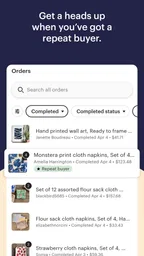
- Manage orders and shipping while away from your computer.
- Receive notifications about new orders and customer messages.
- Create and edit listings directly from your phone.
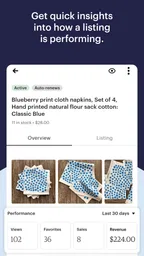
- Track shop stats to monitor sales and traffic.
- Reply to customer inquiries through the app.
What could be better
- Some shop tasks are easier to complete on Etsy's website.
- Notifications can become distracting for busy shops.
- Managing detailed listing edits on a small screen can be awkward.
- App features and availability may vary by region.
- A reliable internet connection is needed for most tasks.





