
Dayforce review
 Analysis by Appsdrops
Dayforce makes the most sense when your employer already uses it: it brings parts of work administration onto a phone instead of leaving them scattered across a work computer, paper notices, and messages. I see it as a practical business app rather than a general productivity tool. Its usefulness depends less on how many features a person expects and more on whether their workplace has connected the tasks they need to handle.
What you get without paying
Dayforce is free to download, so there is no purchase price to weigh against its convenience. That makes trying it a low-risk choice for someone whose workplace relies on it. The app is developed by Dayforce and sits in the business category, with a general-audience age rating. Its current version is 2026.12.0, and it requires Android 11 or later.
Free access should not be confused with a guarantee that every work function will be available to every user. In practice, an employer’s setup determines what the app can help you do. If your organization has not adopted Dayforce, installing it is unlikely to turn it into a standalone planner or a replacement for your workplace’s existing systems. I would check with a manager or workplace administrator before relying on it for an urgent task.
The app has been available since September 15, 2011, and its broad adoption is reflected in more than five million installs. It holds an average rating of 4.5 from around 184,000 ratings, alongside roughly 19,000 written reviews. Those numbers suggest that many people find it useful, but they do not tell you whether your own employer has configured it in a way that suits your role. For a work app, that distinction matters more than popularity alone.
Where the value comes from
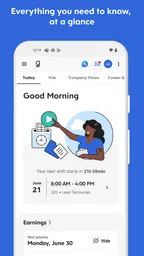
The value is chiefly about reducing friction. When work-related information is accessible on a phone, you can check it in the moment you need it rather than waiting to sign in at a desk or asking someone else to look it up. That can be especially handy for people whose shifts, schedules, or routine work admin do not fit neatly into a nine-to-five office day.
A realistic example is a worker who wants to confirm a work detail while commuting or before leaving home. Having one employer-connected app to check is more convenient than searching old messages or trying to remember which system holds the relevant information. I would still make a habit of checking important details with enough time to act; mobile access is useful, but it does not remove the need to verify that a change or request has gone through.
Another useful approach is to treat the app as a quick-access companion, not as the only place to keep track of work. If you need to remember to follow up on something, putting a reminder in your normal calendar can help, while Dayforce remains the place to check the employer-side information. This separation is a small but worthwhile safeguard: a work app can show what your organization has recorded, whereas a personal reminder helps you remember what you intended to do next.
For employees who do most of their work away from a computer, the phone format is a meaningful advantage. It may save an extra trip to a workstation for a straightforward check. For someone already spending the day at a desk with established access to employer systems, the gain may be smaller. I would judge its value by how often it prevents a real interruption, not by the number of times I open it.
Tradeoffs and points to check
The main tradeoff is reliance on an employer’s implementation. A work app cannot be judged only by its name or its general purpose: access and usefulness depend on how the organization has arranged things for its staff. If a section you expect is unavailable, that may call for a question to your workplace rather than repeated reinstalling or searching through menus. I would ask which tasks the company expects employees to handle in the app before making it part of a daily routine.
There is also a boundary between convenience and certainty. A phone is easy to reach, but it is not automatically the best place to make a consequential work decision. If a schedule or other important detail appears different from what you were told, use the app as a prompt to clarify the discrepancy with the appropriate person. Keeping a record of what you checked and when can also make a follow-up conversation more precise.
Compared with a general calendar, Dayforce is workplace-oriented rather than a flexible personal organizer. A calendar is better for combining work commitments with appointments, family plans, and reminders from many sources. Dayforce is a better fit when the information belongs to the employer’s work process. They can complement each other, but I would not assume one can replace the other.
Compared with checking work through a computer, the app’s strongest case is access while away from a desk. The computer may remain more comfortable for longer tasks or for people who prefer a larger screen. If you only need to handle work administration occasionally, opening a familiar desktop system might be perfectly adequate. The app is most compelling when the convenience of having work information at hand solves a recurring problem.
It is also worth thinking about how you use a personal phone. If you prefer to keep work and personal life strictly separate, a work app on your own device may not suit your habits, even if it costs nothing to download. You could instead use the work access method your employer already supports. I would make that choice based on your own boundaries and workplace expectations, rather than assuming that a mobile app is automatically the easiest option.
Who is likely to get the most from it?
I would recommend trying it to employees whose organization actively uses Dayforce and who often need to check work matters away from a computer. The benefit is clearest for people with changing routines, work outside a conventional office, or limited opportunities to sit down at a workstation. In those situations, a phone can turn a small but recurring admin chore into something easier to handle at a convenient moment.
It is less appealing to someone whose employer does not use the platform, whose role rarely requires mobile access, or who wants one app to manage every part of personal and professional life. Those users may get more from their existing calendar, a company-provided desktop tool, or another system already adopted at work. I would not install it in expectation that it will organize a workplace that has not connected its processes to the service.
For a new user, a sensible first step is to confirm that the employer supports Dayforce and ask which work tasks belong in the app. Then sign in and check whether the information you actually need is available before building a routine around it. This avoids the common mistake of evaluating the app based on assumptions about what a different employer’s setup might offer.
After that, decide what deserves a second check. For routine lookups, mobile convenience may be enough. For anything that affects an important plan, pay, or a shift, I would confirm unclear information through the workplace’s usual channel rather than treating a screen as the final word. That is not a special weakness of Dayforce; it is a sensible habit whenever an app reflects an organization’s records.
My verdict on downloading it
Dayforce is worth trying when your workplace already depends on it and you want work admin within reach. With no download price, it is easy to test whether mobile access saves you time, and its long presence and substantial user base make it a familiar option for many employees. The rating is encouraging, but the deciding factor for me would still be whether my employer has made the app useful for my particular role.
Dayforce is not the right pick as a universal task manager or a shortcut to employer services that are not connected to it. I would skip it if your workplace does not use the platform, or if you would rather keep work off your personal phone and already have a convenient alternative. For supported employees who routinely need work information on the move, though, it can be a practical addition: modest in purpose, but valuable when it removes a repeated hassle.
What we like
- Mobile access makes it easier to check work details away from a computer.
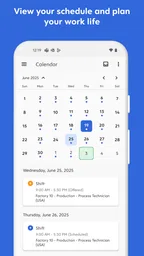
- Shift information can help users plan their work schedules.
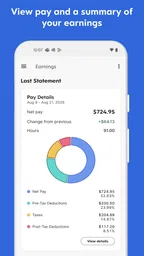
- Employees can review pay statements through the app.
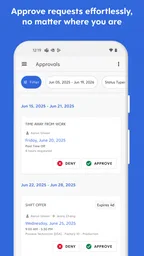
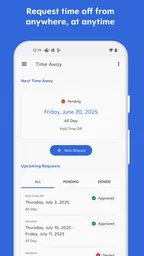
- Time-off requests can be submitted from a mobile device.
- Biometric sign-in may make account access quicker.
What could be better
- Available features depend on the employer's Dayforce setup.
- Some changes may take time to appear in the app.
- The app requires a reliable internet connection for most tasks.
- Login problems can be difficult to resolve without employer support.
- Frequent notifications may distract users during personal time.





