




Cryptoguru: Trading Simulator review
 Analysis by Appsdrops
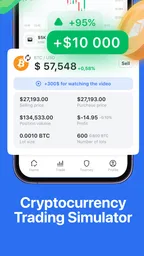
When I use a crypto simulator, I want to practice decisions without confusing a mock trade with a real one. Cryptoguru: Trading Simulator is aimed at that learning space: it gives beginners and more experienced traders a place to explore trading and investing concepts before putting real money at risk. In my view, its usefulness depends not only on what you want to learn, but also on whether you can stay connected while using it. A simulator built around changing markets is less convincing when prices or screens stop updating.
How a simulator fits into everyday learning
This is a free business app from Crypto Guru Trading Academy and Simulator. It is suitable for everyone, runs on Android 8.0 and later, and its current version is 1.5.16. The app has a 4.6 average from around 360,000 ratings, with about 4,500 written reviews and over 50 million installs. Those figures suggest broad interest, but I would treat popularity as a starting point for deciding whether to try it, not as proof that its approach will suit every learner.
Network-dependent moments matter
Crypto practice is most useful when the information you are reacting to is current. That makes a dependable connection important during sessions where you are following a market move, comparing possible choices, or trying to understand how a decision plays out. I would use the app with a stable connection when I want to focus on a longer practice session, rather than assuming that a brief glance between errands is enough to learn from a market scenario.
The practical point is simple: a simulator is a learning aid, not a substitute for understanding what the screen is showing. If an update seems delayed or the app is slow to respond, I would pause before treating the displayed situation as a meaningful lesson. Reconnecting and checking the screen again is a better habit than making a quick decision based on information that may not be current.
I also recommend separating practice from prediction. A simulated outcome can help you think through a choice, but it does not establish that the same choice would work with real funds or in a different market moment. The app’s value is in giving you room to examine your reasoning, not in turning a practice result into a promise.
Using it in short mobile sessions
On a phone, I find it easier to learn when I give each session one clear purpose. For example, I might spend a few minutes thinking through why I would enter a trade, then return later to review whether that reasoning still makes sense. That is more useful than repeatedly opening a simulator simply to react to every movement. It also makes short sessions easier to fit around a commute or a break, provided the connection is reliable enough for the task.
There is a trade-off: mobile convenience can encourage impulsive checking. If you are new to crypto, a stream of price changes may feel like a demand to act. I would instead write down the question I am trying to answer before opening the app: am I practicing a plan, testing an assumption, or just watching? That small pause helps keep a learning tool from becoming a source of restless screen time.
For an everyday scenario, imagine you have a spare moment before work and want to practice a decision you have been considering. I would wait until I have a stable connection, choose one hypothetical approach, and focus on the reason for it rather than chasing a quick result. If I lose connectivity halfway through, I would stop and resume later instead of filling in missing context from memory.
What to do when a session is interrupted
Connection problems are especially frustrating when they happen in the middle of a learning exercise. A sensible recovery routine is to avoid making another decision until the screen has refreshed and the information looks coherent. If the app does not respond, closing and reopening it after the connection returns is a reasonable first step; I would then check where the session stands before continuing. That is general troubleshooting, not a guarantee that every interrupted activity will be restored in a particular way.
This caution is useful even when nothing has gone wrong. A practice session should have a clear beginning and end, so interruptions do not leave you unsure about what you were testing. I would keep a brief note outside the app about the question or strategy I was exploring. That way, if I have to leave unexpectedly, I can return to the learning objective instead of trying to reconstruct every detail from a half-finished screen.
There is also a broader limitation to keep in mind: simulated trading can make decisions feel cleaner than they are in real life. A smooth practice experience cannot capture every emotional pressure associated with risking actual money. I would use this app to develop vocabulary and disciplined thinking, then seek other forms of research and education before making financial decisions.
Being thoughtful about data and attention
Because the experience is tied to market information, I would plan for network use rather than opening it constantly in the background. If your mobile data is limited, use a trusted connection when you can and keep sessions purposeful. I would not assume that any particular setting reduces data use, because that depends on the app and the device configuration. Checking your phone’s own data controls is a more dependable way to understand your usage.
Attention is another resource worth protecting. Repeatedly checking prices can crowd out the slower work of learning why a choice might make sense. Try setting a specific practice window and a stopping point, then review what you learned before opening another session. This approach is particularly helpful for beginners, who may otherwise mistake frequent activity for progress.
For privacy-conscious users, the ordinary good practice applies: review the app’s permissions and your device settings when installing any finance-related tool. I would not grant access simply because an app is about trading; each request should make sense for the task you want to perform. That is a practical precaution, not a claim about what this particular app requests.
Who will get the most from it
I can see this being useful for someone who wants a low-pressure place to explore trading ideas before considering real transactions. Beginners may benefit from approaching it with a notebook and a question, while more experienced users may use a simulator to rehearse a method without treating the exercise as market research. In both cases, the strongest habit is to review the reasoning behind a choice, not just whether the simulated result looked favorable.
It is less suitable for someone seeking guaranteed investment advice, live brokerage services, or a shortcut to profitable trading. A simulator cannot make risk disappear, and practice alone does not replace learning about the assets and conditions involved. If you already have a preferred research platform or need tools built for professional analysis, a dedicated market-data or brokerage app may be a better fit for those specific tasks.
Compared with reading articles or watching tutorials, a simulator can make the act of choosing feel more concrete. Compared with a real exchange, it avoids putting actual funds at stake during practice. Neither alternative is interchangeable: reading can explain concepts more carefully, while a real trading service handles real transactions and their consequences. I would use Cryptoguru alongside educational material, not as a replacement for it.
My connectivity verdict
The best way to use this app is as a focused practice space, with a dependable connection and realistic expectations. Its free access and broad reach make it easy to consider, and its business focus is clear, but the quality of a session still depends on your own discipline and the information available on screen. If your connection is unreliable, keep exercises short and avoid treating interruptions as a signal to guess what happened.
I would recommend trying it if you want to rehearse crypto decisions without immediately involving real money and are willing to treat the experience as education. I would skip it if what you need is authoritative financial guidance, a professional trading terminal, or a dependable substitute for your own research. For me, the decisive question is not how often I can open it, but whether each connected session helps me think more carefully about a choice.
What we like
- Practice trading without putting real money at risk.
- A virtual portfolio makes it easy to track simulated results.
- Useful for learning how market orders work.
- Lets beginners explore crypto trading at their own pace.
- Can help users test strategies before trading with real funds.
What could be better
- Simulated trades cannot reproduce the pressure of real investing.
- Prices or market conditions may not reflect live exchanges.
- Practice results do not guarantee success with real money.
- Trading simulations may oversimplify fees and order execution.
- Crypto markets remain volatile even when learning with virtual funds.





