
Contacts review
 Analysis by Appsdrops
Keeping up with calls is easier when the basics—finding a person, choosing a number, and placing or receiving a call—fit into one straightforward routine. Contacts, presented as Call Pro, is a communication app built around that everyday task. Its pitch is simple: manage contacts, dial, and receive calls without turning a familiar phone habit into a complicated process.
A familiar starting point for everyday calls
I find the appeal of a focused contacts and calling app easiest to judge in ordinary moments: someone needs to be reached, a call comes in, or I want to place a call without fuss. Call Pro keeps its purpose close to those actions. Rather than framing itself as a broad messaging or social platform, it concentrates on the contact-and-call workflow, which makes its role easy to understand from the outset.
That focus matters because calling is often a quick, practical task. If I am trying to reach a relative or colleague, I want to move from locating the right person to the call itself with as little mental overhead as possible. The app’s stated emphasis on managing contacts, dialing, and receiving calls aligns with that expectation. It is aimed at people who want a direct communication tool, not a sprawling collection of unrelated functions.
Call Pro is free, is rated for Everyone, and is available for Android devices running version 6.0 or later. It was released on September 23, 2022, and its current version is 37.0.0. Those details place it within reach of a broad range of Android users, while the simple calling purpose makes it approachable for people who do not want to learn a new communication system.
Getting oriented
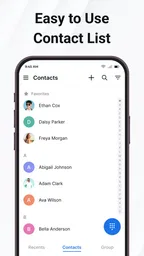
When I approach an app like this, I start by thinking about the information I need before a call: who I am contacting and how I will reach them. Contact management is the natural starting point, because a dependable calling routine depends on being able to identify the intended person. The app’s focus suggests a practical sequence: get to the contact, select the intended person, and continue toward dialing.
That sequence is familiar enough that there is little conceptual learning involved. I do not have to understand a new style of communication before using the core idea. For a person switching between devices or simply seeking a dedicated way to handle calling, familiarity is a genuine advantage. It lowers the barrier to trying the app and keeps attention on the actual task.
The name “Contacts” also sets a clear expectation. Someone looking for a contact-focused calling utility can quickly see the intended purpose, while someone seeking video meetings, group chats, or a full messaging suite should consider whether a call-centered tool matches their needs. I appreciate that distinction: a focused app can be useful precisely because it does not promise to solve every communication problem.
From finding a person to placing a call
The central workflow begins with identifying the person to call. Contact management gives that first step a home, and dialing carries the process toward the conversation. In a smooth everyday routine, I should be able to think “I need to call this person,” find the relevant contact, and proceed without pausing to work out what the app is for. Call Pro’s core description follows that plain-language path.
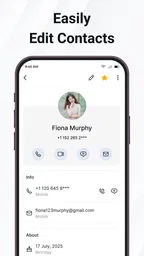
Once I have the intended contact in mind, the next important point is accuracy. A call is only useful if it reaches the person I meant to contact. That makes clear contact organization more than a convenience; it is the bridge between the starting task and the actual conversation. The app’s role is to bring contact handling and calling together, so the user can stay oriented around the person they want to reach.
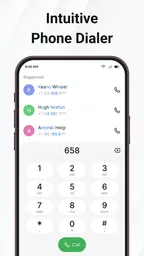
From there, dialing is the decisive handoff. The purpose of a dialer is not to make the process feel elaborate; it is to help the user move from intention to an outgoing call. I value tools that keep that transition understandable, especially when I am making a quick call and do not want to navigate a maze of unrelated options. Call Pro’s stated emphasis gives the experience a clear center: contacts and calls.
There is also a practical rhythm to repeated use. A person may open the app, look up someone they contact regularly, and place a call, then return later to handle another conversation. When a utility is used in short bursts, its value comes from being easy to return to. A simple purpose can help here because the user does not have to re-learn the app’s overall role every time.
Incoming calls and the return handoff
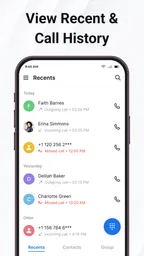
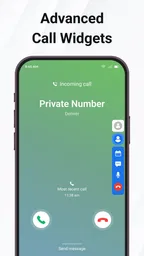
The workflow does not end when I make a call. Receiving calls is part of Call Pro’s stated purpose as well, making the app relevant on both sides of a conversation. Outgoing calling starts with my intention to reach someone; an incoming call starts with someone else trying to reach me. In either case, the goal is to connect the right people and make communication feel direct.
That two-way role is useful because a calling routine naturally includes both directions. I may place a call in the morning and receive one later, so an app centered only on dialing would cover just part of the everyday pattern. By including receiving calls in its focus, Call Pro presents itself as a communication utility for the broader call cycle rather than only a way to initiate one.
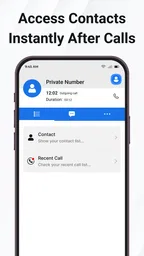
The handoffs are where a focused calling tool has to earn its place. The user moves from contact information to dialing, from an outgoing attempt to a conversation, or from an incoming call to responding. Each transition should feel related to the same basic task. I like the clarity of that scope: the app’s purpose is not buried beneath a long list of unrelated communication modes.
What the experience is best suited to
Call Pro makes the most sense for someone who wants a straightforward Android calling app centered on contacts and calls. It can be a sensible option for people who prioritize familiar phone communication over a feature-heavy platform. The value is in the narrowness of the job: manage contacts, dial, and receive calls. If those are the main things a person wants to handle, the app’s purpose is easy to grasp.
Its public reception gives prospective users another point of reference. Call Pro has a 4.2 average from around 8,300 ratings, with roughly 343 written reviews, and it has passed one million installs. Those figures suggest that it has reached a substantial audience and that many users have taken the time to rate or comment on it. They are useful context, though an individual’s experience will still depend on personal habits and expectations.
I also see the Everyone content rating as a signal that the app is positioned for general audiences. The practical question is less about a niche use case and more about whether a contact-and-calling tool matches the way someone communicates. People who mainly want conventional calling may find the focused approach appealing; those who expect a single app to cover every kind of conversation may want a broader platform instead.
Where the routine can lose momentum
A simple workflow is only as satisfying as its transitions. If a user cannot quickly identify the right contact, the path to a call becomes less direct. If the step from contact selection to dialing feels unclear, the app’s central purpose loses some of its advantage. Those are the natural pressure points for any app that brings contact handling and calls together, and they are the areas I would pay attention to during regular use.
There is a trade-off in keeping an app focused. A compact purpose can make it easier to understand, but it may not suit someone who expects a full communication hub with many different ways to talk. That is not necessarily a weakness; it simply defines the audience. I would judge Call Pro by how well it supports the core contact-and-call routine rather than by features outside its stated role.
Another possible source of friction is expectation. The short description is simply “Contacts,” while the broader summary describes managing contacts, dialing, and receiving calls. A prospective user should approach it as a calling-focused utility rather than assume that the name promises a particular collection of advanced contact tools. Clear expectations help prevent disappointment and make it easier to decide whether the app is a match.
The outcome: a call-centered tool with a clear job
At the end of the workflow, the desired result is uncomplicated: identify the person, move into a call, and take part in an incoming conversation when someone reaches out. Call Pro is built around that outcome. Its value is not in reinventing the idea of a phone call, but in putting contact management and calling at the center of the experience.
For my taste, that straightforward purpose is the strongest reason to consider it. A person who wants a familiar communication app can quickly understand what Call Pro is meant to do, and its free availability makes trying it a low-commitment choice. The broad Android compatibility, general-audience rating, and established user base add helpful context without changing the core appeal: it is about handling contacts and calls.
My overall impression is that Call Pro is best approached as a practical, focused option rather than an all-in-one communications platform. If your day-to-day need is to manage contacts, dial, and receive calls, its purpose lines up neatly with that routine. If you are looking for a much wider set of communication tools, its focused scope may feel limiting. For users who want the basics kept front and center, it is an easy app to understand and worth considering.
What we like
- Keeps contact names and phone numbers together for quick access.
- Supports contact groups for easier organization.
- Makes it simple to search through saved contacts.
- Can display contact details such as email addresses.
- Offers a familiar interface for managing address books.
What could be better
- Some features may depend on the device or Android version.
- Contact syncing can require access to an online account.
- The app needs permission to access personal contact data.
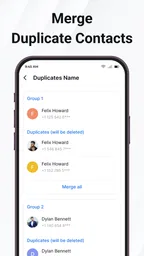
- Duplicate entries may need to be merged manually.
- Available features can vary across device manufacturers.





