
Contacts 2026 review
 Analysis by Appsdrops
I like a contacts app best when it helps me get to the right person quickly, without turning a routine call into a hunt through menus. Contacts 2026 is a free communication app from Paloleum apps, built around reaching saved contacts and recent calls, identifying callers, and making calls from its dialer. That focused purpose makes it easy to understand: it is for people who want everyday calling tools gathered in one place, rather than a broader messaging or social platform.
My overall impression is that its appeal depends on how you use your phone. If you regularly switch between looking up people, checking recent calls, and dialing numbers, a combined calling interface can make those small tasks feel more direct. If you mainly communicate through messaging apps or already find your phone’s built-in contacts and dialer straightforward, there may be little reason to add another app.
What free access means in practice
There is no purchase price to weigh up: the app is listed as free. That makes trying it a low-commitment choice, but “free” alone does not tell me how well it fits someone’s daily routine. The useful question is whether its contacts, call history, caller identification, and dialing tools make a noticeable difference compared with the calling app already on the phone.
The app has a 4.5 average from around 3,900 ratings, with about 260 written reviews, and has passed 500,000 installs. Those figures suggest that plenty of people have tried it, but popularity is not a substitute for checking whether its approach suits your habits. I would treat the rating as a reason to consider it, not a promise that every phone or contact list will behave exactly as you expect.
Its age rating is Everyone, and the current version is 3.1. The app was released on May 6, 2025, and requires Android 7.0 or later. Those details are practical checks before installation: an older Android phone may still meet the minimum requirement, while an iPhone user should not assume this Android app is available for iOS. The listed platform requirement is specifically Android.
One place for the small tasks around calling
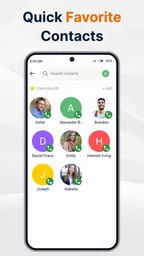
The strongest idea here is the grouping of contacts, recent calls, caller identification, and dialing. Instead of treating a saved person, an unfamiliar incoming number, and a number I want to enter manually as completely separate jobs, the app brings those calling-related tasks into its scope. For someone who makes ordinary voice calls throughout the day, that combination is more relevant than a long list of extras would be.
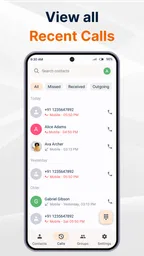
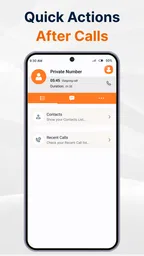
A realistic example is returning a missed call during a busy afternoon. I might first check the recent-call entry, decide whether I recognize the caller, and then call back or look for a saved contact. Having those actions close together can reduce the mental and physical back-and-forth between screens. The benefit is modest in any single interaction, but it can matter when making and returning calls is a regular part of work or family life.
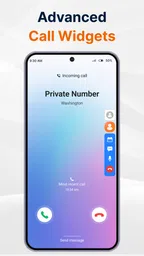
Caller identification is useful for a different reason: it can help me assess an incoming call before deciding what to do. I would still treat an identification result as a clue rather than certainty. Caller ID should not replace judgment, especially if a call seems unexpected or asks for sensitive information. The practical value is helping me make a quicker initial decision, not guaranteeing that every number is labeled correctly.
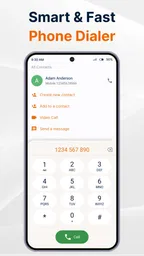
The dialer also gives the app a role beyond browsing a contact list. A person who often calls numbers that are not saved may appreciate having direct dialing included alongside contact access. Conversely, if nearly every call starts from a saved favorite or a recent conversation in another app, the dialer may not change much. The feature’s value depends on whether manual number entry is part of your normal routine.
Make the workflow fit your habits
One useful way to judge the app is to notice where your current calling routine slows down. If you tend to open contacts, search a name, and then switch to another screen to review call history, try using the combined approach for those specific tasks. That gives you a fair comparison based on real use rather than on the promise of having everything together.
A second practical habit is to keep caller identification in perspective. When a number is unfamiliar, use the label as a prompt to think, not as a final verdict about who is calling. If the call matters, you can choose whether to answer or return it based on context. That cautious approach preserves the convenience of caller ID without treating it as a security guarantee.
For people with a large or frequently changing contact list, it is worth paying attention to whether finding the right person feels easier after the switch. A unified calling app is only helpful if its contact access matches the way you search and recognize people. If you find yourself repeatedly returning to the phone’s standard contacts app, that is a concrete sign that the added layer is not earning its place.
Where the tradeoffs show up
The main tradeoff is choosing another calling interface when Android already provides basic ways to manage contacts and place calls. A separate app can make a workflow feel more coherent, but it also means adjusting to a different place for familiar tasks. For someone who has already organized favorites, call history, and contacts around the system dialer, a new interface may add friction instead of removing it.
There is also a difference between having caller identification and having a complete solution for deciding whether a call is trustworthy. I would not choose this app on the assumption that it can block every unwanted call or verify every caller; those outcomes are not part of the confirmed feature set. If your main need is a highly specialized call-screening service, compare options that explicitly focus on that job rather than expecting a general calling app to cover it.
Another limitation is simply scope. Contacts 2026 is centered on phone communication, not on replacing a messaging service, organizing a calendar, or managing a broader digital address book across every platform. That focus is an advantage for people who want calling tools, but it means it is not a universal communications hub. If your priority is coordinating chats across services, a messaging app designed for that purpose is a better fit.
Because the app works with contacts and calls, I would also make a deliberate choice about granting any access the phone requests during setup. Only approve permissions that make sense for the feature you intend to use, and check the system’s permission controls if you later change your mind. This is sensible practice for any app handling communication tools; it is not a claim about a particular policy or permission requirement.
Who is most likely to get value
I would consider it if I make frequent standard calls and want contact access, recent-call review, caller identification, and dialing within one app. It may be especially convenient for someone who regularly returns missed calls, enters numbers manually, or wants a straightforward place to start when an unfamiliar call arrives. The free price makes a personal trial reasonable, provided the app is available for the device in question and the Android requirement is met.
It may also suit a person helping a relative who prefers ordinary phone calls to app-based messaging. In that situation, a focused calling interface can be easier to explain than asking someone to move between several communication tools. I would still test it together first: the best setup is the one the person can use confidently, not necessarily the one with the most features.
I would skip it if the built-in dialer already handles your contacts and recent calls comfortably, or if you rarely make traditional calls. I would also look elsewhere if you need a clearly specialized feature beyond the app’s stated calling scope, such as a dedicated system for screening unwanted calls or a cross-service messaging inbox. The right alternative depends on that specific need, not on which app has the broadest name.
My verdict on trying it
Contacts 2026 is a sensible free option for Android users who want a single place to work with contacts, recent calls, caller identification, and dialing. Its value is practical rather than transformative: it may shorten familiar routines, but it will not necessarily improve a setup that already feels quick and dependable. Paloleum apps has kept the concept focused on everyday calling, which is exactly why the app can be useful for some people and unnecessary for others.
I would install it when my current calling routine feels scattered, then judge it by a few ordinary tasks: finding a saved person, returning a missed call, and entering a number directly. If those actions become easier, it has earned a place on the phone without costing anything to try. If I keep switching back to the standard dialer, I would remove it and stick with the familiar option. The best reason to choose it is a smoother path through the calls you already make. For a free Android app, that is a fair case to give it a try, with realistic expectations about what a focused contacts-and-calling tool can—and cannot—replace.
What we like
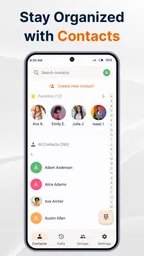
- Keeps contacts organized in a familiar phonebook layout.
- Makes it easy to find a person by name.
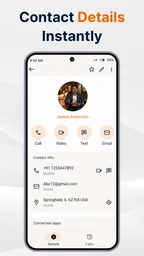
- Contact details are quick to access from one place.
- Useful for managing a large list of saved contacts.
- A practical option for everyday contact lookup.
What could be better
- The app’s features may vary by device and Android version.
- Some functions may require access to personal contact data.
- Contact changes can depend on your device’s sync settings.
- The 2026 label does not guarantee regular updates.
- It may offer little value if your phone’s default Contacts app is sufficient.





