
Connecteam Team Management App review
 Analysis by Appsdrops
I see Connecteam as a practical choice for businesses whose employees spend more time on the move than at a desk. It is a business app from Connecteam Inc., built around employee management, and its strongest appeal is bringing work coordination onto employees’ phones. That can be useful for a team spread across job sites, stores, or changing shifts, but it also makes the quality of the experience depend on a simple condition: people need a workable connection when they use the app.
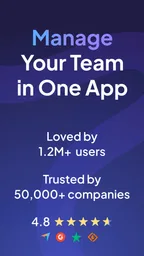
Connecteam Team Management App is free to download, rated for Everyone, and has an average score of 4.8 from around 31,000 ratings. More than a million installs suggest it has found a substantial audience, though popularity alone does not tell me whether it fits a particular workplace. I would judge it by how well a manager can replace scattered messages and last-minute calls with a shared routine—and whether employees will actually open it during a busy day.
When the connection becomes part of the workflow
For a mobile workforce, a management app is not just a digital filing cabinet. It becomes the route through which people receive updates, check what they are expected to do, and keep supervisors informed. In that setting, network access is part of the work process: a team member may need to look at a message before starting a shift, while a manager may rely on timely communication to adjust plans.
That convenience comes with a trade-off. If the team is accustomed to receiving important instructions in Connecteam, a weak signal or a phone that is unavailable can interrupt the routine. I would not make the app the only path for urgent, safety-critical instructions unless the workplace has a clear backup. A short call or an established emergency procedure still matters when a message cannot be seen promptly.
A useful setup is to decide which updates belong in the app and which require direct contact. Routine changes, reminders, and general team communication can be handled in one shared place; a time-sensitive issue affecting someone who is already working may need a more immediate channel. That distinction prevents managers from assuming that “sent” means “seen.” It also gives employees a fair expectation of when they should check their phones.
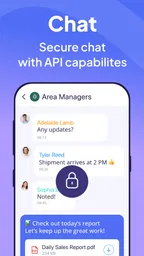
The comparison with ordinary alternatives is straightforward. A group chat is familiar and quick, but conversations can bury instructions, mix personal and work messages, and leave managers unsure who has received an update. Email is easier to search and better suited to longer explanations, yet it is often a poor fit for employees who are moving between tasks. Connecteam’s value is in being a work-focused mobile hub, not in making connectivity irrelevant.
Why a phone-first approach suits some teams
I can see the strongest fit for businesses where staff do not sit at a computer all day: a service crew moving between customer locations, a retail team working different shifts, or a small operation where supervisors need to keep a dispersed group aligned. In these situations, employees are more likely to have a phone close at hand than a company computer. A shared app can reduce the friction of asking everyone to check separate inboxes or noticeboards.
It is less compelling for a small office team that already coordinates comfortably through a well-managed desktop system. If employees rarely need mobile updates, another app can feel like an extra place to check rather than a genuine improvement. I would also be cautious if a business has limited phone access during work or wants to keep work communication entirely off personal devices. The right tool has to match the team’s habits and boundaries, not just the manager’s preference.
A realistic shift-change example
Imagine a supervisor learns that a scheduled handover needs to change shortly before the next shift. With a shared work app, the supervisor can put the update where the team is expected to look, rather than sending separate messages through several channels. A practical improvement is to make the message specific: identify the affected shift, state what has changed, and explain who should respond if they cannot follow the new plan.
The less obvious lesson is to plan for acknowledgment, not merely delivery. If the update is important, the manager should establish a lightweight response habit—such as asking affected staff to confirm they have seen it—rather than treating a post as proof that everyone is informed. This is useful in any connected workflow, but especially when people are moving between locations or may not check a screen at the same moment.
Using the app in busy mobile conditions
On a phone, the best workplace communication is brief enough to understand between tasks. I would keep operational updates focused and avoid turning the app into a stream of low-priority chatter. A message that says exactly what changed and what the reader should do is easier to act on than a long conversation with the key instruction buried in the middle.
Managers can also reduce avoidable confusion by setting a predictable rhythm. For example, routine information can be shared ahead of a shift, while changes that affect the current workday should be clearly marked in the wording and followed through with the appropriate direct contact if they are urgent. This is not a special feature claim; it is a sensible way to make any mobile-first management tool easier to use.
Employees’ circumstances matter too. A worker may be serving a customer, driving, handling equipment, or working where phone use is restricted. The app should support coordination, not pressure people to look at a screen when doing so would be unsafe or inappropriate. I would agree on reasonable check-in windows and make sure supervisors know how to reach someone when an immediate response is genuinely necessary.
What to do when messages are delayed
Connectivity problems are not always dramatic. Sometimes a signal drops briefly, a person has a depleted battery, or someone simply does not notice a notification while concentrating on a task. The practical question is not whether a team can avoid every interruption; it is whether the workplace has a recovery habit when an update does not reach the right person in time.
I would start with a clear escalation path. If an employee has not acknowledged a time-sensitive change by the agreed point, the supervisor can use the normal direct contact method. For less urgent information, the team can review it at the next shift check-in. This avoids both extremes: assuming the app guarantees immediate attention and repeatedly calling people about routine notices.
It is also worth keeping essential instructions understandable when someone joins late or misses the original conversation. Managers should restate the current decision rather than rely on a chain of messages that requires employees to reconstruct what happened. That small discipline helps when connectivity is patchy, but it also makes the team’s communication clearer on an ordinary day.
I would not treat a mobile app as a substitute for a documented process for emergencies or work that must continue during a network outage. Before rolling it out, managers should decide how staff will receive critical instructions if the usual channel is unavailable. The fallback might be a phone call, an in-person briefing, or another established workplace method; the important part is that employees know which route applies.
Keeping mobile use focused and considerate
Because the app is intended for work, managers should be deliberate about when they expect employees to check it. A notification can be helpful during a shift and intrusive after it. Agreeing on communication norms—what counts as urgent, when routine updates are posted, and how employees should respond—can make the tool feel like a work aid rather than an always-on demand.
There is also a human side to adoption. Some employees are comfortable with work apps; others may need a short introduction and a chance to ask questions. I would show the team the specific actions they are expected to take, such as where to find the messages relevant to their role and what to do when a change is unclear. A practical walkthrough is more useful than simply announcing that everyone should start using a new tool.
Making data use more intentional
For people who rely on mobile data, it is sensible to keep usage in mind rather than assume every employee has unlimited access. I would avoid encouraging unnecessary back-and-forth or asking staff to repeatedly refresh for routine information. Clear, consolidated updates help reduce needless checking and make each visit to the app more purposeful.
Managers should also consider the workplace’s device arrangements before making the app central to daily operations. If employees use their own phones, explain what work communication is expected and when. If phones are shared or access is limited, the team needs a realistic way for every affected person to receive instructions. These are policy and planning questions, not reasons to assume the app behaves in a particular way.
One useful habit is to separate information by urgency and audience. A change affecting one shift does not need to create noise for everyone, and a general announcement should say whether action is required. This makes the communication easier to scan and helps prevent staff from spending data and attention on updates that do not concern them.
Who will get the most from it
I would recommend considering Connecteam when a manager is trying to coordinate employees who work away from desks and needs a common mobile point for work communication. It may be especially helpful when the alternative is a patchwork of personal chats, emails, and verbal relays. The developer is Connecteam Inc., and the app sits in the business-software space rather than being a general social messenger.
It is less likely to be the right answer for a team that needs a desktop-first system, has strict limits on phone use, or cannot depend on employees having reliable access during work. A company with complex operational requirements should also evaluate its actual workflows before moving everyone over. I would test the app with a representative group, including people who work in different locations and shifts, and use their feedback to set communication rules before a broad rollout.
The current version is 10.0.1, and it requires Android 8.0 or later. That matters when a workforce includes older phones: a manager should check that employees’ devices meet the minimum requirement before making mobile access part of a required routine. The app’s free price removes a purchase barrier, but it does not eliminate the time needed to introduce the tool and agree on how the team will use it.
My connectivity verdict
Connecteam makes the most sense when a business wants work communication to follow employees onto their phones and is prepared to build sensible habits around that convenience. Its main strength, in my view, is not that it can solve every coordination problem, but that it gives a dispersed team a more work-oriented place to stay aligned than an informal mix of chats and email.
The trade-off is that a mobile hub depends on people being able to access it and on managers communicating clearly. A lost signal, an overlooked notification, or an unclear expectation can still create a gap. Plan a fallback for urgent situations, keep routine messages concise, and make acknowledgment expectations explicit. With those habits in place, I can see it being useful for shift-based and field teams. If your work rarely moves beyond a desk or staff cannot reasonably check phones, a desktop-centered option or a simpler existing process may suit you better.
Connecteam Team Management App has an average rating of 4.8 from over 1,000 reviews, and its Everyone age rating makes it accessible to a broad audience. I would treat those figures as context rather than a guarantee of fit: the deciding factor is whether your employees can use a connected, phone-based workflow comfortably. For the right team, it can make everyday coordination more organized; for a team without reliable mobile access, the same design can become another point of friction.
What we like
- Free plan supports teams with up to 10 users.
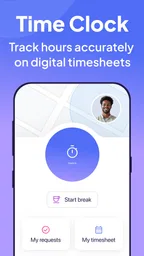
- Mobile clock-in can record employees’ work hours.
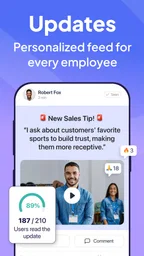
- Managers can share updates through a central news feed.
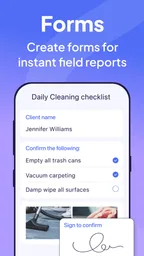
- Task lists help teams track assigned work.
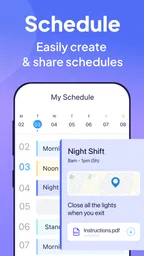
- Employees can access schedules from their phones.
What could be better
- Some advanced tools require a paid subscription.
- The range of features can feel overwhelming at first.
- Reliable internet is needed for many functions.
- Setup may take time for larger teams.
- The app may collect location data for time tracking.





